Forest
Gallery
5.1 Decision tree
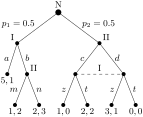
The following example was inspired by a question on TeX Stackexchange: How to change the level distance in tikz-qtree for one level only?. The question is about tikz-qtree: how to adjust the level distance for the first level only, in order to avoid first-level labels crossing the parent–child edge. While this example solves the problem (by manually shifting the offending labels; see elo below), it does more: the preamble is setup so that inputing the tree is very easy.
(106)
  \forestset{

    declare toks={elo}{}, % Edge Label Options

    anchors/.style={anchor=#1,child anchor=#1,parent anchor=#1},

    dot/.style={tikz+={\fill (.child anchor) circle[radius=#1];}},

    dot/.default=2pt,

    decision edge label/.style n args=3{

      edge label/.expanded={node[midway,auto=#1,anchor=#2,\forestoption{elo}]{\strut$\unexpanded{#3}$}}

    },

    decision/.style={if n=1

      {decision edge label={left}{east}{#1}}

      {decision edge label={right}{west}{#1}}

    },

    decision tree/.style={

      for tree={

        s sep=0.5em,l=8ex,

        if n children=0{anchors=north}{

          if n=1{anchors=south east}{anchors=south west}},

        math content,

      },

      anchors=south, outer sep=2pt,

      dot=3pt,for descendants=dot,

      delay={for descendants={~split option~={content}{;}{content,decision}}},

    }

  }

  \begin{forest} decision tree

    [N,plain content

      [I;{p_1=0.5},plain content,elo={yshift=4pt}

        [{5,1};a]

        [II;b,plain content

          [{1,2};m]

          [{2,3};n]

        ]

      ]

      [II;{p_2=0.5},plain content,elo={yshift=4pt}

        [;c

          [{1,0};z]

          [{2,2};t]

        ]

        [;d

          [{3,1};z]

          [{0,0};t]

        ]

      ] {\draw[dashed](!1.anchor)--(!2.anchor) node[pos=0.5,above]{I};}

    ]

  \end{forest}