The TikZpingus package
Wing items
A.4.11 The flag
The flag is special in that it is meant to be customized by commands so that the visible insignia is to the users liking.
/pingu/flag left = ⟨color⟩(default: pingu@purple)

/pingu/flag left pole = ⟨color⟩(default: pingu@bronze)
Requires flag left.
Change the color of the flag pole:

\begin{tikzpicture}

  \pingu[flag left, flag left pole=green]

\end{tikzpicture}
/pingu/flag left bobble = ⟨color⟩(default: pingu@bronze)
Requires flag left.
Change the color of the flag poles top bobble:

\begin{tikzpicture}

  \pingu[flag left, flag left bobble=green]

\end{tikzpicture}
/pingu/flag left code = ⟨LaTeX-code⟩(default: { \noexpand\node[/pingu/@flag@first,/pingu/@flag={⟨flag left⟩}{9.75mm}] (a) at (0,0) {};})
Requires flag left.
Set the flag code which is effectively the drawing code of the flag. You can use the styles /pingu/@flag@first and /pingu/@flag to inherit the default flag styles and to stay compliant with the modifications of the other macros:
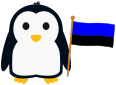
\begin{tikzpicture}

  \pingu[flag left, flag left code={

    \node[/pingu/@flag@first,

      /pingu/@flag={blue}{5mm}]

        (upper) at (0,0) {};

    \node[below,/pingu/@flag={black}{4mm}]

      (lower) at (upper.south) {};

  }]

\end{tikzpicture}
Note that /pingu/@flag expects two arguments: the color of the flag segment and its thickness.
/pingu/pride flag left = ⟨color⟩(default: pingu@bronze)
Uses /pingu/flag left, /pingu/flag left code, and /pingu/flag left pole to set a pride flag. The color argument is passed to /pingu/flag left pole.

\begin{tikzpicture}

  \pingu[pride flag left=green]

\end{tikzpicture}
/pingu/german flag left = ⟨color⟩(default: pingu@bronze)
Uses /pingu/flag left, /pingu/flag left code, and /pingu/flag left pole to set a german flag. The color argument is passed to /pingu/flag left pole.
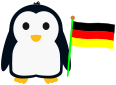
\begin{tikzpicture}

  \pingu[german flag left=green]

\end{tikzpicture}
/pingu/flag right = ⟨color⟩(default: pingu@purple)

\begin{tikzpicture}

  \pingu[flag right=green]

\end{tikzpicture}
/pingu/flag right pole = ⟨color⟩(default: pingu@bronze)
Requires flag right.
Change the color of the flag pole:

\begin{tikzpicture}

  \pingu[flag right, flag right pole=green]

\end{tikzpicture}
/pingu/flag right bobble = ⟨color⟩(default: pingu@bronze)
Requires flag right.
Change the color of the flag poles top bobble:

\begin{tikzpicture}

  \pingu[flag right, flag right bobble=green]

\end{tikzpicture}
/pingu/flag right code = ⟨LaTeX-code⟩(default: { \noexpand\node[/pingu/@flag@first,/pingu/@flag={⟨flag right⟩}{9.75mm}] (a) at (0,0) {};})
Requires flag right.
Set the flag code which is effectively the drawing code of the flag. You can use the styles /pingu/@flag@first and /pingu/@flag to inherit the default flag styles and to stay compliant with the modifications of the other macros:
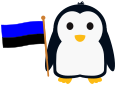
\begin{tikzpicture}

  \pingu[flag right, flag right code={

    \node[/pingu/@flag@first,

      /pingu/@flag={blue}{5mm}]

        (upper) at (0,0) {};

    \node[below,/pingu/@flag={black}{4mm}]

      (lower) at (upper.south) {};

  }]

\end{tikzpicture}
Note that /pingu/@flag expects two arguments: the color of the flag segment and its thickness.
/pingu/pride flag right = ⟨color⟩(default: pingu@bronze)
Uses /pingu/flag right, /pingu/flag right code, and /pingu/flag right pole to set a pride flag. The color argument is passed to /pingu/flag right pole.

\begin{tikzpicture}

  \pingu[pride flag right=green]

\end{tikzpicture}
/pingu/german flag right = ⟨color⟩(default: pingu@bronze)
Uses /pingu/flag right, /pingu/flag right code, and /pingu/flag right pole to set a german flag. The color argument is passed to /pingu/flag right pole.
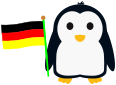
\begin{tikzpicture}

  \pingu[german flag right=green]

\end{tikzpicture}