Forest
Tutorial
2.4 Node positioning¶
Forest positions the nodes by a recursive bottom-up algorithm which, for every non-terminal node, computes the positions of the node’s children relative to their parent. By default, all the children will be aligned horizontally some distance down from their parent: the “normal” tree grows down. More generally, however, the direction of growth can change from node to node; this is controlled by option grow=⟨direction⟩.1 The system computes and stores the positions of children using a coordinate system dependent on the parent, called an ls-coordinate system: the origin is the parent’s anchor; l-axis is in the direction of growth in the parent; s-axis is orthogonal to the l-axis (positive side in the counter-clockwise direction from \(l\)-axis); l stands for level, s for sibling. The example shows the ls-coordinate system for a node with grow=45.2
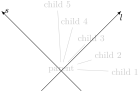
  \begin{forest} background tree

    [parent, grow=45

      [child 1][child 2][child 3][child 4][child 5]

    ]

    %\draw[,->](-135:1cm)--(45:3cm) node[below]{$l$};

    \draw[,->](forest cs:l=-1cm,s=0)--(forest cs:l=3cm,s=0) node[below]{$l$};

    %\draw[,->](-45:1cm)--(135:3cm) node[right]{$s$};

    \draw[,->](forest cs:s=-1cm,l=0)--(forest cs:s=3cm,l=0) node[right]{$s$};

  \end{forest}
  \newcommand\measurexdistance[5][####1]{\measurexorydistance{#2}{#3}{#4}{#5}{\x}{-|}{(5pt,0)}{#1}}

  \newcommand\measureydistance[5][####1]{\measurexorydistance{#2}{#3}{#4}{#5}{\y}{|-}{(0,5pt)}{#1}}

  \tikzset{dimension/.style={<->,>=latex,thin,every rectangle node/.style={midway,font=\scriptsize}},

    guideline/.style=dotted}

  \newdimen\absmd

  \def\measurexorydistance#1#2#3#4#5#6#7#8{%

    \path #1 #3 #6 coordinate(md1) #1; \draw[guideline] #1 --  (md1);

    \path (md1) #6 coordinate(md2) #2; \draw[guideline] #2 -- (md2);

    \path let \p1=($(md1)-(md2)$), \n1={abs(#51)} in \pgfextra{\xdef\md{#51}\global\absmd=\n1\relax};

    \def\distancelabelwrapper##1{#8}%

    \ifdim\absmd>5mm

      \draw[dimension] (md1)--(md2) node[#4]{\distancelabelwrapper{\uselengthunit{mm}\rndprintlength\absmd}};

    \else

      \ifdim\md>0pt

        \draw[dimension,<-] (md1)--+#7; \draw[dimension,<-] let \p1=($(0,0)-#7$) in (md2)--+(\p1);

      \else

        \draw[dimension,<-] let \p1=($(0,0)-#7$) in (md1)--+(\p1); \draw[dimension,<-] (md2)--+#7;

      \fi

      \draw[dimension,-] (md1)--(md2) node[#4]{\distancelabelwrapper{\uselengthunit{mm}\rndprintlength\absmd}};

    \fi}
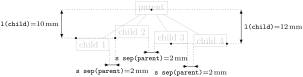
The l-coordinate of children is (almost) completely under your control, i.e. you set what is often called the level distance by yourself. Simply set option l to change the distance of a node from its parent.3 More precisely, l, and the related option s, control the distance between the (node) anchors of a node and its parent. The anchor of a node can be changed using option anchor: by default, nodes are anchored at their base; see [Tantau 2007, §16.5.1].) In the example below, positions of the anchors are shown by dots: observe that anchors of nodes with the same l are aligned and that the distances between the anchors of the children and the parent are as specified in the code.4
  \begin{forest} background tree,

    for tree={draw,tikz={\fill[](.anchor)circle[radius=1pt];}}

    [parent

      [child 1, ~l~=10mm, ~anchor~=north west]

      [child 2, ~l~=10mm, ~anchor~=south west]

      [child 3, ~l~=12mm, ~anchor~=south]

      [child 4, ~l~=12mm, ~anchor~=base east]

    ]

    \measureydistance[\texttt{l(child)}=#1]{(!2.anchor)}{(.anchor)}{(!1.anchor)+(-5mm,0)}{left}

    \measureydistance[\texttt{l(child)}=#1]{(!3.anchor)}{(.anchor)}{(!4.anchor)+(5mm,0)}{right}

    \measurexdistance[\texttt{s sep(parent)}=#1]{(!1.south east)}{(!2.south west)}{+(0,-5mm)}{below}

    \measurexdistance[\texttt{s sep(parent)}=#1]{(!2.south east)}{(!3.south west)}{+(0,-5mm)}{below}

    \measurexdistance[\texttt{s sep(parent)}=#1]{(!3.south east)}{(!4.south west)}{+(0,-8mm)}{below}

  \end{forest}
Positioning the chilren in the s-dimension is the job and raison d’etre of the package. As a first approximation: the children are positioned so that the distance between them is at least the value of option s sep (s-separation), which defaults to double PGF’s inner_xsep (and this is 0.3333em by default). As you can see from the example above, s-separation is the distance between the borders of the nodes, not their anchors!
A fuller story is that s sep does not control the s-distance between two siblings, but rather the distance between the subtrees rooted in the siblings. When the green and the yellow child of the white node are s-positioned in the example below, the horizontal distance between the green and the yellow subtree is computed. It can be seen with the naked eye that the closest nodes of the subtrees are the TP and the DP with a red border. Thus, the children of the root CP (top green DP and top yellow TP) are positioned so that the horizontal distance between the red-bordered TP and DP equals s sep.
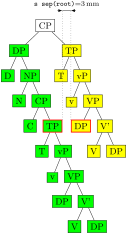
  \begin{forest}

    important/.style={name=#1,draw={red,thick}}

    [CP, ~s sep~=3mm, for tree=draw

      [DP, for tree={fill=green}

        [D][NP[N][CP[C][TP,important=left

        [T][vP[v][VP[DP][V'[V][DP]]]]]]]]

      [TP,for tree={fill=yellow}

        [T][vP[v][VP[DP,important=right][V'[V][DP]]]]]

    ]

    \measurexdistance[\texttt{s sep(root)}=#1]

      {(left.north east)}{(right.north west)}{(.north)+(0,3mm)}{above}

  \end{forest}
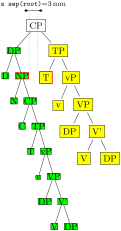
Note that Forest computes the same distances between nodes regardless of whether the nodes are filled or not, or whether their border is drawn or not. Filling the node or drawing its border does not change its size. You can change the size by adjusting TikZ’s inner_sep and outer_sep [Tantau 2007, §16.2.2], as shown below:
  \begin{forest}

    important/.style={name=#1,draw={red,thick}}

    [CP, s sep=3mm, for tree=draw

      [DP, for tree={fill=green,~inner sep~=0}

        [D][NP,important=left[N][CP[C][TP[T][vP[v]

        [VP[DP][V'[V][DP]]]]]]]]

      [TP,for tree={fill=yellow,~outer sep~=2pt}

        [T,important=right][vP[v][VP[DP][V'[V][DP]]]]]

    ]

    \measurexdistance[\texttt{s sep(root)}=#1]

      {(left.north east)}{(right.north west)}{(.north)+(0,3mm)}{above}

  \end{forest}
(This looks ugly!) Observe that having increased outer sep makes the edges stop touching borders of the nodes. By (PGF’s) default, the outer sep is exactly half of the border line width, so that the edges start and finish precisely at the border.
Let’s play a bit and change the l of the root of the yellow subtree. Below, we set the vertical distance of the yellow TP to its parent to 3 cm: and the yellow submarine sinks diagonally … Now, the closest nodes are the higher yellow DP and the green VP.
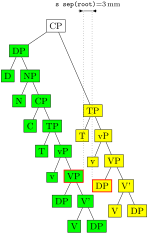
  \begin{forest}

    important/.style={name=#1,draw={red,thick}}

    [CP, s sep=3mm, for tree=draw

      [DP, for tree={fill=green}

        [D][NP[N][CP[C][TP

        [T][vP[v][VP,important=left[DP][V'[V][DP]]]]]]]]

      [TP,for tree={fill=yellow}, l=3cm

        [T][vP[v][VP[DP,important=right][V'[V][DP]]]]]

    ]

    \measurexdistance[\texttt{s sep(root)}=#1]

      {(left.north east)}{(right.north west)}{(.north)+(0,3mm)}{above}

  \end{forest}
Note that the yellow and green nodes are not vertically aligned anymore. The positioning algorithm has no problem with that. But you, as a user, might have, so here’s a neat trick. (This only works in the “normal” circumstances, which are easier to see than describe.)
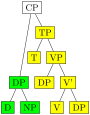
  \begin{forest}

    [CP, for tree=draw

      [DP, for tree={fill=green},~l*~=3

        [D][NP]]

      [TP,for tree={fill=yellow}

        [T][VP[DP][V'[V][DP]]]]

    ]

  \end{forest}
We have changed DP’s l’s value via “augmented assignment” known from many programming languages: above, we have used l*=3 to triple l’s value; we could have also said l+=5mm or l-=5mm to increase or decrease its value by 5 mm, respectively. This mechanism works for every numeric and dimensional option in Forest.
Let’s now play with option s sep.

  \begin{forest}

    [CP, for tree=draw, ~s sep~=0

      [DP, for tree={fill=green},l*=3

        [D][NP]]

      [TP,for tree={fill=yellow}

        [T][VP[DP][V'[V][DP]]]]

    ]

  \end{forest}
Surprised? You shouldn’t be. The value of s sep at a given node controls the s-distance between the subtrees rooted in the children of that node! It has no influence over the internal geometry of these subtrees. In the above example, we have set s_sep=0 only for the root node, so the green and the yellow subtree are touching, although internally, their nodes are not. Let’s play a bit more. In the following example, we set the s sep to: \(0\) at the last branching level (level 3; the root is level 0), to 2 mm at level 2, to 4 mm at level 1 and to 6 mm at level 0.
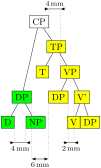
  \begin{forest}

    for tree={~s sep~=(3-level)*2mm}

    [CP, for tree=draw

      [DP, for tree={fill=green},l*=3

        [D][NP]]

      [TP,for tree={fill=yellow}

        [T][VP[DP][V'[V][DP]]]]

    ]

    \measurexdistance{(!11.south east)}{(!12.south west)}{+(0,-5mm)}{below}

    \path(md2)-|coordinate(md)(!221.south east);

    \measurexdistance{(!221.south east)}{(!222.south west)}{(md)}{below}

    \measurexdistance{(!21.north east)}{(!22.north west)}{+(0,2cm)}{above}

    \measurexdistance{(!1.north east)}{(!221.north west)}{+(0,-2.4cm)}{below}

  \end{forest}
As we go up the tree, the nodes “spread.” At the lowest level, V and DP are touching. In the third level, the s sep of level 2 applies, so DP and V’ are 2 mm apart. At the second level we have two pairs of nodes, D and NP, and T and TP: they are 4 mm apart. Finally, at level 1, the s sep of level 0 applies, so the green and yellow DP are 6 mm apart. (Note that D and NP are at level 2, not 4! Level is a matter of structure, not geometry.)
As you have probably noticed, this example also demostrated that we can compute the value of an option using an (arbitrarily complex) formula. This is thanks to PGF’s module pgfmath. Forest provides an interface to pgfmath by defining pgfmath functions for every node option, and some other information, like the level we have used above, the number of children n children, the sequential number of the child n, etc. For details, see §3.18.
The final separation parameter is l sep. It determines the minimal separation of a node from its descendants. It the value of l is too small, then all the children (and thus their subtrees) are pushed away from the parent (by increasing their ls), so that the distance between the node’s and each child’s subtree boundary is at least l sep. The initial l can be too small for two reasons: either some child is too high, or the parent is too deep. The first problem is easier to see: we force the situation using a bottom-aligned multiline node. (Multiline nodes can be easily created using \\ as a line-separator. However, you must first specify the horizontal alignment using option align (see §3.7.1). Bottom vertical alignment is achieved by setting base=bottom; the default, unlike in TikZ, is base=top).

  \begin{forest}

    [parent

      [child]

      [child]

      [a very\\tall\\child, align=center, base=bottom]

    ]

  \end{forest}
The defaults for l and l sep are set so that they “cooperate.” What this means and why it is necessary is a complex issue explained in §2.4.1, which you will hopefully never have to read … You might be out of luck, however. What if you needed to decrease the level distance? And nothing happened, like below on the left? Or, what if you used lots of parenthesis in your nodes? And got a strange vertical misalignment, like below on the right? Then rest assured that these (at least) are features not bugs and read §2.4.1.
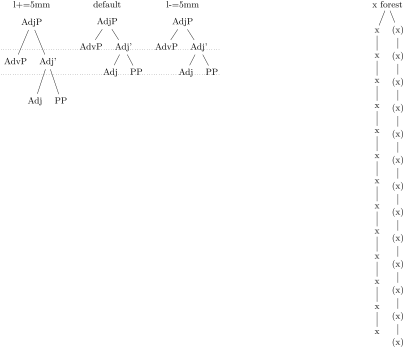
  \begin{forest}

    [,phantom,for children={l sep=1ex,fit=band,

      for 1={edge'=,l=0},baseline}

      [{l+=5mm},for descendants/.pgfmath=content

        [AdjP[AdvP][Adj'[Adj][PP]]]]

      [default

        [AdjP[AdvP][Adj'[Adj][PP]]]]

      [{l-=5mm},for descendants/.pgfmath=content

        [AdjP[AdvP][Adj'[Adj][PP]]]]

    ]

    \path (current bounding box.west)|-coordinate(l1)(!212.base);

    \path (current bounding box.west)|-coordinate(l2)(!2121.base);

    \path (current bounding box.east)|-coordinate(r1)(!212.base);

    \path (current bounding box.east)|-coordinate(r2)(!2121.base);

    \draw[dotted] (l1)--(r1) (l2)--(r2);

  \end{forest}

  \hspace{5cm}

  \begin{forest}

    [x forest, baseline

      [x[x[x[x[x[x[x[x[x[x[x[x[x]]]]]]]]]]]]]

      [(x)[(x)[(x)[(x)[(x)[(x)[(x)[(x)[(x)[(x)[(x)[(x)[(x)]]]]]]]]]]]]]

    ]

  \end{forest}
2.4.1 The defaults, or the hairy details of vertical alignment¶
In this section we discuss the default values of options controlling the l-alignment of the nodes. The defaults are set with top-down trees in mind, so l-alignment is actually vertical alignment. There are two desired effects of the defaults. First, the spacing between the nodes of a tree should adjust to the current font size. Second, the nodes of a given level should be vertically aligned (at the base), if possible.
Let us start with the base alignment: TikZ’s default is to anchor the nodes at their center, while Forest, given the usual content of nodes in linguistic representations, rather anchors them at the base [Tantau 2007, §16.5.1]. The difference is particularly clear for a “phonological” representation:
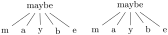
  \begin{forest} for tree={anchor=center}

    [maybe[m][a][y][b][e]]

  \end{forest}\quad

  \begin{forest}

    [maybe[m][a][y][b][e]]

  \end{forest}
The following example shows that the vertical distance between nodes depends on the current font size.

  \hbox{\small A small tree

  \begin{forest} baseline

    [VP[DP][V'[V][DP]]]

  \end{forest}

  \normalsize and

  \large

  a large tree

  \begin{forest} baseline

    [VP[DP][V'[V][DP]]]

  \end{forest}}
Furthermore, the distance between nodes also depends on the value of PGF’s inner_sep (which also depends on the font size by default: it equals 0.3333 em).
\[\index{l sep}=\mbox{height}(\mbox{strut})+\mbox{\texttt{inner ysep}}\]
The default value of s sep depends on inner_xsep: more precisely, it equals double inner_xsep).

  \begin{forest} baseline,for tree=draw

    [VP[DP][V'[V][DP]]]

  \end{forest}

  \pgfkeys{/pgf/inner sep=0.6666em}

  \begin{forest} baseline,for tree=draw

    [VP[DP][V'[V][DP]]]

  \end{forest}
Now a hairy detail: the formula for the default l.
\[\index{option>l}=\index{l sep}+2\cdot\mbox{\texttt{outer ysep}}+\mbox{total height}(\mbox{`dj'})\]
To understand what this is all about we must first explain why it is necessary to set the default l at all? Wouldn’t it be enough to simply set l sep (leaving l at 0)? The problem is that not all letters have the same height and depth. A tree where the vertical position of the nodes would be controlled solely by (a constant) l sep could result in a ragged tree (although the height of the child–parent edges would be constant).
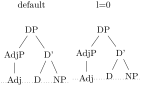
  \begin{forest}

    [default,baseline,for children={no edge}

      [DP

        [AdjP[Adj]]

        [D'[D][NP,name=np]]]]

    \path (current bounding box.west)|-coordinate(l)(np.base);

    \path (current bounding box.east)|-coordinate(r)(np.base);

    \draw[dotted] (l)--(r);

  \end{forest}

  \begin{forest}

    [{l=0},baseline,for children={no edge}

      [DP,for descendants={l=0}

        [AdjP[Adj]]

        [D'[D][NP,name=np]]]]

    \path (current bounding box.west)|-coordinate(l)(np.base);

    \path (current bounding box.east)|-coordinate(r)(np.base);

    \draw[dotted] (l)--(r);

  \end{forest}
The vertical misalignment of Adj in the right tree is a consequence of the fact that letter j is the only letter with non-zero depth in the tree. Since only l sep (which is constant throughout the tree) controls the vertical positioning, Adj, child of AdjP, is pushed lower than the other nodes on level 2. If the content of the nodes is variable enough (various heights and depths), the cumulative effect can be quite strong, see the right tree of example (29).
Setting only a default l sep thus does not work well enough in general. The same is true for the reverse possibility, setting a default l (and leaving l sep at 0). In the example below, the depth of the multiline node (anchored at the top line) is such that the child–parent edges are just too short if the level distance is kept constant. Sometimes, misalignment is much preferred …
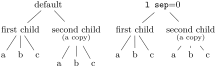
  \mbox{}\begin{forest}

    [default,baseline

      [first child[a][b][c]]

      [{second child\\[-1ex]\scriptsize(a copy)},

       align=center[a][b][c]]

    ]

  \end{forest}\quad

  \begin{forest} for tree={l sep=0}

    [{\texttt{l sep}=0},baseline

      [first child[a][b][c]]

      [{second child\\[-1ex]\scriptsize(a copy)},

                   align=center[a][b][c]]

    ]

  \end{forest}
Thus, the idea is to make l and l sep work as a team: l prevents misalignments, if possible, while l sep determines the minimal vertical distance between levels. Each of the two options deals with a certain kind of a “deviant” node, i.e. a node which is too high or too deep, or a node which is not high or deep enough, so we need to postulate what a standard node is, and synchronize them so that their effect on standard nodes is the same.
By default, Forest sets the standard node to be a node containing letters d and j. Linguistic representations consist mainly of letters, and in the TeX’s default Computer Modern font, d is the highest letter (not character!), and j the deepest, so this decision guarantees that trees containing only letters will look nice. If the tree contains many parentheses, like the right tree of example (29), the default will of course fail and the standard node needs to be modified. But for many applications, including nodes with indices, the default works.
The standard node can be changed using macro \ forestStandardNode; see 3.19.
1 The direction can be specified either in degrees (following the standard mathematical convention that \(0\) degrees is to the right, and that degrees increase counter-clockwise) or by the compass directions: east, north east, north, etc.
2 The axes are drawn using coordinates given in forest cs coordinate system; the “manually” given polar coordinate equivalent is shown in the comment.
3 If setting l seems to have no effect, read about l sep further down this section.
4 Here are the definitons of the macros for measuring distances. Args: the x or y distance between points #2 and #3 is measured; #4 is where the distance line starts (given as an absolute coordinate or an offset to #2); #5 are node options; the optional arg #1 is the format of label. (Lengths are printed using package printlen.)