Forest
Tutorial
2.6 Wrapping¶
We have already seen examples of inserting option values into other expressions. In example (11), we have wrapped the value of the option being assigned to (#1 stood for the current value of option content); example (35) additionally wrapped the value of option n (of the current node) using macro \ forestoption. In general, Forest offers two ways to perform computations (from simple option value lookups to complicated formulas) and insert their results into another expression (of any kind: TeX code, pgfkeys keylist, pgfmath expression, etc.).
Historically, the first Forest’s mechanism that offered wrapping of computed values were handlers .wrap pgfmath arg and .wrap \(n\) pgfmath args (for \(n=2,\dots,8\)), which combine the wrapping mechanism with the pgfmath evaluation. The idea is to compute (most often, just access option values) arguments using pgfmath and then wrap them into the given macro body (marked below) using TeX’s parameters (#1 etc.). Below, this is used to subscript the contents of a node with its sequential number and the number of parent’s children.

  \begin{forest} [,phantom,delay={for descendants={

              content/.wrap 3 pgfmath args=

              ~{#1$_{#2/#3}$}~

              {content}{n}{n_children("!u")}}}

    [c][o][u][n][t]]

  \end{forest}
Note the underscore __ character in n__children: in pgfmath function names, spaces, apostrophes and other non-alphanumeric characters from option names are all replaced by underscores.
As another example, let’s make the numerals example (7) a bit fancier. The numeral type is read off the parent’s content and used to construct the appropriate control sequence (\@arabic, \@roman and \@alph). (The numbers are not specified in content anymore: we simply read the sequence number n.)
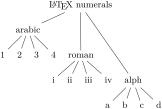
  \begin{forest}

    delay={where level={2}{content/.wrap 2 pgfmath args=

        {\csname @#1\endcsname{#2}}

        {content("!u")}{n}}{}},

    for children={l*=n},

    [\LaTeX\ numerals,

      [arabic[][][][]]

      [roman[][][][]]

      [alph[][][][]]

    ]

  \end{forest}
Invoking pgfmath is fairly time consuming and using it to do nothing but retrieve an option value seems a bit of an overkill. To remedy the situation, argument processor (§3.13) was introduced in Forest v2.0 and considerably expanded in v2.1. One way to invoke it is using handler .process.
The argument processor takes a sequence of instructions and an arbitrary number of arguments, transforms the given arguments according to the instructions, and feeds the resulting list of arguments into the handled key.
An instruction is given by a single-character code. The simplest instructions are: O, which expects its argument to be an option name (possibly preceded by a ⟨relative node name⟩. to access the option value of a non-current node) and returns the value of the option; R, which does the same for registers; and noop, which leaves the argument unchanged.
In the following example, we define style test taking four arguments and call it by providing the arguments via .process. The instruction string ROO__ tells the argument processor that the first argument is the value of (scratch) register temptoksa, the second the value of option n children at the current node, the third the value of option content of the second child of the current node, and the fourth just a plain string. Macro test is thus actually invoked with argument list {Hello}{3}{Jane}{Goodbye}.

  \begin{forest}

    test/.style n args={4}{align=center,

      content={#1!\\I have #2 children.\\One of them is #3.\\#4!}}

    [,delay={temptoksa=Hello,

      test/.process={~ROO_~}{temptoksa}{n children}{!2.content}{Goodbye}}

      [John][Jane][Joe]]

  \end{forest}
To wrap using the argument processor, use instruction w. Unless wrapping a single argument, this instruction should be followed by a number indicating the number of arguments consumed. w will take the required number of arguments from the list of already processed arguments and wrap them in the macro body given as the next (yet unprocessed) argument.
The following example has the same result as example (42). Note that the order of the wrapper-macro body and the arguments is different for .process and .wrap \(n\) pgfmath args. (Experience shows that .process’s order is easier on the eyes.) The example also illustrates that (i) the instructions need not be enclosed in braces and (ii) that repetition of an argument processor instruction can be indicated by appending a number to the instruction: thus O3 below means the same as OOO.

  \begin{forest} [,phantom,delay={for descendants={

              content/.process=~O3 w3~

                {content}{n}{!u.n children}

                {#1$_{#2/#3}$}

              }}

    [c][o][u][n][t]]

  \end{forest}
Note that the order of the wrapper-macro body and the arguments is different for .process and .wrap \(n\) pgfmath args. Experience shows that .process’s order is easier on the eyes. The example also illustrates that the instructions need not be enclosed in braces and that repetition of an argument processor instruction can be indicated by appending a number to the instruction: O3 above is equivalent to OOO. .wrap \(n\) pgfmath args always returns a single braced expression and is thus a bit cumbersome to use when the handled key expects multiple arguments: the trick is to enclose the expected argument list in extra braces (marked in the code below). As .process can return multiple arguments, there is no need for such a workaround. See the following example for comparison of the two methods.
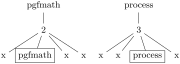
  \begin{forest}

    [,phantom

      [pgfmath[2,delay={for n/.wrap 2 pgfmath args=

          ~{~{#1}{content=#2,draw}~}~

          {content}{content("!u")}

        } [x][x][x][x]]]

      [process[3, delay={for n/.process=

          {O Ow1}{content}

          {!u.content}{content=#1,draw}

        } [x][x][x][x]]]

    ]

  \end{forest}
A single .process invocation can perform multiple wrappings. The numbering of arguments of each wrapping starts at #1. In the example below, for nodewalk takes two arguments, a nodewalk and a list of nodekeys. Each is produced by an independent wrapping (wrap bodies are marked in the code).

  \begin{forest}

    declare toks register=prefix,

    declare count register=level to prefix,

    prefix=X-,

    level to prefix=1,

    delay={

      for nodewalk/.process=Rw Rw

      {level to prefix}{~level=#1~}

      {prefix}{~+content=#1~}

    }

    [0[1[2]][3[4][5]][6[7][8][9]]]

  \end{forest}