chemfig
Advanced usage
4 Shifted double bonds
All double bonds are made up of two line segments, and these segments are drawn on either side of the imaginary line along which a single bond would be drawn. It is possible to shift a double bond so that one of the line segments lies on the imaginary line. The other segment is then shifted above or below the bond. Actually, it is more correct to say “left” or “right” of the imaginary line, as the bond is traversed in the direction of drawing.
To shift the bond to the left, write “=^” and to shift it to the right, write “=_”:

\chemfig{A-=-B}\par

\chemfig{A-=^-B}\par

\chemfig{A-=_-B}
In rings, double bonds are automatically shifted to the left. However, they can be shifted to the right by specifying it with “=_”:
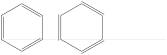
\chemfig{*6(-=-=-=)}\qquad

\chemfig{*6(-=_-=_-=_)}
Shifted bonds are particularly useful in drawing skeleton diagrams of molecules consisting of carbon chains with double bonds. They give a continuous zig-zag path, whereas the path will be broken with regular double bonds:
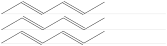
\chemfig{-[:30]=[:-30]-[:30]=[:-30]-[:30]}\par

\chemfig{-[:30]=^[:-30]-[:30]=^[:-30]-[:30]}\par

\chemfig{-[:30]=_[:-30]-[:30]=_[:-30]-[:30]}