Forest
Reference
3.5 Node keys¶
Forest is mostly controlled using PGF’s key management utility pgfkeys [Tantau 2007, §55]. Most of the keys can be given next to the content in the bracket representation of a tree (§3.3): we call these node keys. Some keys, notably nodewalk steps (§3.8), must be used as arguments of specific commands.
Most node keys perform some operation on the current node. When the keylist given after the content of a node is processed, the current node is set to that node. However, the current node can be temporarily changed, for example by spatial propagators (§3.5.1) or, more genarally, nodewalks (§3.8).
The most common function that node keys perform is to set or modify an option of the current node (§3.6), usually to determine the appearance or position of the node and its edge (§3.7), but there are also several kinds of more exotic keys like spatial (§3.5.1) propagators, which temporarily change the current node, temporal (§3.4.2) propagators, which delay the processing of the keylist until some other stage in the workflow, keys that dynamically create and move nodes (§3.11), keys that control the way Forest processes the tree (§3.4.1) etc. Finally, users can also define their own keys, either by defining pgfkeys styles1 [Tantau 2007, §55.4.4] or using Forest’s option declaration mechanism (§3.6.3).
The style definitions and option declarations given among the other keys in the bracket specification are local to the current tree (but note that Forest’s keylist processing, including temporal and spatial propagation, introduces no groups). To define globally accessible styles and options (well, they are always local to the current TeX group), use macro \forestset outside the forest environment, e.g. in the preamble of the document. (Although \ forestset⟨keylist⟩ is currently equivalent to \pgfkeys{/forest,⟨keylist⟩}, don’t rely on this as it will change in some (near) future version of the package, as there is a plan to introduce namespaces …)
By default, unknown keys are assumed to be TikZ keys and are forwarded to node options. This behaviour can be changed using unknown to.
The following subsections list the node keys which are not described elsewhere (see above): spatial propagators (§3.5.1) and general-purpose node keys, i.e. those which don’t deal with tree formatting (§3.5.2).
3.5.1 Spatial propagators¶
Spatial propagators pass the given ⟨keylist⟩ to other node(s) in the tree.
Spatial propagation does not change the current node: after visiting the nodes the keys are propagated to, a spatial propagator (silently, using a so-called fake step) returns to the origin of the embedded nodewalk.
Forest provides many spatial propagators. Almost all of them are built from long-form nodewalk steps using prefix for. This is why the list below is so short: it only documents this prefix and the exceptions. For the list of nodewalk steps, see §3.8, in particular §3.8.2 for single-step keys and §3.8.3 for multi-step keys.
for ⟨step⟩=⟨arg\(_1\)⟩...⟨arg\(_n\)⟩⟨keylist: every-step⟩(propagator)¶
for nodewalk=⟨nodewalk⟩⟨keylist: every-step⟩(propagator)¶
for Nodewalk=⟨keylist: config⟩⟨nodewalk⟩⟨keylist: every-step⟩(propagator)¶
for_parent={l_sep+=3mm}
for_n=2{circle,draw}
for_nodewalk={uu2}{blue}
for_tree={s_sep+=1em}
Walks the (single- or multi-step) ⟨step⟩ from the current node and executes the given ⟨keylist⟩ at every visited node. The current node remains unchanged.
⟨step⟩ must be a long-form nodewalk step. If it has any arguments, they (⟨arg\(_1\)⟩...⟨arg\(_n\)⟩) should be given before every-step ⟨keylist⟩, with two exceptions: embedded nodewalk steps (Nodewalk and nodewalk) already require the ⟨keylist: every-step⟩ argument, so it should be omitted, as it makes no sense to provide the every-step keylist twice.
Examples:
=10000 Here’s the big list of all spatial propagators built with prefix for:

. For details on nodewalk steps, see §3.8.
for tree’=⟨keylist 1⟩⟨keylist 2⟩(propagator)¶
A “combination” of for tree children-first and for tree.
Passes the keylists to the current node and its the descendants. At each node, the ⟨keylist 1⟩ is processed first; then, children are processed recursively; finally, ⟨keylist 2⟩ is processed.
For an example, see the definition of draw brackets from linguistics.
for 1, …(propagator)¶
, for 9=⟨keylist⟩
for -1, …(propagator)¶
, for -9=⟨keylist⟩
Although for normally cannot precede short forms of steps, an exception is made for 1, …, 9. (These keys will work even if the short steps are redefined.)
for \(n\) passes the ⟨keylist⟩ to the \(n\)th child of the current node. for -\(n\) starts counting at the last child.
Nodewalk=⟨keylist: config⟩⟨nodewalk⟩⟨keylist: every-step⟩¶
Use this key carefully as it can change the current node!
The envisioned purpose of this key is to change the current node within the every-step keylist of (an outer) nodewalk, where only node keys are accepted. The config defaults (independent every-step, shared history) are set to facilitate that purpose. But it can also be used as a simple node key, of course.
Configures and executes the ⟨nodewalk⟩. This key is a nodekey-space copy of nodewalk step Nodewalk.
node walk=⟨node walk⟩¶
Node walks can be tail-recursive, i.e. you can call another node walk from node walk/after walk — embedding another node walk in node walk/before walk or node walk/every step will probably fail, because the three node walk styles are not saved and restored (a node walk doesn’t create a TeX group).
every step and after walk can be redefined even during the walk. Obviously, redefining before walk during the walk has no effect (in the current walk).
Deprecated!!! Requires compat=1.0-nodewalk. Please use for nodewalk in new code. From the old documentation:
This is the most general way to use a ⟨node walk⟩.
Before starting the ⟨node walk⟩, key node walk/before walk is processed. Then, the ⟨step⟩s composing the ⟨node walk⟩ are processed: making a step (normally) changes the current node. After every step, key node walk/every step is processed. After the walk, key node walk/after walk is processed.
node walk/before walk, node walk/every step and node walk/after walk are processed with /forest as the default path: thus, Forest’s node keys can be used normally inside their definitions.
3.5.2 Various¶
afterthought=⟨toks⟩(style)¶
Provides the afterthought explicitely.
This key is normally not used by the end-user, but rather called by the bracket parser. By default, this key is a style defined by afterthought/.style={tikz+={#1}}: afterthoughts are interpreted as (cumulative) TikZ code. If you’d like to use afterthoughts for some other purpose, redefine this style — this will take effect even if you do it in the tree preamble.
also=⟨keylist⟩¶
Execute the keys in the given ⟨keylist⟩.
If we are currently processing node keys, ⟨keylist⟩ should contain node keys. If we are in a nodewalk, ⟨keylist⟩ should (or rather, may also) contain nodewalk keys.
For example, to execute, during a nodewalk, a nodewalk keylist stored in register tempkeylista, write also/.register=tempkeylista. Note that no embedded nodewalk will be introduced.
autoforward=⟨option⟩⟨keylist⟩,¶
autoforward register=⟨register⟩⟨keylist⟩
autoforward’=⟨option⟩⟨keylist⟩,¶
autoforward register’=⟨register⟩⟨keylist⟩
Whenever the value of an autoforwarded option or register is given or changed (via an augmented assignment), ⟨option⟩=⟨new value⟩ or ⟨register⟩=⟨new value⟩ is appended to ⟨keylist⟩. This can be used to “intercept and remember” TikZ options, like anchor and rotate.
The autoforward' variant keeps only a single instance of ⟨option⟩ in ⟨keylist⟩.
If you ever need to use the non-forwarded version of the key, prefix it with word autoforwarded, e.g. autoforwarded_rotate. Autoforwarding is limited to the current TeX group.
Autoforward=⟨option⟩⟨style definition⟩,¶
Autoforward register=⟨register⟩⟨style definition⟩
This is a more generic variant of autoforwarding. After the value of an option or register autoforwarded with this key is changed, the style defined by ⟨style definition⟩ is called with the new option/register value as its argument.

  \forestset{~Autoforward~={content}{node options={#1}}}

  \begin{forest}

    [red[blue][green]]

  \end{forest}
unautoforward=⟨option or register⟩¶
Undoes the autoforwarding of the option or register made by any of the autoforwarding keys.
content to=⟨key⟩¶
When parsing the bracket representation of the tree, store the given content using ⟨key⟩=⟨content⟩.
copy command key=⟨pgfkey: source⟩⟨pgfkey: destination⟩¶
Copies the pgf key in a way that .add code and .add style handlers still work.
default preamble=⟨keylist⟩(register, default {})¶
preamble=⟨keylist⟩(register)¶
These registers hold the content of the default preamble and the preamble of the current tree.
preamble is set by the bracket parser. Set default preamble outside the forest environment using \ forestset.
As default preamble and preamble are not styles but keylist registers, the # characters do not need to be doubled: you can freely copy and paste your keylists between the node options of the root node, the preamble and the default preamble. The only difference will be the order of execution: first default preamble, then preamble, and finally the root node’s options.
save and restore register=⟨register⟩⟨keylist⟩¶
Restores the current value of ⟨register⟩ after executing the ⟨keylist⟩.
split=⟨toks⟩⟨separator⟩⟨keylist⟩¶
split option=⟨option⟩⟨separator⟩⟨keylist⟩¶
split register=⟨register⟩⟨separator⟩⟨keylist⟩¶
Pay attention to % characters around the subkeylist. In order for it to actually function as a sublist, its braces should be stripped, but this can only happen if no spaces surround it.
Split ⟨toks⟩ or the value of ⟨option⟩ or ⟨register⟩ at occurrences of ⟨separator⟩ (which must be a single token), and process the keys in ⟨keylist⟩ with the pieces of the split token list as arguments, in the order given.
⟨option⟩ can be either a simple ⟨option name⟩ or a ⟨relative node name⟩.⟨option name⟩.
The difference in the number of split values and given keys is handled gracefully. If there is not enough values, the superfluous keys are not processed; if there are too many values, the last key is called repeatedly.
The keys in ⟨keylist⟩ can be any valid keys, including augmented assignments, non-current option assignments, even TeX or user-defined styles. Actually, as split works by simply appending ={⟨current value⟩} to the relevant given key, it is possible for the key to be a (sub)keylist ending in a simple, non-valued key, like shown below.

  \begin{forest}

    [

      {1,2,3,4}

      [,delay={

        ~split option~=

          {!parent.content}

          {,}

          {

            content',%

            {content+={+},content+}%

          },

          tempcounta'/.process={O+n}{content},

          content+={=},

          content+/.register=tempcounta,

        }

      ]

    ]

  \end{forest}
TeX=⟨toks: TeX code⟩¶
The given code is executed immediately.
This can be used for e.g. enumerating nodes:
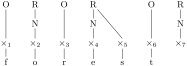
  \newcount\xcount

  \begin{forest} GP1,

    delay={TeX={\xcount=0},

      where tier={x}{TeX={\advance\xcount1},

         content/.expanded={##1$_{\the\xcount}$}}{}}

    [

      [O[x[f]]]

      [R[N[x[o]]]]

      [O[x[r]]]

      [R[N[x[e]]][x[s]]]

      [O[x[t]]]

      [R[N[x]]]

    ]

  \end{forest}
TeX”=⟨toks: TeX code⟩¶
The given code is externalized, i.e. it will be executed when the externalized images are loaded.
The image-loading and TeX’(’) produced code are intertwined.
typeout=⟨toks⟩¶
A Forest version of LaTeX macro \typeout. Useful for debugging, trust me on this one.
unknown key error=⟨keyval⟩¶
Produces an error.
Write unknown to=unknown key error to produce an error when a key unknown to Forest is used.
1 Styles are a feature of the pgfkeys package. They are named keylists, whose usage ranges from mere abbreviations through templates to devices implementing recursion. To define a style, use PGF’s handler .style [Tantau 2007, §55.4.4]: ⟨style name⟩/.style=⟨keylist⟩.