The tcolorbox package
Libraries
22 Library fitting
The library is loaded by a package option or inside the preamble by:
22.1 Macros of the Library
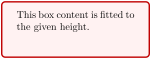
\tcboxfit[⟨options⟩]{⟨box content⟩}
Creates a colored box where the given ⟨box content⟩ is fitted to the width and height of the box. A \tcboxfit has to have a fixed height. If no fixed height is given, a square box is constructed. In principle, most ⟨options⟩ for a tcolorbox can be used for \tcboxfit with some restrictions. A \tcboxfit cannot have a lower part and cannot be broken.
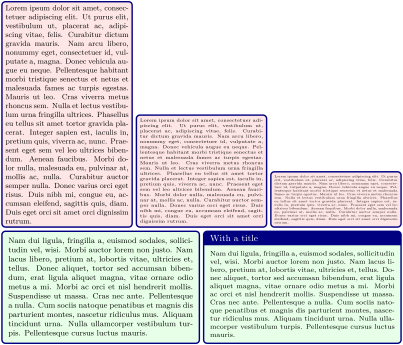
% \usepackage{lipsum} \tcbuselibrary{raster}

\tcbset{colframe=blue!50!black,colback=red!10!white,

    boxsep=0pt,top=1mm,bottom=1mm,left=1mm,right=1mm,

    fit algorithm=hybrid*,raster equal skip=1mm}

\begin{tcbraster}[raster columns=3,raster valign=bottom]

  \tcboxfit[height=8cm]{\lipsum[1]}

  \tcboxfit[height=4cm]{\lipsum[1]}

  \tcboxfit[height=2cm]{\lipsum[1]}

\end{tcbraster}

\begin{tcbraster}[colback=green!10!white,boxsep=1mm]

  \tcboxfit[height=4cm]{\lipsum[2]}

  \tcboxfit[height=4cm,title=With a title]{\lipsum[2]}

\end{tcbraster}
\tcbfitdim(read-only LaTeX length)Updated: 2020-04-24
This is a LaTeX length adapted automatically by most variants of /tcb/fit algorithm. Therefore, it never is to be changed by the user, but may be applied read-only. The \tcbfitdim corresponds to the font size and may also be used to calculate box margins or other distances in dependency. The initial and maximum value for \tcbfitdim is set by /tcb/fit basedim.
\tcbfontsize{⟨factor⟩}
Selects a font size inside a tcolorbox which is scaled with the given ⟨factor⟩ relative to \tcbfitdim. Also see /tcb/fit fontsize macros
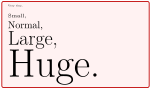
\tcbset{colback=red!5!white,size=small,

  colframe=red!75!black}

\begin{tcolorbox}[fit basedim=10pt]

  {\tcbfontsize{0.25} Very tiny,}\\

  {\tcbfontsize{0.5} Small,}\\

  {\tcbfontsize{1} Normal,}\\

  {\tcbfontsize{2} Large,}\\

  {\tcbfontsize{4} Huge.}

\end{tcolorbox}

\tcbset{colback=red!5!white,size=small,

  colframe=red!75!black}

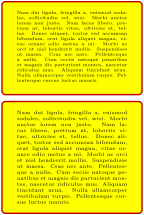
\begin{tcolorbox}[fit basedim=10pt,

    fit to height=2cm]

  {\tcbfontsize{0.25} Very tiny,}\\

  {\tcbfontsize{0.5} Small,}\\

  {\tcbfontsize{1} Normal,}\\

  {\tcbfontsize{2} Large,}\\

  {\tcbfontsize{4} Huge.}

\end{tcolorbox}
22.2 Producing \tcboxfit Commands
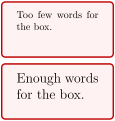
\newtcboxfit[⟨init options⟩]{\⟨name⟩}[⟨number⟩][⟨default⟩]{⟨options⟩}
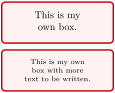
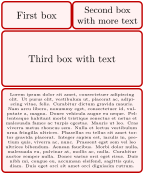
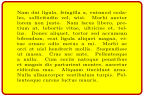
Creates a new macro \⟨name⟩ based on \tcboxfit. Basically, \newtcboxfit operates like \newcommand. The new macro \⟨name⟩ optionally takes ⟨number⟩\(+1\) arguments, where ⟨default⟩ is the default value for the optional first argument. The ⟨options⟩ are given to the underlying \tcboxfit. The ⟨init options⟩ allow setting up automatic numbering, see Section 5.
% \usepackage{lipsum}

\newtcboxfit{\mybox}[2]{colback=red!5!white,

  colframe=red!75!black,fonttitle=\bfseries,

  boxsep=1mm,left=0mm,right=0mm,top=0mm,

  bottom=0mm,halign=center,valign=center,

  nobeforeafter,width=#1,height=#2}


\mybox{2.5cm}{1cm}{First box}%

\mybox{2.5cm}{1cm}{Second box with more text}\\

\mybox{5cm}{2cm}{Third box with text}\\

\mybox{5cm}{3cm}{\lipsum[1]}
\renewtcboxfit[⟨init options⟩]{\⟨name⟩}[⟨number⟩][⟨default⟩]{⟨options⟩}
Operates like \newtcboxfit, but based on \renewcommand instead of \newcommand. An existing macro is redefined.
\NewTCBoxFit[⟨init options⟩]{\⟨name⟩}{⟨specification⟩}{⟨options⟩}
Creates a new command \⟨name⟩ based on \tcboxfit. Basically, \NewTCBoxFit operates like \NewDocumentCommand. This means, the new command \⟨name⟩ is constructed with the given LaTeX3 argument ⟨specification⟩ following [Team 2025]. An error is issued if \⟨name⟩ has already been defined. The ⟨options⟩ are given to the underlying \tcboxfit.
Note that /tcb/savedelimiter is set to the given ⟨name⟩ automatically.
The ⟨init options⟩ allow setting up automatic numbering, see Section 5.
\RenewTCBoxFit[⟨init options⟩]{\⟨name⟩}{⟨specification⟩}{⟨options⟩}
Operates like \NewTCBoxFit, but based on \RenewDocumentCommand instead of \NewDocumentCommand. An existing command is redefined.
\ProvideTCBoxFit[⟨init options⟩]{\⟨name⟩}{⟨specification⟩}{⟨options⟩}
Operates like \NewTCBoxFit, but based on \ProvideDocumentCommand instead of \NewDocumentCommand. The command \⟨name⟩ is only created if it is not already defined.
\DeclareTCBoxFit[⟨init options⟩]{\⟨name⟩}{⟨specification⟩}{⟨options⟩}
Operates like \NewTCBoxFit, but based on \DeclareDocumentCommand instead of \NewDocumentCommand. The new command \⟨name⟩ is always created, irrespective of an already existing command with the same name.
\NewTotalTCBoxFit[⟨init options⟩]{\⟨name⟩}{⟨specification⟩}{⟨options⟩}{⟨content⟩}
Creates a new command \⟨name⟩ based on \tcboxfit. In contrast to \NewTCBoxFit, also the ⟨content⟩ of the \tcboxfit is specified.
Basically, \NewTotalTCBoxFit operates like \NewDocumentCommand. This means, the new command \⟨name⟩ is constructed with the given LaTeX3 argument ⟨specification⟩ following [Team 2025]. An error is issued if \⟨name⟩ has already been defined. The ⟨options⟩ are given to the underlying \tcboxfit which is filled with the specified ⟨content⟩.
Note that /tcb/savedelimiter is set to the given ⟨name⟩ automatically.
The ⟨init options⟩ allow setting up automatic numbering, see Section 5.
% \usepackage{lipsum}


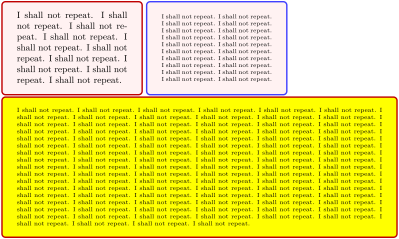
\NewTotalTCBoxFit{\multibox}{ O{} m O{10} m }

 {nobeforeafter,colback=red!5!white,colframe=red!75!black,width=#2,height=#2/3*2,

  valign=center,#1}

 { \foreach \n in {1,...,#3} { #4} }


\multibox{5cm}{I shall not repeat.}

\multibox[colframe=blue!75!white]{5cm}[20]{I shall not repeat.}\\

\multibox[colback=yellow,height=5cm]{14cm}[100]{I shall not repeat.}
\RenewTotalTCBoxFit[⟨init options⟩]{\⟨name⟩}{⟨specification⟩}{⟨options⟩}{⟨content⟩}
Operates like \NewTotalTCBoxFit, but based on \RenewDocumentCommand instead of \NewDocumentCommand. An existing command is redefined.
\ProvideTotalTCBoxFit[⟨init options⟩]{\⟨name⟩}{⟨specification⟩}{⟨options⟩}{⟨content⟩}
Operates like \NewTotalTCBoxFit, but based on \ProvideDocumentCommand instead of \NewDocumentCommand. The command \⟨name⟩ is only created if it is not already defined.
\DeclareTotalTCBoxFit[⟨init options⟩]{\⟨name⟩}{⟨specification⟩}{⟨options⟩}{⟨content⟩}
Operates like \NewTotalTCBoxFit, but based on \DeclareDocumentCommand instead of \NewDocumentCommand. The new command \⟨name⟩ is always created, irrespective of an already existing command with the same name.
22.3 Option Keys of the Library
The font size for the content of a box with fixed width and fixed height can be adjusted automatically. This is called the fitbox capture mode. Note that the fit control algorithm constructs a series of versions for the box and selects the “best”. Therefore, the compilation time is quite longer than for a normal box. The algorithm will fail, if a different selected font size does not change the overall size of the box content. The \tcboxfit macro uses this algorithm by default.
The fit control keys are only applicable to unbreakable boxes without a lower part. The box content should not change counters.
/tcb/fit(style, initially unset)
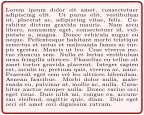
Sets the /tcb/capture mode to fitbox, i. e., enables the font size adjustment algorithm. Thereby, a tcolorbox acts like \tcboxfit where the given ⟨box content⟩ is fitted to the width and height of the box. Therefore, the box has to have a fixed height. If no fixed height is given, a square box is constructed. The font dimension \tcbfitdim can also be used to adjust the margins of the box since a box with a tiny font may not need large margins. The number of constructed boxes is saved to the macro \tcbfitsteps for analysis.
% \usepackage{lipsum}

% \tcbuselibrary{skins}

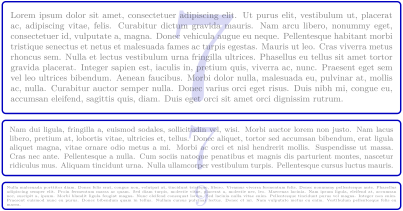
\newtcolorbox{fitting}[2][]{fit,height=#2,boxsep=1pt,valign=center,opacityupper=0.5,

  top=0.4\tcbfitdim,bottom=0.4\tcbfitdim,left=0.75\tcbfitdim,right=0.75\tcbfitdim,

  enhanced,watermark text={\tcbfitsteps},colframe=blue!75!black,colback=white,#1}


\begin{fitting}{4cm}

\lipsum[1]

\end{fitting}


\begin{fitting}{2cm}

\lipsum[2]

\end{fitting}


\begin{fitting}{1cm}

\lipsum[3]

\end{fitting}

/tcb/fit basedim=⟨length⟩(no default, initially 10pt)
Sets the starting font dimension for the font size adjustment algorithm to ⟨length⟩. The algorithm never enlarges this dimension. Therefore, the final \tcbfitdim is identical to or small than ⟨length⟩.
/tcb/fit skip=⟨real value⟩(no default, initially 1.2)
Sets the skip value of the selected font to ⟨real value⟩ times \tcbfitdim.
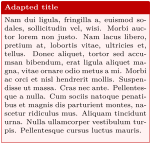
/tcb/fit fontsize macros(style, initially unset)
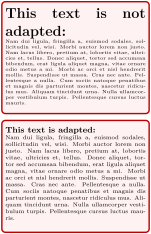
Redefines the standard LaTeX font size macros \tiny, \scriptsize, \footnotesize, \small, \normalsize, \large, \Large, \LARGE, \huge, and \Huge, to set font sizes relative to the current \tcbfitdim. Note that the display skip values for mathematical formulas are respected by the redefined macros. Also see \tcbfontsize.
% \usepackage{lipsum}

\tcbset{colback=red!5!white,

  colframe=red!75!black,left=1mm,

  right=1mm,boxsep=0mm}


\begin{tcolorbox}[fit to height=4cm]

  {\Large\bfseries This text is

             not adapted:\par}

  \lipsum[2]

\end{tcolorbox}


\begin{tcolorbox}[fit to height=4cm,

  fit fontsize macros ]

  {\Large\bfseries This text is adapted:\par}

  \lipsum[2]

\end{tcolorbox}
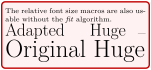
\tcbset{colback=red!5!white,

  colframe=red!75!black,left=1mm,

  right=1mm,boxsep=0mm}


\let\realHuge=\Huge


\begin{tcolorbox}[fit basedim=7pt,

  fontupper=\normalsize,

  fit fontsize macros]

The relative font size macros

are also usable without the

\textit{fit} algorithm.\par

{\Huge Adapted Huge} ---

{\realHuge Original Huge}

\end{tcolorbox}
/tcb/fit height plus=⟨dimension⟩(no default, initially 0pt)
The box is allowed to enlarge the fixed height up to the given ⟨dimension⟩, before a font size fit is applied. An optional /tcb/fit width plus is tried after the height adaption.
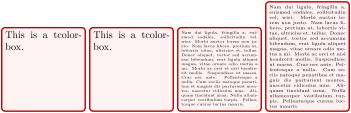
% \usepackage{lipsum}

\tcbset{colback=red!5!white,colframe=red!75!black,left=1mm,top=1mm,bottom=1mm,

  right=1mm,boxsep=0mm,width=3cm,height=3cm,nobeforeafter}


\begin{tcolorbox}[fit]

This is a tcolorbox.

\end{tcolorbox}

\begin{tcolorbox}[fit,fit height plus=1cm]

This is a tcolorbox.

\end{tcolorbox}

\begin{tcolorbox}[fit]

\lipsum[2]

\end{tcolorbox}

\begin{tcolorbox}[fit,fit height plus=1cm]

\lipsum[2]

\end{tcolorbox}
/tcb/fit width plus=⟨dimension⟩(no default, initially 0pt)
The box is allowed to enlarge the fixed width up to the given ⟨dimension⟩, before a font size fit is applied. An optional /tcb/fit height plus is tried before the width adaption.
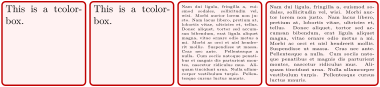
% \usepackage{lipsum}

\tcbset{colback=red!5!white,colframe=red!75!black,left=1mm,top=1mm,bottom=1mm,

  right=1mm,boxsep=0mm,width=3cm,height=3cm,nobeforeafter}


\begin{tcolorbox}[fit]

This is a tcolorbox.

\end{tcolorbox}

\begin{tcolorbox}[fit,fit width plus=1cm]

This is a tcolorbox.

\end{tcolorbox}

\begin{tcolorbox}[fit]

\lipsum[2]

\end{tcolorbox}

\begin{tcolorbox}[fit,fit width plus=1cm]

\lipsum[2]

\end{tcolorbox}
Typically but not necessarily, the optional title of a tcolorbox is not part of the fit operation. If a /tcb/fit width plus is applied, the title is also adapted to the new width. If counters are increased inside the title text, they may be increased more than one time. To avoid this, you are encouraged to use /tcb/phantom or /tcb/step and label to set counters or use automatic numbering, see Section 5.1.
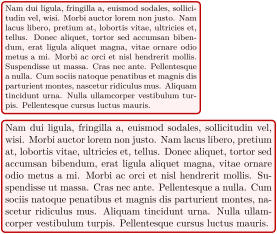
/tcb/fit width from=⟨min⟩ to ⟨max⟩(style, no default)
Sets the box width to ⟨min⟩ and allows the width to grow up to ⟨max⟩.
/tcb/fit height from=⟨min⟩ to ⟨max⟩(style, no default)
Sets the box height to ⟨min⟩ and allows the height to grow up to ⟨max⟩.
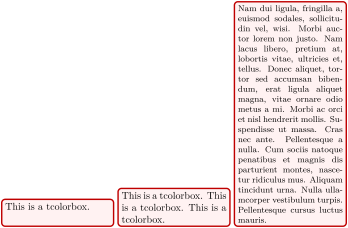
% \usepackage{lipsum}

\newtcolorbox{mybox}{colback=red!5!white,colframe=red!75!black,left=1mm,top=1mm,

  bottom=1mm,right=1mm,boxsep=0mm,width=4cm,nobeforeafter,

  fit height from=1cm to 8cm}


\begin{mybox}

This is a tcolorbox.

\end{mybox}

\begin{mybox}

This is a tcolorbox. This is a tcolorbox. This is a tcolorbox.

\end{mybox}

\begin{mybox}

\lipsum[2]

\end{mybox}
/tcb/fit algorithm=⟨name⟩(no default, initially fontsize)
fontsize (initial): The algorithm is a bisection method that adapts the font size until certain stop conditions are fulfilled. This is the most time-consuming method but it is robust and gives pleasant results.
The used font has to be freely scalable for this method! Other content than text is not scaled down. The aspect ratio is fully guaranteed.
fontsize*:New: 2014-10-29 First, the fontsize algorithm is applied. If the font was scaled down and the resulting height is too small, the box is squeezed to fit the area.
The used font has to be freely scalable for this method! Other content than text may be slightly rescaled. The aspect ratio cannot be fully guaranteed.
areasize: The algorithm calculates the area size for the text without scaling the font. The text box is shaped for the needed aspect ratio in one or two steps. Finally, it is scaled down with a standard \resizebox macro.
The used font has not to be scalable. Every box content is scaled down. The aspect ratio cannot be fully guaranteed.
areasize*:New: 2014-10-29 The areasize algorithm is applied, but if the content was scaled down and the resulting height is too small, the box is squeezed to fit the area.
The used font has not to be scalable. Every box content is scaled down. The aspect ratio cannot be fully guaranteed.
hybrid: First, this algorithm estimates the needed font size in one or two steps. Then an areasize fitting as above is a applied.
The used font has to be freely scalable for this method! Other content than text may be slightly rescaled. The aspect ratio cannot be fully guaranteed.
hybrid*:New: 2014-10-29 First, this algorithm estimates the needed font size in one or two steps. Then an areasize* fitting as above is a applied.
The used font has to be freely scalable for this method! Other content than text may be slightly rescaled. The aspect ratio cannot be fully guaranteed.
squeeze: The text box is brutally scaled down to fit.
The aspect ratio is very likely to be horrible. You should not use this method for final documents.
Sets the algorithm for the fitting process after optionally width and height are adapted. In the following, adapting the font size means adapting \tcbfitdim. Feasible values for ⟨name⟩ are:
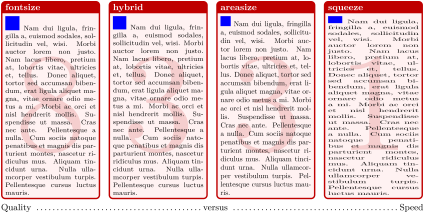
% \usepackage{lipsum}

\newtcboxfit{\mybox}[1]{colback=red!5!white,colframe=red!75!black,left=1mm,top=1mm,

  bottom=1mm,right=1mm,boxsep=0mm,width=3.5cm,height=7cm,nobeforeafter,

  before upper=\textcolor{blue}{\rule{5mm}{5mm}}\ ,

  enhanced,watermark text={\tcbfitsteps},

  fonttitle=\bfseries,adjusted title={#1},fit algorithm=#1}


\mybox{fontsize}{\lipsum[2]}\hfill

\mybox{hybrid}{\lipsum[2]}\hfill

\mybox{areasize}{\lipsum[2]}\hfill

\mybox{squeeze}{\lipsum[2]}


Quality \dotfill versus \dotfill Speed
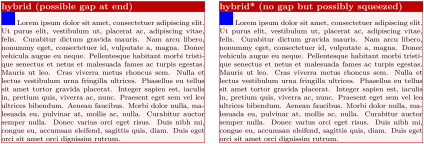
% \usepackage{lipsum}

\newtcboxfit{\mybox}[2]{colback=red!5!white,colframe=red!75!black,left=1mm,top=1mm,

  size=tight,width=7.2cm,height=5cm,nobeforeafter,

  before upper=\textcolor{blue}{\rule{5mm}{5mm}}\ ,

  enhanced,fonttitle=\bfseries,adjusted title={#2},fit algorithm=#1}


\mybox{hybrid}{hybrid (possible gap at end)}{\lipsum[1]}\hfill

\mybox{hybrid*}{hybrid* (no gap but possibly squeezed)}{\lipsum[1]}
The following options set control parameters for the fit algorithm. Mainly, they apply to the fontsize variant, see /tcb/fit algorithm. The options should be seen as experimental and are likely to change in future versions, if necessary.
/tcb/fit maxstep=⟨number⟩(no default, initially 20)
Sets the maximal step size for the font size adjustment algorithm. In normal situations, the algorithm stops before reaching the initial value of 20 steps. If the box content does not shrink, this value prevents an endless loop.
/tcb/fit maxfontdiff=⟨dimension⟩(no default, initially 0.1pt)
The algorithm stops, if the font size is determined within a deviation of ⟨dimension⟩.
/tcb/fit maxfontdiffgap=⟨dimension⟩(no default, initially 1pt)
The algorithm stops, if the number of lines is determined and the font size is determined within a deviation of ⟨dimension⟩.
/tcb/fit maxwidthdiff=⟨dimension⟩(no default, initially 1pt)
The algorithm stops, if the (optionally) flexible box width is determined within a deviation of ⟨dimension⟩.
/tcb/fit maxwidthdiffgap=⟨dimension⟩(no default, initially 10pt)
The algorithm stops, if the number of lines is determined and the (optionally) flexible box width is determined within a deviation of ⟨dimension⟩.
/tcb/fit warning=⟨value⟩(no default, initially off)
off: Most of `Underfull \hbox' and `Overfull \hbox' warnings are switched off (including the ones for the finally used box).
on: All warnings for all auxiliary boxes are displayed.
final: Only warnings for the finally used box are displayed. Note that an additional box has to be constructed for these messages.
Typically, the fit control algorithm constructs several auxiliary boxes to determine the optimal one. If not switched off, the construction of the auxiliary boxes may produce many hbox warnings. This option key changes the \hbadness value.