4Additional goodies¶
This package provides some general pgf infrastructure to achieve its goals. These additional goodies are documented in this section.
4.1The asymmetrical rectangle shape¶
The following shape is used inside {tikzcd} to ensure that arrows between nodes in the same row are perfectly horizontal, even if the nodes contain text with different heights and depths.
-
Shape asymmetrical rectangle ¶
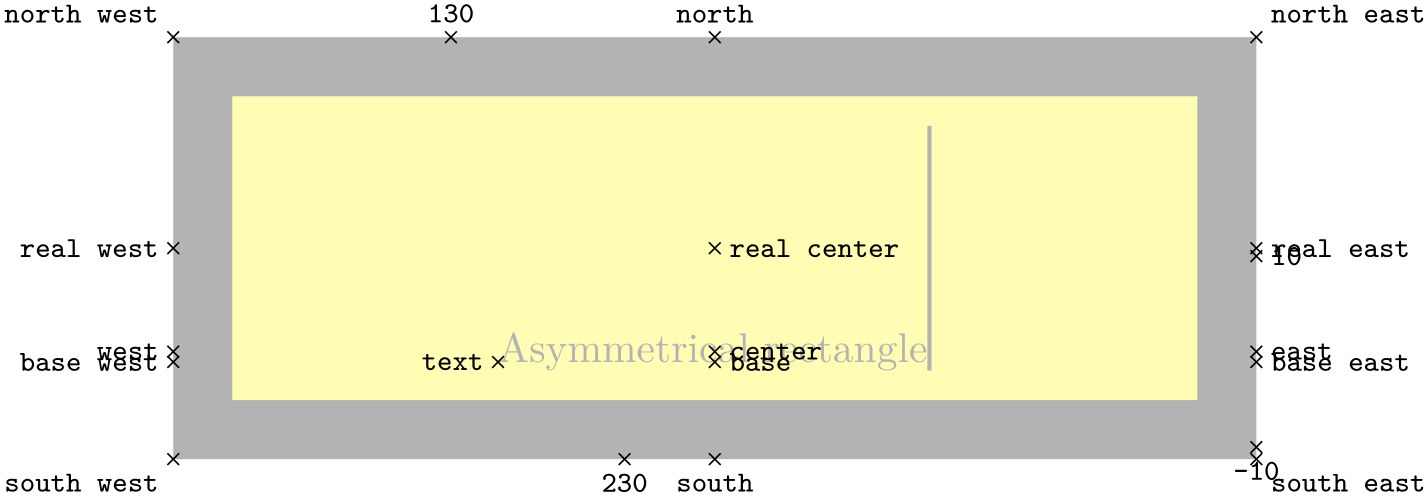
This shape is similar to the rectangle shape, but its center is located at a fixed distance of the base, as determined by the center yshift key, rather than lying at the shape’s geometric center. The numerical anchors, as well as east and west, are modified accordingly, and there are anchors called real center, real east, and real west matching rectangle’s original definitions. All other anchors provided by rectangle are available and remain unmodified.
-
/tikz/commutative diagrams/center yshift=⟨dimension⟩ (no default, initially axis_height) ¶
Determines the distance between asymmetrical rectangle’s base and center anchors.
The picture below shows some of the available anchors.
4.2Reading font parameters¶
The following are pgfmath functions used to access relevant math font parameters. They take no arguments, but the result depends of the currently selected font size.
4.3Computer Modern arrow tips¶
The following arrow tips mimic the Computer Modern designs. It is useful to know that at size 10 pt, the Computer Modern arrow stems are 0.4 pt thick; for other font sizes, scale this parameter accordingly, or set line width=rule_thickness.
Notice that by using the mechanism explained in §1.3, it is not necessary, and in fact not advisable, to directly refer to the arrow tips listed in this section inside a {tikzcd}.







4.4Glyph arrow tips¶
As an attempt to provide a general solution to the problem of having matching arrow tips in text and pictures, this feature produces arrow tips that consist of (pieces of) font glyphs carefully placed at the endpoints of the path. To activate it in {tikzcd} diagrams, refer to the arrow style key.
-
Arrow Tip Kind Glyph
-
/pgf/arrow keys/glyph math command=⟨name⟩(no default) ¶
-
/pgf/arrow keys/glyph length=⟨dimension⟩ (no default, initially 1ex) ¶
-
/pgf/arrow keys/glyph axis=⟨dimension⟩ (no default, initially axis_height) ¶
-
/pgf/arrow keys/glyph shorten=⟨dimension⟩ (no default, initially -0.1ex) ¶
An arrow tip made from a piece of text. It accepts the following parameters.
The name of a command (to be used inside $\csname …\endcsname$) producing the desired glyph.
The length of the portion of the glyph not clipped away. Also used to set the ‘tip end’ parameter.
A vertical displacement applied to the glyph in order to make the glyph’s central axis (typically an arrow stem) aligned with the path.
An additional amount by which the end of the path is shortened. This is used to compensate for the gap that usually exists between the tip end and the glyph’s bounding box.
Below are some usage examples. Notice that glyph arrow tips do not scale with pgf line width but their size depends on the current font size, so you will probably want to set line width=rule_thickness when using them. Also, contrarily to the arrow parameters defined by the arrows.meta library, the parameters described above are evaluated only at the time the arrow tip is drawn, so they can (and should) be given in the units em or ex.
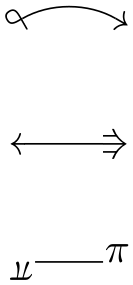
\tikzset{

  math to/.tip={Glyph[glyph math command=rightarrow]},

  loop/.tip={Glyph[glyph math command=looparrowleft, swap]},

  weird/.tip={Glyph[glyph math command=Rrightarrow, glyph length=1.5ex]},

  pi/.tip={Glyph[glyph math command=pi, glyph length=1.5ex, glyph axis=0pt]},

}


\begin{tikzpicture}[line width=rule_thickness]

  \draw[loop-math to, bend left] (0,2) to (1,2);

  \draw[math to-weird] (0,1) to (1,1);

  \draw[pi-pi] (0,0) to (1,0);

\end{tikzpicture}
It is important to be aware of some drawbacks of this feature. First, the transition between a line and the arrow tip may become visible with some printers (especially in low resolutions or draft mode) and document viewers, as you may be able to see in the samples above.
Second, these rather long tips may (  ) or may not (
  ) fit nicely with dashed or curved lines. Finally, the method used to place the arrow tip at the end of a stroked path and clip away the arrow stem makes certain assumptions about the font design and could fail in cases where unusual design choices are made.
References¶
-
[Milne] James Milne, Guide to commutative diagrams. Available at http://www.jmilne.org/not/CDGuide.html.
-
[Tantau] Till Tantau, The TikZ and pgf packages: Manual for version 3.1.9. Available at http://mirrors.ctan.org/graphics/pgf/base/doc/pgfmanual.pdf.
Index¶
A
\ar, Inserting arrows
\arrow, Inserting arrows, Alternative syntax for arrows
arrow style key, Global options for arrows
Arrow tips
cm bar, Computer Modern arrow tips
cm bold to, Computer Modern arrow tips
cm double to, Computer Modern arrow tips
cm implies, Computer Modern arrow tips
cm left hook, Computer Modern arrow tips
cm left to, Computer Modern arrow tips
cm right hook, Computer Modern arrow tips
cm right to, Computer Modern arrow tips
cm to, Computer Modern arrow tips
cm to reversed, Computer Modern arrow tips
Glyph, Glyph arrow tips
arrows key, Global options for arrows
asymmetrical rectangle shape, The asymmetrical rectangle shape
axis_height math function, Reading font parameters
B
background color key, General options
C
cd library, Getting started, Usage in plain TeX, Usage in ConTeXt
cells key, General options
center yshift key, The asymmetrical rectangle shape
cm bar arrow tip, Computer Modern arrow tips
cm bold to arrow tip, Computer Modern arrow tips
cm double to arrow tip, Computer Modern arrow tips
cm implies arrow tip, Computer Modern arrow tips
cm left hook arrow tip, Computer Modern arrow tips
cm left to arrow tip, Computer Modern arrow tips
cm right hook arrow tip, Computer Modern arrow tips
cm right to arrow tip, Computer Modern arrow tips
cm to arrow tip, Computer Modern arrow tips
cm to reversed arrow tip, Computer Modern arrow tips
column sep key, General options
cramped key, General options
crossing over key, Three-dimensional diagrams
crossing over clearance key, Three-dimensional diagrams
D
\dar, Alternative syntax for arrows
dashed key, Dashed arrows
description key, Options for labels
diagrams key, General options
\dlar, Alternative syntax for arrows
\drar, Alternative syntax for arrows
E
end anchor key, Fine-tuning the placement of arrows
Environments
tikzcd, Creating a diagram, Usage in plain TeX, Usage in ConTeXt
every arrow key, Global options for arrows
every cell key, General options
every diagram key, General options
every label key, Options for labels
every matrix key, General options
F
from key, Absolute placement of arrows
G
Glyph arrow tip, Glyph arrow tips
glyph axis key, Glyph arrow tips
glyph length key, Glyph arrow tips
glyph math command key, Glyph arrow tips
glyph shorten key, Glyph arrow tips
H
harpoon key, Harpoons
hook key, Arrows with hook
L
labels key, Options for labels
\lar, Alternative syntax for arrows
Libraries
cd, Getting started, Usage in plain TeX, Usage in ConTeXt
M
maps to key, Arrows from bar
marking key, Options for labels
Math functions
axis_height, Reading font parameters
rule_thickness, Reading font parameters
math mode key, General options
N
no head key, Non-arrows
P
Packages and files
tikz-cd, Getting started
/pgf/
arrow keys/
glyph axis, Glyph arrow tips
glyph length, Glyph arrow tips
glyph math command, Glyph arrow tips
glyph shorten, Glyph arrow tips
phantom key, Phantom arrows
R
\rar, Alternative syntax for arrows
row sep key, General options
rule_thickness math function, Reading font parameters
S
sep key, General options
Shapes
asymmetrical rectangle, The asymmetrical rectangle shape
shift key, Fine-tuning the placement of arrows
shift left key, Fine-tuning the placement of arrows
shift right key, Fine-tuning the placement of arrows
shorten key, Fine-tuning the placement of arrows
squiggly key, Squiggly arrows
start anchor key, Fine-tuning the placement of arrows
T
tail key, Arrows with tail
/tikz/
commutative diagrams/
arrow style, Global options for arrows
arrows, Global options for arrows
background color, General options
cells, General options
center yshift, The asymmetrical rectangle shape
column sep, General options
cramped, General options
crossing over, Three-dimensional diagrams
crossing over clearance, Three-dimensional diagrams
dashed, Dashed arrows
description, Options for labels
diagrams, General options
end anchor, Fine-tuning the placement of arrows
every arrow, Global options for arrows
every cell, General options
every diagram, General options
every label, Options for labels
every matrix, General options
from, Absolute placement of arrows
harpoon, Harpoons
hook, Arrows with hook
labels, Options for labels
maps to, Arrows from bar
marking, Options for labels
math mode, General options
no head, Non-arrows
phantom, Phantom arrows
row sep, General options
sep, General options
shift, Fine-tuning the placement of arrows
shift left, Fine-tuning the placement of arrows
shift right, Fine-tuning the placement of arrows
shorten, Fine-tuning the placement of arrows
squiggly, Squiggly arrows
start anchor, Fine-tuning the placement of arrows
tail, Arrows with tail
to, Absolute placement of arrows
to head, Basic arrows
two heads, Two-headed arrows
xshift, Fine-tuning the placement of arrows
yshift, Fine-tuning the placement of arrows
tikz-cd package, Getting started
tikz/commutative diagrams/dash, Non-arrows
tikz/commutative diagrams/dash key, Non-arrows
tikz/commutative diagrams/dashleftarrow, Dashed arrows
tikz/commutative diagrams/dashleftarrow key, Dashed arrows
tikz/commutative diagrams/dashrightarrow, Dashed arrows
tikz/commutative diagrams/dashrightarrow key, Dashed arrows
tikz/commutative diagrams/equal, Non-arrows
tikz/commutative diagrams/equal key, Non-arrows
tikz/commutative diagrams/harpoon', Harpoons
tikz/commutative diagrams/harpoon' key, Harpoons
tikz/commutative diagrams/hook', Arrows with hook
tikz/commutative diagrams/hook' key, Arrows with hook
tikz/commutative diagrams/hookleftarrow, Arrows with hook
tikz/commutative diagrams/hookleftarrow key, Arrows with hook
tikz/commutative diagrams/hookrightarrow, Arrows with hook
tikz/commutative diagrams/hookrightarrow key, Arrows with hook
tikz/commutative diagrams/Leftarrow, Basic arrows
tikz/commutative diagrams/Leftarrow key, Basic arrows
tikz/commutative diagrams/leftarrow, Basic arrows
tikz/commutative diagrams/leftarrow key, Basic arrows
tikz/commutative diagrams/leftarrowtail, Arrows with tail
tikz/commutative diagrams/leftarrowtail key, Arrows with tail
tikz/commutative diagrams/leftharpoondown, Harpoons
tikz/commutative diagrams/leftharpoondown key, Harpoons
tikz/commutative diagrams/leftharpoonup, Harpoons
tikz/commutative diagrams/leftharpoonup key, Harpoons
tikz/commutative diagrams/Leftrightarrow, Basic arrows
tikz/commutative diagrams/Leftrightarrow key, Basic arrows
tikz/commutative diagrams/leftrightarrow, Basic arrows
tikz/commutative diagrams/leftrightarrow key, Basic arrows
tikz/commutative diagrams/leftrightsquigarrow, Squiggly arrows
tikz/commutative diagrams/leftrightsquigarrow key, Squiggly arrows
tikz/commutative diagrams/leftsquigarrow, Squiggly arrows
tikz/commutative diagrams/leftsquigarrow key, Squiggly arrows
tikz/commutative diagrams/Mapsfrom, Arrows from bar
tikz/commutative diagrams/Mapsfrom key, Arrows from bar
tikz/commutative diagrams/mapsfrom, Arrows from bar
tikz/commutative diagrams/mapsfrom key, Arrows from bar
tikz/commutative diagrams/Mapsto, Arrows from bar
tikz/commutative diagrams/Mapsto key, Arrows from bar
tikz/commutative diagrams/mapsto, Arrows from bar
tikz/commutative diagrams/mapsto key, Arrows from bar
tikz/commutative diagrams/no tail, Non-arrows
tikz/commutative diagrams/no tail key, Non-arrows
tikz/commutative diagrams/Rightarrow, Basic arrows
tikz/commutative diagrams/Rightarrow key, Basic arrows
tikz/commutative diagrams/rightarrow, Basic arrows
tikz/commutative diagrams/rightarrow key, Basic arrows
tikz/commutative diagrams/rightarrowtail, Arrows with tail
tikz/commutative diagrams/rightarrowtail key, Arrows with tail
tikz/commutative diagrams/rightharpoondown, Harpoons
tikz/commutative diagrams/rightharpoondown key, Harpoons
tikz/commutative diagrams/rightharpoonup, Harpoons
tikz/commutative diagrams/rightharpoonup key, Harpoons
tikz/commutative diagrams/rightsquigarrow, Squiggly arrows
tikz/commutative diagrams/rightsquigarrow key, Squiggly arrows
tikz/commutative diagrams/twoheadleftarrow, Two-headed arrows
tikz/commutative diagrams/twoheadleftarrow key, Two-headed arrows
tikz/commutative diagrams/twoheadrightarrow, Two-headed arrows
tikz/commutative diagrams/twoheadrightarrow key, Two-headed arrows
tikzcd environment, Creating a diagram, Usage in plain TeX, Usage in ConTeXt
\tikzcdset, Controlling the appearance of diagrams
to key, Absolute placement of arrows
to head key, Basic arrows
two heads key, Two-headed arrows
U
\uar, Alternative syntax for arrows
\ular, Alternative syntax for arrows
\urar, Alternative syntax for arrows
X
xshift key, Fine-tuning the placement of arrows
Y
yshift key, Fine-tuning the placement of arrows