3Advanced usage
This section provides further details on the functioning of this package, with the aim of allowing the advanced user to make a more or less arbitrary use of other TikZ features within {tikzcd}.
3.1Internals of tikzcd and the arrow commands
The {tikzcd} environment works by substituting code of the form
-
\begin{tikzcd}[⟨options⟩]
⟨contents⟩
\end{tikzcd}
with roughly the following:
-
\begin{tikzpicture}[⟨options⟩]
\matrix[matrix of nodes] {
⟨contents⟩ \\
};
⟨paths⟩
\end{tikzpicture}
Not shown above are a number of initialization procedures, such as defining \arrow and its relatives, as well as applying the default settings specified by every diagram and its relatives. Note that the next-row command \\ for the last row is inserted by {tikzcd}, and therefore should not be present in ⟨contents⟩. Notice also that you can use the key execute at end picture in ⟨options⟩ to have arbitrary TikZ code executed after a diagram is drawn.
Initially, ⟨paths⟩ is the empty string. A command \arrow[⟨options⟩] does nothing at the point it is inserted, and causes the following code to be appended to ⟨paths⟩:
-
\path[⟨options⟩] (⟨source node⟩) to (⟨target node⟩);
By default, ⟨source node⟩ and ⟨target node⟩ refer to the node corresponding to the matrix cell where the command \arrow is present. This can be changed using the from and to keys, or a direction argument (a string consisting of characters r, l, d, u).
3.2Tweaking to paths
Recall that the to path operation used in the paths created by \arrow can take a number of options, as described in to paths of the pgf manual [Tantau]. In particular, the key /tikz/to path determines the path that is actually drawn, and can be used to do all sorts of fiddling.

The following example shows how to produce a “snake” map. The arrow with the phantom option (going from \(B\) to \(E\)) has the sole purpose of creating a coordinate, named Z, lying halfway between these two cells. The arrow starting at \(C\) has target \(D\), so the macros \tikztostart and \tikztotarget will expand to the nodes corresponding to these two cells in the argument of to path. Notice also the use of \tikztonodes at the point where we want the label to be inserted.
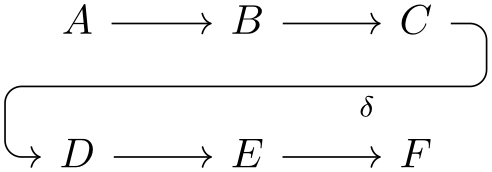
\begin{tikzcd}

  A \arrow[r]

    & B \arrow[r]

        \arrow[d, phantom, ""{coordinate, name=Z}]

      & C \arrow[dll,

                 "\delta",

                 rounded corners,

                 to path={ -- ([xshift=2ex]\tikztostart.east)

                           |- (Z) [near end]\tikztonodes

                           -| ([xshift=-2ex]\tikztotarget.west)

                           -- (\tikztotarget)}] \\

   D \arrow[r]

    & E \arrow[r]

      & F

\end{tikzcd}
3.3Drawing diagrams directly with TikZ
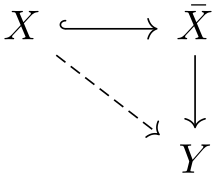
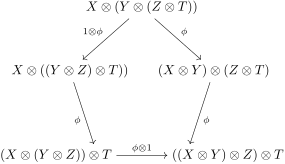
If you find that this package is not flexible enough for some particular application, you can use the methods described in [Milne] and draw diagrams directly with TikZ. In this case, you can still use the styles provided here to obtain pictures with a uniform appearance throughout your document. The pictures below show how this can be done (the second one is adapted from [Milne]).
\begin{tikzpicture}[commutative diagrams/every diagram]

  \matrix[matrix of math nodes, name=m, commutative diagrams/every cell] {

    X & \bar X \\

      & Y      \\};

  \path[commutative diagrams/.cd, every arrow, every label]

    (m-1-1) edge[commutative diagrams/hook] (m-1-2)

            edge[commutative diagrams/dashed] (m-2-2)

    (m-1-2) edge (m-2-2);

\end{tikzpicture}
\begin{tikzpicture}[commutative diagrams/every diagram]

  \node (P0) at (90:2.3cm) {$X\otimes (Y\otimes (Z\otimes T))$};

  \node (P1) at (90+72:2cm) {$X\otimes ((Y\otimes Z)\otimes T))$} ;

  \node (P2) at (90+2*72:2cm) {\makebox[5ex][r]{$(X\otimes (Y\otimes Z))\otimes T$}};

  \node (P3) at (90+3*72:2cm) {\makebox[5ex][l]{$((X\otimes Y)\otimes Z)\otimes T$}};

  \node (P4) at (90+4*72:2cm) {$(X\otimes Y)\otimes (Z\otimes T)$};


  \path[commutative diagrams/.cd, every arrow, every label]

    (P0) edge node[swap] {$1\otimes\phi$} (P1)

    (P1) edge node[swap] {$\phi$} (P2)

    (P2) edge node {$\phi\otimes 1$} (P3)

    (P4) edge node {$\phi$} (P3)

    (P0) edge node {$\phi$} (P4);

\end{tikzpicture}
3.4Issues with active characters
By default, TikZ makes the character & active inside matrices, and this causes the error message
-
! Package pgfbasematrix Error: Single ampersand used with wrong catcode.
when {tikzcd} is used inside the argument to a macro such as a Beamer frame or a footnote. One solution to this problem is to call {tikzcd} with the option ampersand replacement=\&, and replace all occurrences of & with \& in the diagram. This procedure is also needed if you want to use matrices in a diagram cell or label.

An alternative fix to this issue that does not require replacing & with a different column separator consists in adding the following line to your document after all packages have been loaded:
-
\def\temp{&} \catcode`&=\active \let&=\temp
However, this may interfere in unexpected ways with other packages. Use this trick at your own risk.
A different but related issue is that some packages, notably Babel and Polyglossia, modify the catcodes of certain characters in a way that may upset TikZ’s parser. To fix this, add
-
\usetikzlibrary{babel}
to your document preamble.