tkz-euclide
Marking and labelling
31 Marking
31.1 Mark a segment \tkzMarkSegment
\tkzMarkSegment[⟨local options⟩](⟨pt1,pt2⟩)
This macro places a mark on a segment.
| options | default | definition |
|---|---|---|
| pos | .5 | position of the mark |
| color | black | color of the mark |
| mark | none | choice of the mark |
| size | 4pt | size of the mark |
Possible marks are those provided by TikZ, but other marks have been created based on an idea by Yves Combe.
31.1.1 Several marks
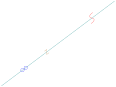
\begin{tikzpicture}

  \tkzDefPoint(2,1){A}

  \tkzDefPoint(6,4){B}

  \tkzDrawSegment(A,B)

  \tkzMarkSegment[color=brown,size=2pt,pos=0.4, mark=z](A,B)

  \tkzMarkSegment[color=blue,pos=0.2, mark=oo](A,B)

  \tkzMarkSegment[pos=0.8,mark=s,color=red](A,B)

\end{tikzpicture}
31.1.2 Use of mark
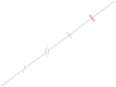
\begin{tikzpicture}

  \tkzDefPoint(2,1){A}

  \tkzDefPoint(6,4){B}

  \tkzDrawSegment(A,B)

  \tkzMarkSegment[color=gray,pos=0.2,mark=s|](A,B)

  \tkzMarkSegment[color=gray,pos=0.4,mark=s||](A,B)

  \tkzMarkSegment[color=brown,pos=0.6,mark=||](A,B)

  \tkzMarkSegment[color=red,pos=0.8,mark=|||](A,B)

\end{tikzpicture}
31.2 Marking segments \tkzMarkSegments
\tkzMarkSegments[⟨local options⟩](⟨pt1,pt2 pt3,pt4 ...⟩)
The arguments are a list of pairs of points separated by spaces. The TikZ styles are available.
31.2.1 Marks for an isosceles triangle
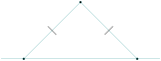
\begin{tikzpicture}[scale=1]

 \tkzDefPoints{0/0/O,2/2/A,4/0/B,6/2/C}

 \tkzDrawSegments(O,A A,B)

 \tkzDrawPoints(O,A,B)

 \tkzDrawLine(O,B)

 \tkzMarkSegments[mark=||,size=6pt](O,A A,B)

\end{tikzpicture}
31.3 Marking with a construction: equilateral triangle
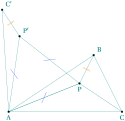
 \begin{tikzpicture}[scale=1]

  \tkzDefPoint(0,0){A}\tkzDefPoint(3,2){B}

  \tkzDefPoint(4,0){C}\tkzDefPoint(2.5,1){P}

  \tkzDrawPolygon(A,B,C)

  \tkzDefEquilateral(A,P) \tkzGetPoint{P'}

  \tkzDefPointsBy[rotation=center A angle 60](P,B){P',C'}

  \tkzDrawPolygon(A,P,P')

  \tkzDrawPolySeg(P',C',A,P,B)

  \tkzDrawSegment(C,P)

  \tkzDrawPoints(A,B,C,C',P,P')

  \tkzMarkSegments[mark=s|,size=6pt,

  color=blue](A,P P,P' P',A)

  \tkzMarkSegments[mark=||,color=orange](B,P P',C')

  \tkzLabelPoints(A,C) \tkzLabelPoints[below](P)

  \tkzLabelPoints[above right](P',C',B)

\end{tikzpicture}
31.4 Mark an arc \tkzMarkArc
\tkzMarkArc[⟨local options⟩](⟨pt1,pt2,pt3⟩)
This macro places a mark on an arc: pt1 is the center, pt2 and pt3 are the endpoints of the arc.
| options | default | definition |
|---|---|---|
| pos | .5 | position of the mark |
| color | black | color of the mark |
| mark | none | choice of the mark |
| size | 4pt | size of the mark |
Possible marks are those provided by TikZ, but other marks have been created based on an idea by Yves Combe.
|, ||,|||, z, s, x, o, oo
31.4.1 Several marks
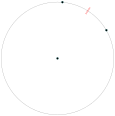
\begin{tikzpicture}

\tkzDefPoint(0,0){O}

\pgfmathsetmacro\r{2}

\tkzDefPoint(30:\r){A}

\tkzDefPoint(85:\r){B}

\tkzDrawCircle(O,A)

\tkzMarkArc[color=red,mark=||](O,A,B)

\tkzDrawPoints(B,A,O)

\end{tikzpicture}
31.5 Marking an angle: \tkzMarkAngle
More delicate operation because there are many options. The symbols used for marking in addition to those of TikZ are defined in the file tkz-lib-marks.tex and designated by the following characters:
|, ||,|||, z, s, x, o, oo
\tkzMarkAngle[⟨local options⟩](⟨A,O,B⟩)
\(O\) is the vertex. Several markings are possible: you can simply draw an arc, or add a mark on this arc. The style of the arc is chosen with the option arc, its radius is given by size and the size of the mark by mksize; the arc can, of course, be colored.
| options | default | definition |
|---|---|---|
| arc | l | choice of l, ll and lll (single, double or triple). |
| size | 1 (cm) | arc radius. |
| mark | none | choice of mark. |
| mksize | 4pt | symbol size (mark). |
| mkcolor | black | symbol color (mark). |
| mkpos | 0.5 | position of the symbol on the arc. |
31.5.1 Example with mark = x and with mark =
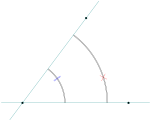
\begin{tikzpicture}[scale=.75]

    \tkzDefPoints{0/0/O,5/0/A,3/4/B}

    \tkzMarkAngle[size = 4,mark = x,

                  arc=ll,mkcolor = red,mkpos=.33](A,O,B)

    \tkzMarkAngle[size = 2,mark = ||,

                arc=ll,mkcolor = blue,mkpos=.66](A,O,B)

    \tkzDrawLines(O,A O,B)

    \tkzDrawPoints(O,A,B)

\end{tikzpicture}
\tkzMarkAngles[⟨local options⟩](⟨A,O,B⟩)(⟨A’,O’,B’⟩)etc.
With common options, there is a macro for several angles.
31.6 Marking a small angle: option veclen
The problem comes from the "decorate" action and from the value of size in \tkzMarkAngle. The solution is to place \tkzMarkAngle in a scope with the option veclen. In the next example, without the scope the result is: LaTeX Error: Dimension too large.
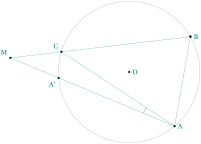
    \begin{tikzpicture}[scale=1]

      \tkzDefPoint(0,0){O}

      \tkzDefPoint(2.5,0){N}

      \tkzDefPoint(-4.2,0.5){M}

      \tkzDefPointBy[rotation=center O angle 30](N)

      \tkzGetPoint{B}

      \tkzDefPointBy[rotation=center O angle -50](N)

      \tkzGetPoint{A}

      \tkzInterLC[common=B](M,B)(O,B) \tkzGetFirstPoint{C}

      \tkzInterLC[common=A](M,A)(O,A) \tkzGetFirstPoint{A'}

      \tkzDrawSegments(A,C M,A M,B A,B)

      \tkzDrawCircle(O,N)

      \begin{scope}[veclen]

        \tkzMarkAngle[mkpos=.2, size=1.2](C,A,M)

      \end{scope}

      \tkzDrawPoints(O, A, B, M, B, C, A')

      \tkzLabelPoints[right](O,A,B)

      \tkzLabelPoints[above left](M,C)

      \tkzLabelPoint[below left](A'){$A'$}

    \end{tikzpicture}
31.7 Marking a right angle: \tkzMarkRightAngle
\tkzMarkRightAngle[⟨local options⟩](⟨A,O,B⟩)
The option german changes the style of the mark, and the option size its size.
| options | default | definition |
|---|---|---|
| german | normal | german arc with inner point. |
| size | 0.2 | side size. |
31.7.1 Marking a right angle
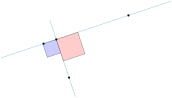
\begin{tikzpicture}

  \tkzDefPoints{0/0/A,3/1/B,0.9/-1.2/P}

  \tkzDefPointBy[projection = onto B--A](P)  \tkzGetPoint{H}

  \tkzDrawLines[add=.5 and .5](P,H)

  \tkzMarkRightAngle[fill=blue!20,size=.5,draw](A,H,P)

  \tkzDrawLines[add=.5 and .5](A,B)

  \tkzMarkRightAngle[fill=red!20,size=.8](B,H,P)

  \tkzDrawPoints[](A,B,P,H)

\end{tikzpicture}
31.7.2 Marking a right angle, German style
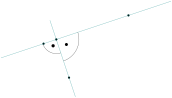
\begin{tikzpicture}

  \tkzDefPoints{0/0/A,3/1/B,0.9/-1.2/P}

  \tkzDefPointBy[projection = onto B--A](P)  \tkzGetPoint{H}

  \tkzDrawLines[add=.5 and .5](P,H)

  \tkzMarkRightAngle[german,size=.5,draw](A,H,P)

  \tkzDrawPoints[](A,B,P,H)

  \tkzDrawLines[add=.5 and .5](A,B)

  \tkzMarkRightAngle[german,size=.8](P,H,B)

\end{tikzpicture}
31.7.3 Mix of styles
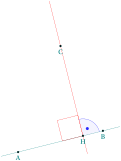
\begin{tikzpicture}[scale=.75]

  \tkzDefPoint(0,0){A}

  \tkzDefPoint(4,1){B}

  \tkzDefPoint(2,5){C}

  \tkzDefPointBy[projection=onto B--A](C)

      \tkzGetPoint{H}

  \tkzDrawLine(A,B)

  \tkzDrawLine[add = .5 and .2,color=red](C,H)

  \tkzMarkRightAngle[,size=1,color=red](C,H,A)

  \tkzMarkRightAngle[german,size=.8,color=blue](B,H,C)

  \tkzFillAngle[opacity=.2,fill=blue!20,size=.8](B,H,C)

  \tkzLabelPoints(A,B,C,H)

  \tkzDrawPoints(A,B,C,H)

\end{tikzpicture}
31.7.4 Full example
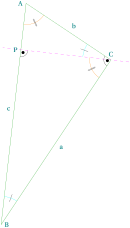
\begin{tikzpicture}[rotate=-90]

\tkzDefPoint(0,1){A}

\tkzDefPoint(2,4){C}

\tkzDefPointWith[orthogonal normed,K=7](C,A)

\tkzGetPoint{B}

\tkzDrawSegment[green!60!black](A,C)

\tkzDrawSegment[green!60!black](C,B)

\tkzDrawSegment[green!60!black](B,A)

\tkzDefSpcTriangle[orthic](A,B,C){N,O,P}

\tkzDrawLine[dashed,color=magenta](C,P)

\tkzLabelPoint[left](A){$A$}

\tkzLabelPoint[right](B){$B$}

\tkzLabelPoint[above](C){$C$}

\tkzLabelPoint[left](P){$P$}

\tkzLabelSegment[auto](B,A){$c$}

\tkzLabelSegment[auto,swap](B,C){$a$}

\tkzLabelSegment[auto,swap](C,A){$b$}

\tkzMarkAngle[size=1,color=cyan,mark=|](C,B,A)

\tkzMarkAngle[size=1,color=cyan,mark=|](A,C,P)

\tkzMarkAngle[size=0.75,color=orange,

    mark=||](P,C,B)

\tkzMarkAngle[size=0.75,color=orange,

   mark=||](B,A,C)

\tkzMarkRightAngle[german](A,C,B)

\tkzMarkRightAngle[german](B,P,C)

\end{tikzpicture}
31.8 \tkzMarkRightAngles
\tkzMarkRightAngles[⟨local options⟩](⟨A,O,B⟩)(⟨A’,O’,B’⟩)etc.
With common options, there is a macro for several angles.
31.9 The TikZ library angles
If you prefer the TikZ library angles, you can mark angles with the macros \tkzPicAngle and \tkzPicRightAngle.
\tkzPicAngle[⟨tikz options⟩](⟨A,O,B⟩)
| options | example | definition |
|---|---|---|
| tikz option | see below | drawing of the angle \(\widehat{AOB}\). |
\tkzPicRightAngle[⟨tikz options⟩](⟨A,O,B⟩)
| options | example | definition |
|---|---|---|
| tikz option | see below | drawing of the right angle \(\widehat{AOB}\). |
You need to know the options of the library angles.
31.9.1 Angle with TikZ
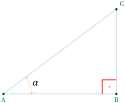
  \begin{tikzpicture}

  \tkzDefPoints{0/0/A,4/0/B}

  \tkzDefTriangle[right,swap](A,B) \tkzGetPoint{C}

  \tkzDrawPolygon(A,B,C)

  \tkzDrawPoints(A,B,C)

  \tkzLabelPoints[below](B,A)

  \tkzLabelPoints[above right](C)

  \tkzPicAngle["$\alpha$",draw=orange,

               <->,angle eccentricity=1.2,

               angle radius=1cm](B,A,C)

  \tkzPicRightAngle[draw,red,thick,

                angle eccentricity=.5,

                pic text=.](C,B,A)

  \end{tikzpicture}