tkz-euclide
Points
5 First step: fixed points
The first step in a geometric construction is to define the fixed points from which the figure will be constructed.
The general idea is to avoid manipulating coordinates, and to use instead the references of the points fixed in the first step or obtained with the tools of the package. Even if it is possible, I think it’s a bad idea to work directly with coordinates: it is better to use named points.
tkz-euclide uses macros and a vocabulary specific to geometric construction. You can of course use the tools of TikZ, but it seems more logical to me not to mix the two syntaxes.
For TikZ, a point of tkz-euclide is a particular node. In the next section we will see how to define points with coordinates. The style of the points (color and shape) is not discussed here: you will find some indications in the examples, and more information in section 42.
6 Definition of a point: \tkzDefPoint or \tkzDefPoints
Points can be specified in any of the following ways:
Cartesian coordinates;
Polar coordinates;
Named points;
Relative points.
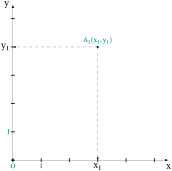
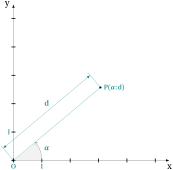
A point is defined when its name is linked to a unique pair of decimal numbers: \((x,y)\) (\(x\) abscissa, \(y\) ordinate) or \((a:d)\) (\(a\) angle, \(d\) distance). This is possible because the plane is given an orthonormal Cartesian coordinate system, whose unit is \(1\) cm.
The Cartesian coordinate \((a,b)\) refers to the point \(a\) centimeters in the \(x\)-direction and \(b\) centimeters in the \(y\)-direction.
A point in polar coordinates requires an angle \(\alpha\), in degrees, and a distance \(d\) from the origin; the default unit is the cm.
The macro \tkzDefPoint defines a point by assigning coordinates to it. This macro is based on
\coordinate, a macro of TikZ, and accepts TikZ options such as shift. Calculations are done with the package xfp. We can use Cartesian or polar coordinates.
Cartesian coordinates
\begin{tikzpicture}[scale=1]

  \tkzInit[xmax=5,ymax=5]

  % necessary to limit

  % the size of the axes

  \tkzDrawX[>=latex]

  \tkzDrawY[>=latex]

  \tkzDefPoints{0/0/O,1/0/I,0/1/J}

  \tkzDefPoint(3,4){A}

  \tkzDrawPoints(O,A)

  \tkzLabelPoint[above](A){$A_1(x_1,y_1)$}

  \tkzShowPointCoord[xlabel=$x_1$,

                     ylabel=$y_1$](A)

  \tkzLabelPoints(O,I)

  \tkzLabelPoints[left](J)

  \tkzDrawPoints[shape=cross](I,J)

\end{tikzpicture}
Polar coordinates
\begin{tikzpicture}[scale=1]

  \tkzInit[xmax=5,ymax=5]

  \tkzDrawX[>=latex]

  \tkzDrawY[>=latex]

  \tkzDefPoints{0/0/O,1/0/I,0/1/J}

  \tkzDefPoint(40:4){P}

  \tkzDrawSegment[dim={$d$,

                 16pt,above=6pt}](O,P)

  \tkzDrawPoints(O,P)

  \tkzMarkAngle[mark=none,->](I,O,P)

  \tkzFillAngle[opacity=.5](I,O,P)

  \tkzLabelAngle[pos=1.25](I,O,P){%

                              $\alpha$}

  \tkzLabelPoint[right](P){$P(\alpha:d)$}

  \tkzDrawPoints[shape=cross](I,J)

  \tkzLabelPoints(O,I)

  \tkzLabelPoints[left](J)

\end{tikzpicture}
6.1 Defining a named point: \tkzDefPoint
\tkzDefPoint[⟨local options⟩](⟨\(x,y\)⟩){⟨ref⟩} or (⟨\(\alpha\):\(d\)⟩){⟨ref⟩}
| arguments | default | definition |
|---|---|---|
| (\(x,y\)) | no default | \(x\) and \(y\) are two dimensions, by default in cm. |
| (\(\alpha\):\(d\)) | no default | \(\alpha\) is an angle in degrees, \(d\) is a dimension |
| {ref} | no default | Reference assigned to the point: \(A\), \(T\_a\) ,\(P1\) or \(P_1\) |
The mandatory arguments of this macro are two decimal numbers: in the first case two lengths, in the second case an angle in degrees and a length. Do not confuse the reference of a point with its name: the reference is used by the calculations, but the name is frequently identical to the reference.
| options | default | definition |
|---|---|---|
| label | no default | allows you to place a label at a predefined distance |
| shift | no default | adds \((x,y)\) or \((\alpha:d)\) to all coordinates |
6.1.1 Cartesian coordinates
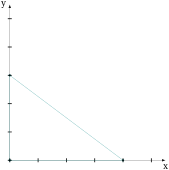
  \begin{tikzpicture}

  \tkzInit[xmax=5,ymax=5] % limits the size of the axes

  \tkzDrawX[>=latex]

  \tkzDrawY[>=latex]

  \tkzDefPoint(0,0){A}

  \tkzDefPoint(4,0){B}

  \tkzDefPoint(0,3){C}

  \tkzDrawPolygon(A,B,C)

  \tkzDrawPoints(A,B,C)

  \end{tikzpicture}
6.1.2 Calculations with xfp
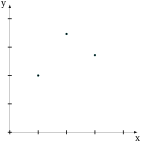
\begin{tikzpicture}[scale=1]

  \tkzInit[xmax=4,ymax=4]

  \tkzDrawX\tkzDrawY

  \tkzDefPoint(-1+2,sqrt(4)){O}

  \tkzDefPoint({3*ln(exp(1))},{exp(1)}){A}

  \tkzDefPoint({4*sin(pi/6)},{4*cos(pi/6)}){B}

  \tkzDrawPoints(O,B,A)

\end{tikzpicture}
6.1.3 Polar coordinates
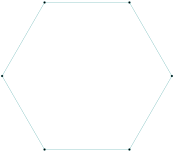
  \begin{tikzpicture}

  \foreach \an [count=\i] in {0,60,...,300}

   { \tkzDefPoint(\an:3){A_\i}}

  \tkzDrawPolygon(A_1,A_...,A_6)

  \tkzDrawPoints(A_1,A_...,A_6)

  \end{tikzpicture}
6.1.4 Relative points
First, we can use the scope environment from TikZ. In the following example, we have a way to define an equilateral triangle.
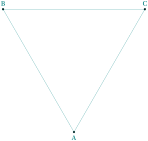
\begin{tikzpicture}[scale=1]

 \begin{scope}[rotate=30]

  \tkzDefPoint(2,3){A}

  \begin{scope}[shift=(A)]

     \tkzDefPoint(90:5){B}

     \tkzDefPoint(30:5){C}

  \end{scope}

 \end{scope}

 \tkzDrawPolygon(A,B,C)

\tkzLabelPoints[above](B,C)

\tkzLabelPoints[below](A)

\tkzDrawPoints(A,B,C)

\end{tikzpicture}
6.2 Point relative to another: \tkzDefShiftPoint
\tkzDefShiftPoint[⟨Point⟩](⟨\(x,y\)⟩){⟨ref⟩} or (⟨\(\alpha\):\(d\)⟩){⟨ref⟩}
| arguments | default | definition |
|---|---|---|
| (\(x,y\)) | no default | \(x\) and \(y\) are two dimensions, by default in cm. |
| (\(\alpha\):\(d\)) | no default | \(\alpha\) is an angle in degrees, \(d\) is a dimension |
| {ref} | no default | Reference assigned to the point: \(A\), \(T\_a\) ,\(P1\) or \(P_1\) |
| options | default | definition |
| [pt] | no default | \tkzDefShiftPoint[A](0:4){B} |
6.2.1 Isosceles triangle
This macro places a point relative to another one; it is equivalent to a translation. Here is how to construct an isosceles triangle with main vertex \(A\) and an angle of \(30^{\circ}\) at this vertex.
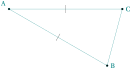
\begin{tikzpicture}[rotate=-30]

 \tkzDefPoint(2,3){A}

 \tkzDefShiftPoint[A](0:4){B}

 \tkzDefShiftPoint[A](30:4){C}

 \tkzDrawSegments(A,B B,C C,A)

 \tkzMarkSegments[mark=|](A,B A,C)

 \tkzDrawPoints(A,B,C)

 \tkzLabelPoints[right](B,C)

 \tkzLabelPoints[above left](A)

\end{tikzpicture}
6.2.2 Equilateral triangle
Let’s see how to get an equilateral triangle (there is a much simpler way, see \tkzDefTriangle).

\begin{tikzpicture}[scale=1]

 \tkzDefPoint(2,3){A}

 \tkzDefShiftPoint[A](30:3){B}

 \tkzDefShiftPoint[A](-30:3){C}

 \tkzDrawPolygon(A,B,C)

 \tkzDrawPoints(A,B,C)

 \tkzLabelPoints[right](B,C)

 \tkzLabelPoints[above left](A)

 \tkzMarkSegments[mark=|](A,B A,C B,C)

\end{tikzpicture}
6.2.3 Parallelogram
There is a simpler way, see \tkzDefParallelogram.
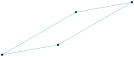
\begin{tikzpicture}

 \tkzDefPoint(0,0){A}

 \tkzDefPoint(30:3){B}

 \tkzDefShiftPointCoord[B](10:2){C}

 \tkzDefShiftPointCoord[A](10:2){D}

 \tkzDrawPolygon(A,...,D)

 \tkzDrawPoints(A,...,D)

\end{tikzpicture}
6.3 Definition of multiple points: \tkzDefPoints
\tkzDefPoints[⟨local options⟩]{⟨\(x_1/y_1/r_1,x_2/y_2/r_2\), ...⟩}
\(x_i\) and \(y_i\) are the coordinates of the point with reference \(r_i\).
| arguments | default | example |
|---|---|---|
| \(x_i/y_i/r_i\) | \tkzDefPoints{0/0/O,2/2/A} |
| options | default | definition |
|---|---|---|
| shift | no default | Adds \((x,y)\) or \((\alpha:d)\) to all coordinates |
6.4 Create a triangle

\begin{tikzpicture}[scale=.75]

 \tkzDefPoints{0/0/A,4/0/B,4/3/C}

 \tkzDrawPolygon(A,B,C)

 \tkzDrawPoints(A,B,C)

\end{tikzpicture}
6.5 Create a square
Note here the syntax for drawing the polygon.

\begin{tikzpicture}[scale=1]

 \tkzDefPoints{0/0/A,2/0/B,2/2/C,0/2/D}

 \tkzDrawPolygon(A,...,D)

 \tkzDrawPoints(A,...,D)

\end{tikzpicture}