chemfig
Operation of chemfig
8 Customization of bonds
There is a fifth and last optional argument for bonds which is found after the fourth comma:
[,,,,⟨tikz code⟩]
This ⟨tikz code⟩ is passed directly to TikZ when the bond is drawn. There one can put characteristics such as colour (red), dash type (dash pattern=on 2pt off 2pt), thickness (line width=2pt), or even decoration if the TikZ decoration library has been loaded. A bond can be made invisible by writing “draw=none”. To set several attributes, the syntax of TikZ is used, separating them by a comma:
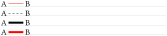
Passing tikz code
\chemfig{A-[,,,,red]B}\par

\chemfig{A-[,,,,dash pattern=on 2pt off 2pt]B}\par

\chemfig{A-[,,,,line width=2pt]B}\par

\chemfig{A-[,,,,red,line width=2pt]B}
Numerous TikZ decoration libraries are available. For example, one can use the “pathmorphing” library by putting \usetikzlibrary{decorations.pathmorphing} in the preamble in order to draw wavy bonds:

Wavy bonds
\chemfig{A-[,3,,,decorate,decoration=snake]B}
Cram bonds ignore thickness and dash settings.