chemfig
Operation of chemfig
14 Representing electron movements
Starting with chemfig version 0.3, we can represent the movement of electrons in mesomeric effects or reaction mechanisms. This is done by marking the departure and arrival points of the electron movement arrow using the syntax “@{⟨argument⟩}”. This syntax allows a TikZ node to be placed and makes this node accessible outside the argument of the \chemfig command thanks to the “remember picture” option which is passed to all the “tikzpicture” environments. It is assumed that the viewer supports “picture remembering” and that the compilation is done twice.
Two types of diagrams can arise, so we can ask for:
a zero size node on a bond using the syntax “@{⟨name⟩,⟨coeff⟩}” placed at the beginning of the optional argument of the relevant bond, without being followed by a comma if there is a first optional argument. In this case, the node takes the name “⟨name⟩” and the ⟨coeff⟩, which must be between 0 and 1, determines where the node is located on the bond. If “@{⟨name⟩}” is used, the ⟨coeff⟩ is set to 0.5 by default, which means that the node is placed halfway along the bond;
a node on an atom using the syntax “@{⟨name⟩}” immediately before the relevant atom. In this case, the node has exactly the same footprint as the atom, but may be empty and therefore have zero dimensions.
Once the \chemfig command has drawn the molecule(s) and has placed the nodes with the syntax described above, we can connect these nodes to each other with TikZ instructions. These instructions are placed in the argument of the command \chemmove1 and has the following syntax if (for example) we need to connect a node named “⟨name1⟩” to the node named “⟨name2⟩”:
\chemmove[⟨opt⟩]{\draw[⟨tikz opt⟩](⟨name1⟩)⟨tikz link⟩(⟨name2⟩);}
The optional argument ⟨opt⟩ of the \chemmove command will be added to the argument of the tikzpicture environment in which the links between the nodes will be drawn. The ⟨tikz opt⟩ and ⟨tikz link⟩ instructions are describe in detail in the documentation of the TikZ package.
14.1 Mesomeric effects
To make these concepts concrete, let’s take the example of a mesomeric effect involving a double bond and non-bonding lone pair conjugate. Let’s begin with the possible delocalization of electrons from the double bond. We will place a node named “db” (double bond) in the middle of the double bond and a node named “a1” on the end of the double bond.
The macros \schemestart, \schemestop, \arrow and \+ are explained in the chapter Reaction schemes, starting on section Reaction schemes.

\schemestart

  \chemfig{@{a1}=_[@{db}::30]-[::-60]\charge{90=\|}{X}}

  \arrow{<->}

  \chemfig{\chemabove{\vphantom{X}}{\ominus}-[::30]=_[::-60]

  \chemabove{X}{\scriptstyle\oplus}}

\schemestop

  \chemmove{\draw(db).. controls +(100:5mm) and +(145:5mm).. (a1);}
As noted above, there is no comma after the node placed in the optional arguments of a bond; we write “=_[@{db}::30]” and not “=_[@{db},::30]” as one might be tempted to do.
To link the nodes “db” and “a1” we have used the following syntax:
\chemmove{\draw(db)..controls +(80:8mm) and +(145:8mm)..(a1);}
For arrows in \chemmove, the default tip is “CF”.In this example, we use two control points2. These will be located using polar coordinates at 80° and 8 mm from “db” for the first and at 145° and 8 mm from “a1” for the second. Though this syntax may seem complicated at first reading, one need not be alarmed because its use will usually be a matter of copying and pasting. Only the names and coordinates of the control points need be changed, as can be verified from the example below, where an arrow has been added from the lone pair (node “dnl” to the single bond (node “sb”).

\schemestart

  \chemfig{@{a1}=_[@{db}::30]-[@{sb}::-60]@{dnl}\charge{90=\|}{X}}

  \arrow{<->}

  \chemfig{\chemabove{\vphantom{X}}{\ominus}-[::30]=_[::-60]

  \chemabove{X}{\scriptstyle\oplus}}

\schemestop

\chemmove{

    \draw(db)..controls +(100:5mm) and +(145:5mm)..(a1);

    \draw(dnl)..controls +(90:4mm) and +(45:4mm)..(sb);}
For our new arrow we have set the control points as follows: 4 mm at an angle of 90° from “dnl” and 4 mm at an angle of 45° from “sb”. But we are not completely satisfied, since we would like the arrow not to touch the line segment representing the lone pair. To do this we will add some options to our arrow.

\schemestart

  \chemfig{@{a1}=_[@{db}::30]-[@{sb}::-60]@{dnl}\charge{90=\|}{X}}

  \arrow{<->}

  \chemfig{\chemabove{\vphantom{X}}{\ominus}-[::30]=_[::-60]

  \chemabove{X}{\scriptstyle\oplus}}

\schemestop

\chemmove[->]{% change the tip style

    \draw(db).. controls +(100:5mm) and +(145:5mm).. (a1);

    \draw[shorten <=3pt,shorten >=1pt](dnl) .. controls +(90:4mm)

          and +(45:4mm) .. (sb);}
The option “shorten <=3pt” indicates that the tail of the arrow is to be shortened by 3 pt just as “shorten >=2pt” means that the head of the arrow is shortened by 2 pt.
We can use all the power of TikZ instructions to modify the style of the arrow. Here we change the head of the arrow leaving the double bound and set it to “-stealth”, and we draw the arrow with a fine dashed red line. We also add the letter \(\pi\) above the middle of the arrow:

\schemestart

  \chemfig{@{a1}=_[@{db}::30]-[@{sb}::-60]@{dnl}\charge{90=\|}{X}}

  \arrow{<->}

  \chemfig{\chemabove{\vphantom{X}}{\ominus}-[::30]=_[::-60]

  \chemabove{X}{\scriptstyle\oplus}}

\schemestop

\chemmove{

    \draw[-stealth,thin,dash pattern= on 2pt off 2pt,red]

        (db).. controls +(100:5mm) and +(145:5mm)..

        node[sloped,above] {$\pi$} (a1);

    \draw[shorten <=3pt, shorten >= 1pt]

        (dnl).. controls +(90:4mm) and +(45:4mm).. (sb);}
In the following example, we’ll see how to indicate the position of the departure or arrival anchor points of the arrow. If we write

\chemfig{@{x1}\charge{45=\:}{X}}

\hspace{2cm}

\chemfig{@{x2}\charge{90=\|}{X}}

\chemmove{

    \draw[shorten >=4pt](x1).. controls +(90:1cm) and +(90:1cm).. (x2);}
Note that the tail of the arrow does not leave correctly from our electrons; it leaves from the middle of the upper edge of the node. Indeed, we chose a departure angle of 90 ° and so TikZ makes the arrow leave from the anchor “x1.90” which corresponds to the intersection of the ray leaving from the center of node “x1” at a 90° angle relative to the horizontal and of the edge of the rectangular node. To get the arrow departure angle that we want, we must specify its position. After some trial and error, it is “x1.57”:

\chemfig{@{x1}\charge{45=\:}{X}}

\hspace{2cm}

\chemfig{@{x2}\charge{90=\|}{X}}

\chemmove[shorten <=4pt,shorten >=4pt]{

    \draw(x1.57).. controls +(60:1cm) and +(120:1cm).. (x2.90);}
In some cases it will be easier to use Cartesian coordinated for the control points. Here we use just one control point placed 1 cm to the right of and 1.5 cm above “x1”:

\chemfig{@{x1}\charge{45=\:}{X}}

\hspace{2cm}

\chemfig{@{x2}\charge{90=\|}{X}}

\chemmove[shorten <=4pt,shorten >=4pt]{

    \draw(x1.57).. controls +(1cm,.8cm).. (x2.90);}
All the graphics drawn by means of the command \chemmove are superimposed and will not be included in the bounding boxes. We can see this in the preceding example.
14.2 Reaction mechanisms
Thanks to the option remenber picture which is passed to all the “tikzpicture” environments we can easily draw arrows indicating reaction mechanisms. Let’s take for example the first step of the esterification reaction.
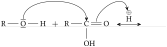
\setchemfig{atom sep=7mm}

\schemestart

  \chemfig{R-@{dnl}\charge{90=\|,-90=\|}{O}-H}

  \+

  \chemfig{R-@{atoc}C([6]-OH)=[@{db}]O}

  \arrow(.mid east--){<->[\chemfig{@{atoh}\chemabove{H}{\scriptstyle\oplus}}]}

\schemestop

\chemmove[shorten <=2pt]{

  \draw(dnl)..controls +(90:1cm)and+(north:1cm)..(atoc);

  \draw[shorten >=6pt](db)..controls +(north:5mm)and+(100:1cm)..(atoh);}
The use of the \chemabove{⟨code⟩}{⟨materiel⟩} command does not change the dimensions of the bounding box of ⟨code⟩. For this reason we can run into some difficulty in pointing to the symbol representing the charge carried (\(\oplus\) or \(\ominus\)). In the example above the solution is to create a control point with an angle of 110° at 1 cm from “atoh” and to shorten the arrow by 6pt. In the following example, the second step of the esterification reaction, we can see that the arrow can take more complicated forms without complicating the code.
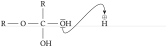
\setchemfig{atom sep=7mm}

\chemfig{R-O-C(-[2]R)(-[6]OH)-@{dnl}\charge{90=\|,-90=\|}{O}H}\hspace{1cm}

\chemfig{@{atoh}\chemabove{H}{\scriptstyle\oplus}}

\chemmove{

    \draw[shorten <=2pt, shorten >=7pt]

        (dnl).. controls +(south:1cm) and +(north:1.5cm).. (atoh);}
The rest is left as an exercise to the reader….