chemfig
Operation of chemfig
4 Different types of bonds
For chemfig, bonds between two atoms are one of nine types, represented by the characters -, =, ~, >, <, >:, <:, >| and <| :
| Bond # | Code | Result | Bond type |
| 1 | \chemfig{A-B} |  | Single |
| 2 | \chemfig{A=B} |  | Double |
| 3 | \chemfig{A~B} |  | Triple |
| 4 | \chemfig{A>B} |  | right Cram, plain |
| 5 | \chemfig{A<B} |  | left Cram, plain |
| 6 | \chemfig{A>:B} |  | right Cram, dashed |
| 7 | \chemfig{A<:B} |  | left Cram, dashed |
| 8 | \chemfig{A>|B} |  | right Cram, hollow |
| 9 | \chemfig{A<|B} |  | left Cram, hollow |
The ⟨key⟩ double bond sep=⟨dim⟩ adjusts the spacing between the lines in double or triple bonds. This spacing is 2pt by default.
We must understand that when a bond is made between two atoms, these atoms are contained within invisible rectangular boxes. The centers of these two rectangles are separated by an adjustable distance \(\Delta\) called the “interatomic distance”. Furthermore, bonds do not connect to the exact edges of the rectangles: a length \(\delta\), also adjustable, separates the edges of the rectangles and the beginning and end of the bond line. The rectangular boxes are made visible in the diagram below to help understanding.
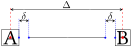
The ⟨key⟩ atom sep = ⟨dim⟩ adjusts the interatomic distance \(\Delta\). This setting, like all other settings, affects all the following molecules.

\chemfig[atom sep=2em]{A-B}\par

\chemfig[atom sep=50pt]{A-B}
The ⟨key⟩ bond offset = ⟨dim⟩ sets the spacing \(\delta\) between the bond line and the atom. Its default value is 2pt.

\chemfig[bond offset=0pt]{A-B}\par

\chemfig[bond offset=5pt]{A-B}
If one bond is followed immediately by another, then chemfig inserts an empty group {}. Around this empty group the separation \(\delta\) is zero:

\chemfig{A-B=-=C}
The ⟨key⟩ bond style = ⟨tikz code⟩ sets the style for all the bonds drawn thereafter. The ⟨tikz code⟩ is empty by default. To custom a single bond, see section 8.

\chemfig[bond style={line width=1pt,red}]{A-B=C>|D<E>:F}
The spacing \(\delta\) for just one bond can be specified with either the character #, the macro \# or \CFhash. It is important to notice that if the macro \chemfig is in the argument of a macro, # must not be used and in that case, \# or \CFhash must be prefered.
The token #, \# or \CFhash must be placed immediately after the bond symbol and has one required argument between parentheses of the form “(⟨dim1⟩,⟨dim2⟩)”, where ⟨dim1⟩ is the spacing \(\delta\) at the beginning of the bond and ⟨dim2⟩ is the that at the end. If ⟨dim2⟩ is omitted, the spacing at the end of the bond takes the value of \(\delta\) in effect at that time. One can see in the example how the shortening, set to 4pt to be more visible, is nullified for the bond arriving at “B”, then for the one leaving “B”, and finally for both:
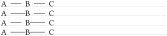
\setchemfig{bond offset=4pt}

\chemfig{A-B-C}\par

\chemfig{A-#(,0pt)B-C}\par

\chemfig{A-B-#(0pt)C}\par

\chemfig{A-#(,0pt)B-#(0pt)C}
By default, all atoms within groups of atoms are typeset in math mode (spaces are ignored). They may therefore contain math mode specific commands such as subscripts or superscripts1:

\chemfig{A_1B^2-C _ 3 ^ 4}
There are settings specifically for Cram bonds:
cram width = ⟨dim⟩ is the size of the base of the triangle, and is 1.5pt by default;
cram dash width = ⟨dim⟩ is the thickness of the dots, and is 1pt by default;
cram dash sep = ⟨dim⟩ is the spacing between the dots, and is 2pt by default.
Here is an example where the three dimensions are changed:

\chemfig[cram width=10pt,

         cram dash width=0.4pt,

         cram dash sep=1pt]{A>B>:C>|D}
1 There is a problem with the placement of groups of atoms containing exponents or subscripts.