The nicematrix package
13 Captions and notes in the tabulars
13.1 Caption of a tabular
The environment {NiceTabular} provides the keys caption, short-caption and label which may be used when the tabular is inserted in a floating environment (typically the environment {table}).
With the key caption, the caption, when it is long, is wrapped at the width of the tabular (except the potential exterior columns specified by first-col and last-col: cf. 9), without the use of the package threeparttable or the package floatrow.
By default, the caption is composed below the tabular. With the key caption-above, available in \NiceMatrixOptions, the caption will be composed above the tabular (that key is not available for an individual environment).
The key short-caption corresponds to the optional argument of the classical command \caption and the key label corresponds, of course, to the command \label.
See table 1, for an example of use the keys caption and label.
These functionalities are compatible with the extension caption. For example, it’s possible to use the tuning \captionsetup{justification=raggedright,singlelinecheck=false} in order to have left-align captions, even when the caption is shorter than the tabular.
13.2 The footnotes
The package nicematrix allows, by using footnote or footnotehyper, the extraction of the notes inserted by \footnote in the environments of nicematrix and their composition in the foot of the page with the other notes of the document.
If nicematrix is loaded with the option footnote (with \usepackage[footnote]{nicematrix} or with \PassOptionsToPackage), the package footnote is loaded (if it is not yet loaded) and it is used to extract the footnotes.
If nicematrix is loaded with the option footnotehyper, the package footnotehyper is loaded (if it is not yet loaded) ant it is used to extract footnotes.
Caution: The packages footnote and footnotehyper are incompatible. The package footnotehyper is the successor of the package footnote and should be used preferently. The package footnote has some drawbacks, in particular: it must be loaded after the package xcolor and it is not perfectly compatible with hyperref.
13.3 The notes of tabular
The package nicematrix also provides a command \tabularnote which gives the ability to specify notes that will be composed at the end of the array with a width of text equal to the width of the array (except the potential exterior columns specified by first-col and last-col: cf. 9). With no surprise, that command is available only in the environments {NiceTabular}, {NiceTabular*} and {NiceTabularX}.
In fact, this command is available only if the extension enumitem has been loaded (before or after nicematrix). Indeed, the notes are composed at the end of the array with a type of list provided by the package enumitem. If enumitem has not been loaded, an error will be raised.
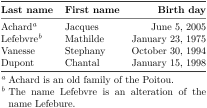
\begin{NiceTabular}{@{}llr@{}}

\toprule \RowStyle{\bfseries}

Last name & First name & Birth day \\

\midrule

Achard\tabularnote{Achard is an old family of the Poitou.}

& Jacques & June 5, 2005 \\

Lefebvre\tabularnote{The name Lefebvre is an alteration of the name Lefebure.}

& Mathilde & January 23, 1975 \\

Vanesse & Stephany & October 30, 1994 \\

Dupont & Chantal & January 15, 1998 \\

\bottomrule

\end{NiceTabular}
If you have several successive commands \tabularnote{...} with no space at all between them, the labels of the corresponding notes are composed together, separated by commas (this is similar to the option multiple of footmisc for the footnotes).
If a command \tabularnote{...} is exactly at the end of a cell (with no space at all after) and if the alignment mode of the column is c or r, the label of the note is composed in an overlapping position (towards the right). This structure may provide a better alignment of the cells of a given column.
If the key notes/para is used, the notes are composed at the end of the array in a single paragraph (as with the key para of threeparttable).
There is a key tabularnote which provides a way to insert some text in the zone of the notes before the numbered tabular notes.
An alternative syntax is available with the environment {TabularNote}. That environment should be used at the end of the environment {NiceTabular} (but before a potential instruction \CodeAfter).
If the package booktabs has been loaded (before or after nicematrix), the key notes/bottomrule draws a \bottomrule of booktabs after the notes.
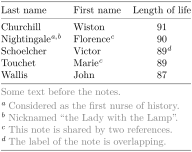
The command \tabularnote may be used before the environment of nicematrix. Thus, it’s possible to use it on the title inserted by \caption in an environment {table} of LaTeX (or in a command \captionof of the package caption). It’s also possible, as expected, to use the command \tabularnote in the caption provided by the key caption of the environment {NiceTabular}.
If several commands \tabularnote are used in a tabular with the same argument, only one note is inserted at the end of the tabular (but all the labels are composed, of course). It’s possible to control that feature with the key notes/detect-duplicates.1
It’s possible to create a reference to a tabular note created by \tabularnote (with the usual command \label used after the \tabularnote).
The command \tabularnote has an optional argument (between square brackets) to change the symbol of the reference of the note.
Example: \tabularnote[$\star$]{A footnote...}
For an illustration of some of those remarks, see table 1. This table has been composed with the following code (the package caption has been loaded in this document).
\begin{table}[hbt]

\centering

\NiceMatrixOptions{caption-above}

\begin{NiceTabular}{@{}llc@{}

  [

    caption = A tabular whose caption has been specified by the key

      \texttt{caption}\tabularnote[$\star$]{It's possible to put a tabular

      note in the caption.} ,

    label = t:tabularnote ,

    tabularnote = Some text before the notes. ,

    notes/bottomrule

  ]

\toprule

  Last name & First name & Length of life \\

\midrule

  Churchill & Wiston &  91\\

  Nightingale\tabularnote{Considered as the first nurse of history}%

  \tabularnote{Nicknamed ``the Lady with the Lamp''.}

  & Florence\tabularnote{This note is shared by two references.} & 90 \\

  Schoelcher & Victor & 89\tabularnote{The label of the note is overlapping.}\\

  Touchet & Marie\tabularnote{This note is shared by two references.} & 89 \\

  Wallis & John & 87 \\

\bottomrule

\end{NiceTabular}

\end{table}
13.4 Customisation of the tabular notes
The tabular notes can be customized with a set of keys available in \NiceMatrixOptions. The name of these keys is prefixed by notes.f
notes/para
notes/bottomrule
notes/style
notes/label-in-tabular
notes/label-in-list
notes/enumitem-keys
notes/enumitem-keys-para
notes/code-before
notes/no-print
For sake of commodity, it is also possible to set these keys in \NiceMatrixOptions via a key notes which takes in as value a list of pairs key=value where the name of the keys need no longer be prefixed by notes:
\NiceMatrixOptions

  {

    notes =

     {

       bottomrule ,

       style = ... ,

       label-in-tabular = ... ,

       enumitem-keys =

        {

          labelsep = ... ,

          align = ... ,

          ...

        }

     }

  }
We detail these keys.
The key notes/para requires the composition of the notes (at the end of the tabular) in a single paragraph.
Initial value: false
That key is also available within a given environment.
The key notes/bottomrule adds a \bottomrule of booktabs after the notes. Of course, that rule is drawn only if there actually are notes in the tabular. The package booktabs must have been loaded (before or after the package nicematrix). If it is not, an error is raised.
Initial value: false
That key is also available within a given environment.
The key notes/style is a command whose argument is specified by #1 and which gives the style of numerotation of the notes. That style will be used by \ref when referencing a tabular note marked with a command \label. The labels formatted by that style are used, separated by commas, when the user puts several consecutive commands \tabularnote. The marker #1 is meant to be the name of a LaTeX counter.
Initial value: \textit{\alph{#1}}
Another possible value should be a mere \arabic{#1}
The key notes/label-in-tabular is a command whose argument is specified by #1 which is used when formatting the label of a note in the tabular. Internally, this number of note has already been formatted by notes/style before sent to that command.
Initial value: \textsuperscript{#1}
In French, it’s a tradition of putting a small space before the label of note. That tuning could be achieved by the following code:
\NiceMatrixOptions{notes/label-in-tabular = \,\textsuperscript{~#1}}The key notes/label-in-list is a command whose argument is specified by #1 which is used when formatting the label in the list of notes at the end of the tabular. Internally, this number of note has already been formatted by notes/style before sent to that command.
Initial value: \textsuperscript{#1}
In French, the labels of notes are not composed in upper position when composing the notes. Such behaviour could be achieved by:
\NiceMatrixOptions{notes/label-in-list = ~#1.\nobreak\hspace{0.25em}}The command \nobreak is for the event that the option para is used.
The notes are composed at the end of the tabular by using internally a style of list of enumitem. This style of list is defined as follows (with, of course, keys of enumitem):
noitemsep , leftmargin = * , align = left , labelsep = 0pt
The specification align = left in that style requires a composition of the label leftwards in the box affected to that label. With that tuning, the notes are composed flush left, which is pleasant when composing tabulars in the spirit of booktabs (see for example the table 1).
The key notes/enumitem-keys specifies a list of pairs key=value (following the specifications of enumitem) to customize that style of list (it uses internally the command \setlist* of enumitem).
The key notes/enumitem-keys-para is similar to the previous one but corresponds to the type of list used when the option para is in force. Of course, when the option para is used, a list of type inline (as called by enumitem) is used and the pairs key=value should correspond to such a list of type inline.
Initially, the style of list is defined by: afterlabel = \nobreak, itemjoin = \quad
The key notes/code-before\(^+\) is a token list inserted by nicematrix just before the composition of the notes at the end of the tabular.
Initial value: empty
For example, if one wishes to compose all the notes in gray and \footnotesize, he should use that key:
\NiceMatrixOptions{notes/code-before = \footnotesize \color{gray}}It’s also possible to add \raggedright or \RaggedRight in that key (\RaggedRight is a command of ragged2e).
The key nodes/code-before has a normal syntax, but also an “additive syntax”, which means that it’s possible to write, for example notes/code-before += \footnotesize. With that syntax, the tokens are appended on the right of the current value of the parameter notes/code-before.
The key notes/detect-duplicates activates the detection of the commands \tabularnotes with the same argument.
Initial value: true
When the key notes/no-print is in force, the notes are not composed by nicematrix under the tabular. However, the final user may use the command \NiceTabularNotes in order to insert these notes where he wishes (after the composition of the tabular).
Initial value: false
For an example of customisation of the tabular notes, see 18.1.
1 For technical reasons, the final user is not allowed to put several commands \tabularnote with exactly the same argument in the caption of the tabular. It’s not a real restriction...