The nicematrix package
8 The width of the columns
8.1 Basic tools
In the environments with an explicit preamble (like {NiceTabular}, {NiceArray}, etc.), it’s possible to fix the width of a given column with the standard letters w, W, p, b and m of the package array (which is loaded by nicematrix).
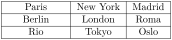
\begin{NiceTabular}{W{c}{2cm}cc}[hvlines]

  Paris  & New York & Madrid \\

  Berlin & London   & Roma   \\

  Rio    & Tokyo    & Oslo

\end{NiceTabular}
In the environments of nicematrix, it’s also possible to fix the minimal width of all the columns (except the potential exterior columns: cf. 9) directly with the key columns-width.
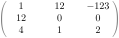
$\begin{pNiceMatrix}[columns-width = 1cm]

  1  & 12 & -123 \\

  12 & 0  & 0    \\

  4  & 1  & 2

\end{pNiceMatrix}$
Note that the space inserted between two columns (equal to 2 \tabcolsep in {NiceTabular} and to 2 \arraycolsep in the other environments) is not suppressed (of course, it’s possible to suppress this space by setting \tabcolsep or \arraycolsep equal to \(0\) pt before the environment).
It’s possible to give the special value auto to the option columns-width: all the columns of the array will have a width equal to the widest cell of the array.1
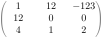
$\begin{pNiceMatrix}[columns-width = auto]

  1  & 12 & -123 \\

  12 & 0  & 0    \\

  4  & 1  & 2

\end{pNiceMatrix}$
Without surprise, it’s possible to fix the minimal width of the columns of all the arrays of a current scope with the command \NiceMatrixOptions.

\NiceMatrixOptions{columns-width=10mm}

$\begin{pNiceMatrix}

a & b \\ c & d

\end{pNiceMatrix}

=

\begin{pNiceMatrix}

1   & 1245 \\ 345 & 2

\end{pNiceMatrix}$
It’s also possible to fix a zone where all the matrices will have their columns of the same width, equal to the widest cell of all the matrices. This construction uses the environment {NiceMatrixBlock} with the option auto-columns-width2. The environment {NiceMatrixBlock} has no direct link with the command \Block presented previously in this document (cf. 4).

\begin{NiceMatrixBlock}[auto-columns-width]

$\begin{array}{c}

\begin{bNiceMatrix}

 9 & 17 \\ -2 & 5

 \end{bNiceMatrix} \\ \\

\begin{bNiceMatrix}

 1   & 1245345 \\  345 & 2

\end{bNiceMatrix} \\

\end{array}$

\end{NiceMatrixBlock}
8.2 The columns V of varwidth
Let’s recall first the behaviour of the environment {varwidth} of the eponymous package varwidth. That environment is similar to the classical environment {minipage} but the width provided in the argument is only the maximal width of the created box. In the general case, the width of the box constructed by an environment {varwidth} is the natural width of its contents.
That point is illustrated on the following examples.

\fbox{%

\begin{varwidth}{8cm}

\begin{itemize}

\item first item

\item second item

\end{itemize}

\end{varwidth}}

\fbox{%

\begin{minipage}{8cm}

\begin{itemize}

\item first item

\item second item

\end{itemize}

\end{minipage}}
The package varwidth provides also the column type V. A column of type V{\(\langle\)dim\(\rangle\)} encapsulates all its cells in a {varwidth} with the argument \(\langle\)dim\(\rangle\) (and does also some tuning).
When the package varwidth is loaded, the columns V of varwidth are supported by nicematrix.
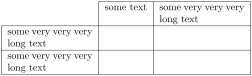
Concerning nicematrix, one of the benefits of this type of columns is that, for a cell of a column of type V, the PGF/TikZ node created by nicematrix for the content of that cell has a width adjusted to the content of the cell : cf. 15.1.2.
The columns V of nicematrix supports the keys t, p, m, b, l, c and r also supported by the columns X: see their description in the section 8.3.
One should remark that the extension varwidth (at least in its version 0.92) has some problems: for instance, with LuaLaTeX, it does not work when the content begins with \color. Moreover, varwidth must be loaded after the package array (itself loaded by nicematrix).
8.3 The columns X
The environment {NiceTabular} provides X columns similar to those provided by the environment {tabularx} of the eponymous package.3
The required width of the tabular may be specified with the key width (in {NiceTabular} or in \NiceMatrixOptions). The initial value of this parameter is the parameter \linewidth of LaTeX (and not \textwidth).
For sake of similarity with the environment {tabularx}, nicematrix also provides an environment {NiceTabularX} with a syntax similar to the syntax of {tabularx}, that is to say with a first mandatory argument which is the width of the tabular.
The specifier X takes in an optional argument (between square brackets) which is a list of keys.
It’s possible to give a weight for the column by providing a positive number directly as argument of the specifier X. For example, a column X[0.5] will have a width equal to the half of the width of a column X (which has a weight equal to \(1\)).
It’s possible to specify an horizontal alignment with one of the letters l, c and r (which insert respectively \raggedright, \centering and \raggedleft followed by \arraybackslash).4
It’s possible to specify a vertical alignment with one of the keys t (alias p), m and b (which construct respectively columns of type p, m and b). The initial value is t.
It’s possible to use the key V in a column of type X. When that key is used, the column X behaves in fact like a column V of the extension varwidth (which must have been loaded by the user). Henece, the width of the columns, as computed by the X process, is in fact the maximal width of the column.

\begin{NiceTabular}[width=9cm]{X[c,m]X[0.5,c,m]}[hvlines]

  a rather long text which fits on several lines

  & a rather long text which fits on several lines \\

  a shorter text & a shorter text

\end{NiceTabular}
1 The result is achieved with only one compilation (but PGF/TikZ will have written information in the aux file and a message requiring a second compilation will appear).
2 At this time, this is the only usage of the environment {NiceMatrixBlock} but it may have other usages in the future.
3 The environment {tabularx} catches its body as an argument and typesets it several times during a LaTeX run in order to compute the width of the columns. On its side, {NiceTabular} does not catch its body as an argument (except when the key light-syntax is in force) and typesets the tabular only once but writes informations on the aux file, and requires several compilations.
4 In fact, when ragged2e is loaded, nicematrix uses the commands \RaggedRight, \Centering and \RaggedLeft of ragged2e instead of the commands \raggedright, \centering and \raggedleft. That ensures a better output.