The nicematrix package
17 Technical remarks
First remark: the package underscore must be loaded before nicematrix. If it is loaded after, an error will be raised.
17.1 Diagonal dotted leaders
By default, all the diagonal dotted lines1 of a same array are “parallelized”. That means that the first diagonal line is drawn and, then, the other lines are drawn parallel to the first one (by rotation around the left-most extremity of the line). That’s why the position of the instructions \Ddots in the array can have a marked effect on the final result.
In the following examples, the first \Ddots instruction is written in color.
Example with parallelization (default):
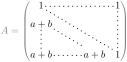
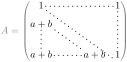
It’s possible to turn off the parallelization with the option parallelize-diags set to false:
The same example without parallelization:
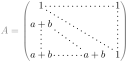
It’s possible to specify the instruction \Ddots which will be drawn first (and which will be used to draw the other diagonal dotted lines when the parallelization is in force) with the key draw-first: \Ddots[draw-first].
17.2 The “empty” cells
The package nicematrix uses, in several circunstancies, the concept of “empty cell”. For example, an instruction like \Ldots, \Cdots, etc. (cf. 10) tries to determine the first non-empty cell on both sides. In the same way, when the key corners is used (cf. 5.3.3), nicematrix computes corners consisting of empty cells.
However, an “empty cell” is not necessarily a cell with no TeX content (that is to say a cell with no token between the two ampersands &). The precise rules are as follow.
An implicit cell is empty. For example, in the following matrix:
\begin{pmatrix}

a & b \\

c \\

\end{pmatrix}
the last cell (second row and second column) is empty.
For the columns of type p, m, b, V2 and X3, the cell is empty if (and only if) its content in the TeX code is empty (there is only spaces between the ampersands &).
For the columns of type c, l, r and w{...}{...}, the cell is empty if (and only if) its TeX output has a width equal to zero.
A cell containing the command \NotEmpty is not empty (and a PGF/TikZ node is created in that cell).
A cell within a block (command \Block) which uses the key empty is considered as empty.
A cell with only a command \Hspace (or \Hspace*) is empty. This command \Hspace is a command defined by the package nicematrix with the same meaning as \hspace except that the cell where it is used is considered as empty. This command can be used to fix the width of some columns of the matrix without interfering with nicematrix.
17.3 The option exterior-arraycolsep
The environment {array} inserts an horizontal space equal to \arraycolsep before and after each column. In particular, there is a space equal to \arraycolsep before and after the array. This feature of the environment {array} was probably not a good idea4. The environment {matrix} of amsmath and its variants ({pmatrix}, {vmatrix}, etc.) of amsmath prefer to delete these spaces with explicit instructions \hskip -\arraycolsep5. The package nicematrix does the same in all its environments, {NiceArray} included. However, if the user wants the environment {NiceArray} behaving by default like the environment {array} of array (for example, when adapting an existing document) it’s possible to control this behaviour with the option exterior-arraycolsep, set by the command \NiceMatrixOptions. With this option, exterior spaces of length \arraycolsep will be inserted in the environments {NiceArray} (the other environments of nicematrix are not affected).
17.4 Incompatibilities
The package nicematrix can’t be used in the class revtex4-2 because this class is not compatible with the recent versions of LaTeX. Indeed, revtex4-2 modifies serval interal commands of array and those modifications have not been updated to take into acount the recent changes in array in relation with the Tagging Project.
There might be incompatibilities between nicematrix and babel with the language which activate (in the TeX sens) some characters, in particular the character <.
Par exemple, for Spanish, it’s recommended to deactivate the abreviations at load-time with the instruction:
\usepackage[spanish,es-noshorthands]{babel}
The extension nicematrix is usually not compatible with the classes and packages that redefine the environments {tabular} and {array}. In particular, it’s the case of the class socg-lipics-v2021. However, in that case, it’s possible to load the class with the key notab which requires that the environment {tabular} is not redefined.
The package nicematrix is not compatible with the class ieeeaccess because that class is not compatible with PGF/TikZ. However, there is a simple workaround by writing:6
\let\TeXyear\year

\documentclass{IEEEaccess}

\let\year\TeXyear
In order to use nicematrix with the class aastex631 (of the American Astronomical Society), you have to add the following instructions in the preamble of your document : gray \BeforeBegin{NiceTabular}{\let\begin\BeginEnvironment\let\end\EndEnvironment}
\BeforeBegin{NiceArray}{\let\begin\BeginEnvironment}
\BeforeBegin{NiceMatrix}{\let\begin\BeginEnvironment}
The package nicematrix is not fully compatible with the packages and classes of LuaTeX-ja: the detection of the empty corners (cf. 5.3.3) may be wrong in some circonstances.
The package nicematrix is not compatible with the package arydshln and does not support the columns V of boldline (because the letter V is reserved for the columns V of varwidth). By any means, nicematrix provides tools to draw dashed rules (with the command \hdashedline and the letter ;) and rules of different weights with the key custom-line (cf. 5.3.5).
The columns d of dcolumn and the columns n of numprint are not supported (but it’s possible to use the columns S of siunitx).
17.5 Compatibility with the Tagging Project of LaTeX
Since the version 7.0, the extension nicematrix is compatible with the Tagging Project of LaTeX (whose aim is to create tagged PDF). At this time, only simple standard tabulars are correctly tagged.
Here is a example of code which will generate a tagged PDF.
\DocumentMetadata{tagging = on}

\documentclass{article}

\usepackage{lmodern}

\usepackage{nicematrix}


\begin{document}


\begin{center}

\tagpdfsetup{table/header-rows=1}

\begin{NiceTabular}{ccc}[hvlines]

  First name & Last name & Age \\

  Paul       & Imbert    & $66$ \\

  John       & Sarrus    & $23$ \\

  Liz        & Taylor    & $100$ \\

  George     & Adams     & $34$

\end{NiceTabular}

\end{center}


\end{document}
1 We speak of the lines created by \Ddots or \Iddots and not the lines created by a command \line in the \CodeAfter.
2 The columns of type V are provided by varwidth, which must be loaded: cf. 8.2.
4 In the documentation of amsmath, we can read: The extra space of \arraycolsep that array adds on each side is a waste so we remove it [in {matrix}] (perhaps we should instead remove it from array in general, but that’s a harder task).
5 And not by inserting @{} on both sides of the preamble of the array. As a consequence, the length of the \hline is not modified and may appear too long, in particular when using square brackets.