tkz-euclide
Lines, triangles and polygons
16 Definition of polygons
16.1 Defining the points of a square
We have seen how to define some triangles. Let us look at some quadrilaterals and regular polygons.
\tkzDefSquare(⟨pt1,pt2⟩)
From two points, two more points are obtained such that the four points, taken in order, form a square; the square is defined counterclockwise.
The results are in tkzFirstPointResult and tkzSecondPointResult.
We can rename them with \tkzGetPoints.
| Arguments | example | explanation |
|---|---|---|
| (⟨pt1,pt2⟩) | \tkzDefSquare(⟨A,B⟩) | The square is defined in the direct direction. |
16.1.1 Using \tkzDefSquare with two points
Note how exchanging the first two points changes the result.

\begin{tikzpicture}[scale=.5]

  \tkzDefPoint(0,0){A} \tkzDefPoint(3,0){B}

  \tkzDefSquare(A,B)

  \tkzDrawPolygon[new](A,B,tkzFirstPointResult,%

               tkzSecondPointResult)

  \tkzDefSquare(B,A)

  \tkzDrawPolygon(B,A,tkzFirstPointResult,%

               tkzSecondPointResult)

\end{tikzpicture}
We may only need one point, to draw an isosceles right triangle, so we use
\tkzGetFirstPoint or \tkzGetSecondPoint.
16.1.2 Use of \tkzDefSquare to obtain an isosceles right-angled triangle
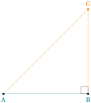
\begin{tikzpicture}[scale=1]

  \tkzDefPoint(0,0){A}

  \tkzDefPoint(3,0){B}

  \tkzDefSquare(A,B) \tkzGetFirstPoint{C}

  \tkzDrawSegment(A,B)

  \tkzDrawSegments[new](A,C B,C)

  \tkzMarkRightAngles(A,B,C)

  \tkzDrawPoints(A,B) \tkzDrawPoint[new](C)

  \tkzLabelPoints(A,B)

  \tkzLabelPoints[new,above](C)

\end{tikzpicture}
16.1.3 Pythagorean Theorem and \tkzDefSquare
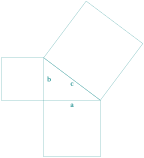
\begin{tikzpicture}[scale=.5]

\tkzDefPoint(0,0){C}

\tkzDefPoint(4,0){A}

\tkzDefPoint(0,3){B}

\tkzDefSquare(B,A)\tkzGetPoints{E}{F}

\tkzDefSquare(A,C)\tkzGetPoints{G}{H}

\tkzDefSquare(C,B)\tkzGetPoints{I}{J}

\tkzDrawPolygon(A,B,C)

\tkzDrawPolygon(A,C,G,H)

\tkzDrawPolygon(C,B,I,J)

\tkzDrawPolygon(B,A,E,F)

\tkzLabelSegment(A,C){$a$}

\tkzLabelSegment[right](C,B){$b$}

\tkzLabelSegment[swap](A,B){$c$}

\end{tikzpicture}
16.2 Defining the points of a rectangle
.
\tkzDefRectangle(⟨pt1,pt2⟩)
From two points, two more points are obtained such that the four points, taken in order, form a rectangle; the rectangle is defined counterclockwise. The two points given as arguments are the endpoints of a diagonal, and the sides are parallel to the axes.
The results are in tkzFirstPointResult and tkzSecondPointResult.
We can rename them with \tkzGetPoints.
| Arguments | example | explanation |
|---|---|---|
| (⟨pt1,pt2⟩) | \tkzDefRectangle(⟨A,B⟩) | The rectangle is defined in the direct direction. |
16.2.1 Example of a rectangle definition

\begin{tikzpicture}

\tkzDefPoints{0/0/A,5/2/C}

\tkzDefRectangle(A,C) \tkzGetPoints{B}{D}

\tkzDrawPolygon[fill=teal!15](A,...,D)

\end{tikzpicture}
16.3 Definition of parallelogram
Defining the points of a parallelogram: a fourth point completes three given points.
\tkzDefParallelogram(⟨pt1,pt2,pt3⟩)
| arguments | default | definition |
|---|---|---|
| (⟨pt1,pt2,pt3⟩) | no default | Three points are necessary |
From three points, another point is obtained such that the four points, taken in order, form a parallelogram.
The result is in tkzPointResult.
We can rename it with \tkzGetPoint.
16.3.1 Example of a parallelogram definition
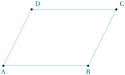
\begin{tikzpicture}[scale=1]

 \tkzDefPoints{0/0/A,3/0/B,4/2/C}

 \tkzDefParallelogram(A,B,C)

 % or   \tkzDefPointWith[colinear= at C](B,A)

 \tkzGetPoint{D}

 \tkzDrawPolygon(A,B,C,D)

 \tkzLabelPoints(A,B)

 \tkzLabelPoints[above right](C,D)

 \tkzDrawPoints(A,...,D)

\end{tikzpicture}
16.4 The golden rectangle
\tkzDefGoldenRectangle(⟨point,point⟩)
The macro determines a rectangle whose sides are in the ratio \(\Phi\).
The created points are in tkzFirstPointResult and tkzSecondPointResult.
They can be retrieved with the macro \tkzGetPoints.
| arguments | example | explanation |
|---|---|---|
| (⟨pt1,pt2⟩) | (⟨A,B⟩) | If C and D are created then \(AB/BC=\Phi\). |
\tkzDefGoldenRectangle or \tkzDefGoldRectangle
16.4.1 Golden Rectangles

\begin{tikzpicture}[scale=.6]

 \tkzDefPoint(0,0){A}      \tkzDefPoint(8,0){B}

 \tkzDefGoldRectangle(A,B) \tkzGetPoints{C}{D}

 \tkzDefGoldRectangle(B,C) \tkzGetPoints{E}{F}

 \tkzDefGoldRectangle(C,E) \tkzGetPoints{G}{H}

 \tkzDrawPolygon(A,B,C,D)

 \tkzDrawSegments(E,F G,H)

\end{tikzpicture}
16.4.2 Construction of the golden rectangle
Here is how to get the golden rectangle without the previous macro.
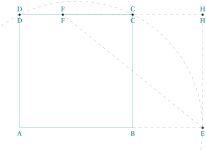
\begin{tikzpicture}[scale=.5]

\tkzDefPoint(0,0){A}

\tkzDefPoint(8,0){B}

\tkzDefMidPoint(A,B)

\tkzGetPoint{I}

\tkzDefSquare(A,B)\tkzGetPoints{C}{D}

\tkzInterLC(A,B)(I,C)\tkzGetPoints{G}{E}

\tkzDefPointWith[colinear= at C](E,B)

 \tkzGetPoint{F}

\tkzDefPointBy[projection=onto D--C ](E)

 \tkzGetPoint{H}

\tkzDrawArc[style=dashed](I,E)(D)

\tkzDrawPolygon(A,B,C,D)

\tkzDrawPoints(C,D,E,F,H)

\tkzLabelPoints(A,B,C,D,E,F,H)

\tkzLabelPoints[above](C,D,F,H)

\tkzDrawSegments[style=dashed,color=gray]%

(E,F C,F B,E F,H H,C E,H)

\end{tikzpicture}
16.5 Regular polygon
\tkzDefRegPolygon[⟨local options⟩](⟨pt1,pt2⟩)
Given the number of sides, this macro determines a regular polygon from its center or from one side, depending on the option.
| arguments | example | explanation |
|---|---|---|
| (⟨pt1,pt2⟩) | (⟨O,A⟩) | with option center, \(O\) is the center of the polygon. |
| (⟨pt1,pt2⟩) | (⟨A,B⟩) | with option side, \([AB]\) is a side. |
| options | default | example |
|---|---|---|
| name | P | The vertices are named \(P1\),\(P2\),… |
| sides | 5 | number of sides. |
| center | center | The first point is the center. |
| side | center | The two points are vertices. |
| Options TikZ | ... |
16.5.1 Option center
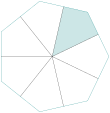
\begin{tikzpicture}

  \tkzDefPoints{0/0/P0,0/0/Q0,2/0/P1}

  \tkzDefMidPoint(P0,P1) \tkzGetPoint{Q1}

  \tkzDefRegPolygon[center,sides=7](P0,P1)

  \tkzDefMidPoint(P1,P2) \tkzGetPoint{Q1}

  \tkzDefRegPolygon[center,sides=7,name=Q](P0,Q1)

  \tkzFillPolygon[teal!20](Q0,Q1,P2,Q2)

  \tkzDrawPolygon(P1,P...,P7)

  \foreach \j in {1,...,7} {%

  \tkzDrawSegment[black](P0,Q\j)}

\end{tikzpicture}
16.5.2 Option side
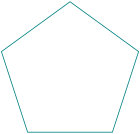
\begin{tikzpicture}[scale=1]

    \tkzDefPoints{-4/0/A, -1/0/B}

    \tkzDefRegPolygon[side,sides=5,name=P](A,B)

    \tkzDrawPolygon[thick](P1,P...,P5)

\end{tikzpicture}