Forest
Reference
3.11 Dynamic tree¶
The following keys can be used to change the geometry of the tree by creating new nodes and integrating them into the tree, moving and copying nodes around the tree, and removing nodes from the tree.
The ⟨node⟩ that will be (re)integrated into the tree can be specified in the following ways: ⟨empty⟩: uses the last non-integrated (i.e. created/removed/replaced) node.
This node can also be referred to using nodewalk step last dynamic node.
The list of all such nodes is automatically saved in named nodewalk dynamic nodes, to be loaded when needed.
⟨node⟩: a new node is created using the given bracket representation (the node may contain children, i.e. a tree may be specified), and used as the argument to the key.
The bracket representation must be enclosed in brackets, which will usually be enclosed in braces to prevent them being parsed while parsing the “host tree.”
Unlike the bracket representation in a forest environment, the bracket representation of a dynamically created node must start with [. Specifically, it cannot begin with a preamble or the action character.
⟨relative node name⟩: the node ⟨relative node name⟩ resolves to will be used.
A dynamic tree operation is made in two steps:
If the argument is given by a ⟨node⟩ argument, the new node is created immediately, i.e. while the dynamic tree key is being processed. Any options of the new node are implicitely delayed.
The requested changes in the tree structure are actually made between the cycles of keylist processing.
Such a two-stage approach is employed because changing the tree structure during the dynamic tree key processing would lead to an unmanageable order of keylist processing.
A consequence of this approach is that nested dynamic tree keys take several cycles to complete. Therefore, be careful when using delay and dynamic tree keys simultaneously: in such a case, it is often safer to use before typesetting nodes instead of delay, see example (84), and it is also possible to define additional stages, see §3.4.
Examples: title page (in style random tree) and (101) (in style xlist).
Here is the list of dynamic tree keys:
append=⟨empty⟩ | [⟨node⟩] | ⟨relative node name⟩(dynamic tree)¶
The specified node becomes the new final child of the current node. If the specified node had a parent, it is first removed from its old position.
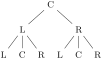
  \begin{forest}

    before typesetting nodes={for tree={

      if n=1{content=L}

           {if n'=1{content=R}

                    {content=C}}}}

    [,repeat=2{append={[

      ,repeat=3{append={[]}}

    ]}}]

  \end{forest}
create=[⟨node⟩](dynamic tree)¶
Create a new node. The new node becomes the last node.
create’=[⟨node⟩](dynamic tree)¶
Create a new node and process its given options immediately. The new node becomes the last node.
insert after=⟨empty⟩ | [⟨node⟩] | ⟨relative node name⟩(dynamic tree)¶
The specified node becomes the new following sibling of the current node. If the specified node had a parent, it is first removed from its old position.
insert before=⟨empty⟩ | [⟨node⟩] | ⟨relative node name⟩(dynamic tree)¶
The specified node becomes the new previous sibling of the current node. If the specified node had a parent, it is first removed from its old position.
prepend=⟨empty⟩ | [⟨node⟩] | ⟨relative node name⟩(dynamic tree)¶
The specified node becomes the new first child of the current node. If the specified node had a parent, it is first removed from its old position.
remove(dynamic tree)¶
The current node is removed from the tree and becomes the last node.
The node itself is not deleted: it is just not integrated in the tree anymore. Removing the root node has no effect.
replace by=⟨empty⟩ | [⟨node⟩] | ⟨relative node name⟩(dynamic tree)¶
The current node is replaced by the specified node. The current node becomes the last node.
If the specified node is a new node containing a dynamic tree key, it can refer to the replaced node by the ⟨empty⟩ specification. This works even if multiple replacements are made.
If replace by is used on the root node, the “replacement” becomes the root node (set root is used).
If given an existing node, most of the above keys move this node (and its subtree, of course). Below are the versions of these operations which rather copy the node: either the whole subtree (') or just the node itself ('').
append’,(dynamic tree)¶
insert after’, insert before’, prepend’, replace by’
Same as versions without ' (also the same arguments), but it is the copy of the specified node and its subtree that is integrated in the new place.
append”,(dynamic tree)¶
You might want to delay the processing of the copying operations, giving the original nodes the chance to process their keys first!
insert after”, insert before”, prepend”, replace by”
Same as versions without '' (also the same arguments), but it is the copy of the specified node (without its subtree) that is integrated in the new place.
copy name template=⟨empty⟩ | ⟨macro definition⟩(dynamic tree)¶
⟨empty⟩
Defines a template for constructing the name of the copy from the name of the original. ⟨macro definition⟩ should be either empty (then, the name is constructed from the id, as usual), or an expandable macro taking one argument (the name of the original).
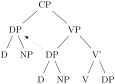
  \begin{forest}

    copy name template={copy of #1}

    [CP,delay={prepend'=subject}

      [VP[DP,name=subject[D][NP]][V'[V][DP]]]]

    \draw[->,dotted] (subject)--(copy of subject);

  \end{forest}
set root=⟨empty⟩ | [⟨node⟩] | ⟨relative node name⟩(dynamic tree)¶
The specified node becomes the new formal root of the tree.
Note: If the specified node has a parent, it is not removed from it. The node becomes the root only in the sense that the default implementation of stage-processing will consider it a root, and thus typeset/pack/draw the (sub)tree rooted in this root. The processing of keys such as for parent and for root is not affected: for root finds the real, geometric root of the current node. To access the formal root, use nodewalk step root’, or the corresponding propagator for root’.