Forest
Reference
3.8 Nodewalks¶
A nodewalk is a sequence of steps describing a path through the tree. Most steps are defined relative to the current node, for example parent steps to the parent of the current node, and n=2 steps to the second child of the current node, where “to make a step” means to change the current node. Thus, nodewalk parent,_parent,_n=2 describes the path which first steps to the parent of the origin node, then to its grandparent and finally to the second child of the origin’s grandparent.
The origin of the nodewalk depends on how the nodewalk is invoked. When used after the ! in a relative node name (§3.15), the origin is the node with the name given before !; when invoked by a spatial propagator such as for nodewalk (§3.5.1), the origin is the current node; when invoked within another (outer) nodewalk, the origin is the current node of the outer nodewalk.
Formally, a ⟨nodewalk⟩ is a list of pgfkeys key–value pairs. Steps in a nodewalk are thus separated by commas. However, Forest also recognizes short-form steps, whose names consist of a single character and which do not need to be separated by a comma. For example, nodewalk parent,_parent,_n=2 can be concisely written as uu2. Long and short forms can be mixed freely, like this: next,_uu2,_previous.
Besides nodewalk keys, a ⟨nodewalk⟩ can also contain node keys (or even TikZ keys).1 These keys do their usual function, but within the context of the current node of the nodewalk: parent, s=2em, parent, text=red sets the parent’s s to 2em and the grandparent’s text color to red. It is worth noting that node keys include TeX, which makes it possible to execute any TeX code while nodewalking.
Some steps target a single node, like above-mentioned parent and n. Others, called multi-steps, describe mini-walks themselves: for example children visits each child of the node in turn, and tree visits each of the node’s descendants (including the node itself). The path of many steps is determined by the geometric relations of the tree, or the value of some option. However, there are also keys for embedding nodewalks (nodewalk, branch, etc.), saving and loading nodewalks, sorting them, or even re-walking the history of steps made (like in a web browser).2 Finally, if all this is not enough, you can define your own steps, see §3.8.8.
Each nodewalk has an associated every-step keylist: a keylist of node keys3 which get executed after each step of the nodewalk. The every-step keylist of the current nodewalk is contained in register every step and can be changed at any point during the nodewalk. Its value at the start of the nodewalk depends on how the nodewalk was invoked. In most cases (e.g. nodewalk or prefix for-based spatial propagators), it is given explicitely as an argument to the key that executes the nodewalk. However, see Nodewalk option every step for information on how the every-step keylist of an embedded nodewalk can interact with the every-step keylist of its parent nodewalk.
Each nodewalk step can be either real or fake. Fake steps only change the current node. Real steps also trigger execution of the every-step keylist and update of history. Fake steps are sometimes useful as a “computational tool”. They can be introduced explicitely using fake; some other keys (like several history nodewalk keys, §3.8.5) introduce fake steps implicitely.
In some cases, the nodewalk might step “out of the tree”. (Imagine using parent at the root of the tree, or n=42 at a node with less that 42 children.) Our official term will be that the nodewalk stepped on an invalid node; what happens formally is that the current node is changed to the node with id=0. Normally, such an event raises an error. However, the full story is told by on invalid.
Nodewalks can be hard to follow, especially when designing styles. Forest does its best to help. First, it logs the nodewalk stack in case of error. Second, if package option debug=nodewalks is given, it logs every step made.
3.8.1 Invoking (embedded) nodewalks¶
There are many ways to invoke a nodewalk. For example, several keys, like /tikz/fit to, and aggregate functions (§3.14) expect a ⟨nodewalk⟩ argument. This section lists keys which can be used to explicitely invoke a nodewalk.
The keys in this section can be used not only as node keys (in fact, not all of them can be used so), but also as nodewalk keys. The latter fact means that they can be used to introduce embedded nodewalks, which (can) have its own every-step keylist, history and on-invalid mode; for details on how these properties of outer and embedded nodewalk can interact, see Nodewalk. There is no limit to the depth of nodewalks embedding (nodewalk within nodewalk within nodewalk …).
An embedded nodewalk functions as a single, fake step of the outer nodewalk. Specifically, this means that, while stepping through the embedded nodewalk, the every-step keylist of the outer nodewalk is not executed. Furthermore, by default, modifying the every-step keylist of the inner walk (by manipulating register every step) does not influence the outer nodewalk (but see option every step).
An embedded nodewalk does not count as a (real, every-step keyslist invoking) step of the outer nodewalk. After it is finished, there are two options with respect to the new current node of the outer nodewalk,4 depending on whether the embedded nodewalk was invoked using a variant of the key with or without the for prefix (all keys in this section have the for variant).
For keys without the for prefix, the current node of the outer nodewalk changes, via a fake step, to the final node visited by the embedded nodewalk. This holds even if the final node was reached as a fake step and even if it is invalid (id=0). The fake step in the outer nodewalk cannot be made real, not even by real: if you want to execute the every-step keylist of the outer nodewalk at the finishing node of the embedded nodewalk, follow the latter by step current.
For keys with the for prefix, the current node of the outer nodewalk remains unchanged. For this reason, the for-prefixed keys are available as node keys (we call them spatial propagators, §3.5.1), while the steps without this prefix are generally not, with the sole exception of Nodewalk, which I advise to use carefully.
All steps described in this section can be prefixed by for. All of them, with or without this prefix, are available as nodewalk keys. The list of keys from this section which are available as node keys: Nodewalk, for Nodewalk, for nodewalk; you will most often want to use the latter.
Nodewalk=⟨keylist: config⟩⟨nodewalk⟩⟨keylist: every-step⟩(step)¶
every step={independent|inherited|shared}(Nodewalk option, default independent)¶
history={independent|inherited|shared}(Nodewalk option, default shared)¶
on invalid={error|fake|error in real|last valid|inherited}(Nodewalk option, default inherited)¶
Use Nodewalk if you need to execute nodewalk keys within the every-step keylist.
Walks an ⟨nodewalk⟩ starting at the current node.
This is the most generic form of embedding a nodewalk. Unlike other keys described in this subsection, it can also be used as a node key even without the for prefix, but take care as it will, in general, change the current node.
The ⟨config⟩ argument serves to specify the interaction between the outer and embedded nodewalk. It can contain the following keys:
The following table shows what happens to the every-step keylist and history depending on the value of every step and history, respectively. State B is ⟨every-step⟩ for every step and empty for history.

As shown in the table above, argument ⟨every-step⟩ is used to initialize the embedded nodewalk’s every-step keylist when it is independent of the outer nodewalk. In other cases, this argument is ignored (use {}).
Like on invalid, but local to this nodewalk. The additional alternative inherited (which is the default) means to retain the current value, regardless of how it was set (by an outer nodewalk, explicit on invalid, or the package default, error).
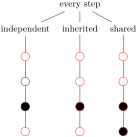
  \begin{forest}

    for 2=calign with current, for children={for descendants={circle,draw}}

    [every step,

      [independent,for nodewalk={

          1,Nodewalk={~every step=independent~}{1,every step=fill,1}{},1

        }{draw=red},

        [[[[]]]]]

      [inherited,for nodewalk={

          1,Nodewalk={~every step=inherited~}{1,every step=fill,1}{},1

        }{draw=red},

        [[[[]]]]]

      [shared,for nodewalk={

          1,Nodewalk={~every step=shared~}{1,every step=fill,1}{},1

        }{draw=red},

        [[[[]]]]]]

  \end{forest}
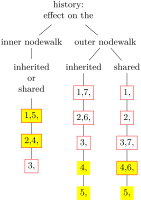
  \begin{forest}

    mark/.style={tempcounta+=1,content+/.register=tempcounta,content+={,}},

    [history:\\effect on the,align=center

      [inner nodewalk

        % uncommenting this would result in an error:

        % [independent, delay={for nodewalk={

        %     tempcounta=0,111,

        %     Nodewalk={history=independent}{walk back=2}{mark,fill=yellow}

        %   }{mark,draw=red}},

        %   [[[]]]]

        [inherited\\or\\shared, align=center,delay={for nodewalk={

              tempcounta=0,111,

              Nodewalk={~history=inherited~}{walk back=2}{mark,fill=yellow}

            }{mark,draw=red}},

          [[[]]]]]

      [outer nodewalk

        [inherited,delay={for nodewalk={

            tempcounta=0,111,

            Nodewalk={~history=inherited~}{11}{mark,fill=yellow},

            walk back=2

          }{mark,draw=red}},

          [[[[[]]]]]]

        [shared,delay={for nodewalk={

            tempcounta=0,111,

            Nodewalk={~history=shared~}{11}{mark,fill=yellow},

            walk back=2

          }{mark,draw=red}},

          [[[[[]]]]]]]]

  \end{forest}
nodewalk=⟨nodewalk⟩⟨keylist: every-step⟩(step)¶
for nodewalk is the most common way to explicitely invoke a nodewalk from a node keylist (the keylist immediately following the content of the node).
This key is a shorthand for
Nodewalk={every step=independent,history=independent,on invalid=inherited}⟨nodewalk⟩⟨keylist: every-step⟩
nodewalk’=⟨nodewalk⟩(step)¶
Using this key, it is easy to “temporarily change” the every step keylist of a nodewalk.
Using for nodewalk’ is probably the easiest way to make a “trip” within a nodewalk, i.e. walk some steps but return to their origin afterwards.
This key (with or without the for prefix) is not available as a node key — it would make little sense there, as it has no every-step keylist argument.
This key is a shorthand for
Nodewalk={every step=inherited,history=independent,on invalid=inherited}⟨nodewalk⟩{}
3.8.2 Single-step keys¶
Single-step nodewalk keys visit a single node. The behaviour in the situation when the target node does not exist is determined by on invalid.
For each single-step key, spatial propagator for ⟨step⟩ is also defined. for ⟨step⟩=⟨keylist⟩ is equivalent to for nodewalk={⟨step⟩}{⟨keylist⟩}. If the step takes an argument, then its for ⟨step⟩ propagator takes two and the argument of the step precedes the ⟨keylist⟩. See also §3.5.1.
Linear order below means the order of nodes in the bracket representation, i.e. depth-first parent-first first-child-first.
first(step)¶
the first child
first leaf,(step)¶
first leaf’ the first leaf (terminal node) of the current node’s descendants (first leaf) or subtree (first leaf'), in the linear order
id=⟨id⟩(step)¶
the node with the given id; this step does not depend on the current node
last(step)¶
the last child
last leaf,(step)¶
last leaf’ the last leaf (terminal node) of the current node’s descendants (last leaf) or subtree (last leaf'), in the linear order
n’=\(n\)(step)¶
the \(n\)th child, starting the count from the last child
name=⟨name⟩(step)¶
the node with the given name or alias; this step does not depend on the current node
next(step)¶
the next sibling
next leaf(step)¶
the next node (in the linear order) which is a leaf (the current node need not be a leaf)
next node(step)¶
the next node of the entire tree, in the linear order
next on tier=⟨tier⟩(step)¶
the next node (in the linear order) on the given tier; if no tier is given, assume the tier of the current node
parent(step)¶
the parent
previous(step)¶
the previous sibling
previous leaf(step)¶
the previous node (in the linear order) which is a leaf (the current node need not be a leaf)
previous node(step)¶
the previous node of the entire tree, in the linear order
previous on tier=⟨tier⟩(step)¶
the previous node (in the linear order) on the given tier; if no tier is given, assume the tier of the current node
root(step)¶
the root node, i.e. the ancestor of the current node without the parent; note that this key does depend on the current node
sibling(step)¶
the sibling
(don’t use if the parent doesn’t have exactly two children …)
to tier=⟨tier⟩(step)¶
the first ancestor of the current node (or the node itself) on the given ⟨tier⟩
3.8.3 Multi-step keys¶
Multi-step keys visit several nodes, in general. If a multi-step key visits no nodes, the current node remains unchanged.
For each multi-step key, spatial propagator for ⟨step⟩ is also defined, see §3.5.1.
Many of the keys below have a reversed variant. Those keys reverse the order of children. Note that in general, this differs from operation key reverse, which reverses the order of the entire embedded nodewalk.
Linear order below means the order of nodes in the bracket representation, i.e. depth-first parent-first first-child-first.
children,(step)¶
children reversed
Visit all the children of the current node.
tree,(step)¶
tree reversed
tree children-first,(step)¶
tree children-first reversed
tree breadth-first,(step)¶
tree breadth-first reversed
Visit the current node and all its descendants.
The above keys differ in the order the nodes are visited. The basic key, tree, traverses the nodes in the depth-first, parent-first first-child-first order, i.e. the order in which they are given in the bracket representation: so it visits the parent before its children and it visits the children from the first to the last.
reversed variants reverse the order of children, visiting them from the last to the first (from the viewpoint of the bracket representation).
children-first variants visit the children before the parent.
breadth-first variants behave like level steps below: they first visit level 0 nodes, then level 1 nodes etc.
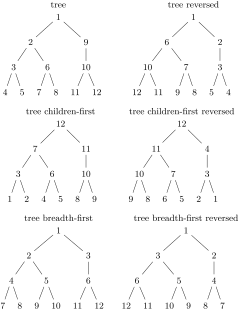
    \forestset{

      enumerate/.style={

        tempcounta=1,

        for #1={

          content/.pgfmath=tempcounta,

          tempcounta+=1

        }

      }

    }

    \newcommand\enumtree[1]{%

      \begin{forest}

        [#1,l sep=0,for n=1{

          l=0,no edge,delay={enumerate=#1}}

          [[[[][]][[][]]][[[][]]]]

        ]

      \end{forest}

    }

    \renewcommand\arraystretch{2}

    \begin{tabular}{cc}

      \enumtree{tree}&

      \enumtree{tree reversed}\\

      \enumtree{tree children-first}&

      \enumtree{tree children-first reversed}\\

      \enumtree{tree breadth-first}&

      \enumtree{tree breadth-first reversed}

    \end{tabular}
descendants,(step)¶
descendants reversed
descendants children-first,(step)¶
descendants children-first reversed
descendants breadth-first,(step)¶
descendants breadth-first reversed
Visit all the descendants of the current node.
Like the tree keys, but the current node is not visited.
relative level< ,(step)¶
relative level , relative level > =⟨count⟩
relative level reversed<,(step)¶
relative level reversed, relative level reversed >=⟨count⟩
level< ,(step)¶
level , level > =⟨count⟩
level reversed<,(step)¶
level reversed, level reversed >=⟨count⟩
Visits the nodes in the subtree of the current node whose level (depth) is less than or equal to, equal to, or greater than or equal to the given level.
The relative variants consider the level as relative to the current node: relative level of the current node is \(0\); relative level of its children is \(1\), of its grandchildren \(2\), etc. The absolute variants consider the depth with respect to the (geometric) root, i.e. as returned by node option level.
The nodes are traversed in the breadth-first order. The reversed variants reverse the order of the children within each level, but the levels are still traversed from the highest to the deepest.
leaves(step)¶
Visits all the leaves in the current node’s subtree.
-level=⟨count⟩(step)¶
-level’=⟨count⟩(step)¶
Visits all the nodes ⟨count⟩ levels above the leaves in the current node’s subtree.
preceding siblings (step)¶
following siblings
current and preceding siblings (step)¶
current and following siblings
preceding siblings reversed(step)¶
following siblings reversed
current and preceding siblings reversed(step)¶
current and following siblings reversed
siblings (step)¶
current and siblings (step)¶
siblings reversed (step)¶
current and siblings reversed(step)¶
Visit preceding, following or all siblings; visit the current node as well or not; visit in normal or reversed order.
ancestors(step)¶
current and ancestors(step)¶
Visit the ancestors of the current node, starting from the parent/current node, ending at the root node.
preceding nodes(step)¶
following nodes
current and preceding nodes(step)¶
current and following nodes Visit all preceding or following nodes of the entire tree, in the linear order; visit the current node as well or not.
3.8.4 Operations¶
Generally speaking, nodewalk operations take an input nodewalk and transform it into an output nodewalk, while possibly also having side effects.
The most important categorization of operations is in terms of the input nodewalk:
“Normal” keys execute the input nodewalk “invisibly”, i.e. with a every-step keylist that is initially empty. However, even such an “invisible” nodewalk might not always be completely without effect. For example, the effects of any node keys contained in the input nodewalk or modifications of its (initially empty) every-step keylist will be felt.
Most of the operation keys have the walk_and_... variant, where input given nodewalk is meant to be “visible”: it is walked directly in the context of the invoking nodewalk (specifically, with its every-step keylist in effect).
Some operation keys have the ..._in_nodewalk variant, which operates on the portion of the current nodewalk that was already walked.
load has no input nodewalk.
All operation keys except ..._in_nodewalk variants can be prefixed by for to create a spatial propagator (§3.5.1).
The output nodewalk is always walked in the context of the invoking nodewalk. However, note that, as mentioned above, in the case of walk_and_... variants, that context can be changed during the execution of the input nodewalk.
Trivia: save is the only operation with no output nodewalk and also the only operation with a “side effect” (of saving the nodewalk, obviously).
For some operations (filter and branch), the every-step keylist contains instructions on how collect the relevant information. While you can safely append and prepend to every step keylist of their input nodewalk, you should not completely rewrite it. If you want the operations to actually work, of course.
group=⟨nodewalk⟩(step)¶
Treat ⟨nodewalk⟩ as a single step of the (outer) nodewalk, i.e. the outer every-step keylist is executed only at the end of the embedded nodewalk. The embedded ⟨nodewalk⟩ inherits history from the outer nodewalk. Using this key is equivalent to writing
Nodewalk={every step=independent,history=inherited}⟨nodewalk⟩{}, current
reverse=⟨nodewalk⟩(step)¶
walk and reverse=⟨nodewalk⟩(step)¶
Visits the nodes of the given ⟨nodewalk⟩ in the reversed order.
unique=⟨nodewalk⟩(step)¶
Walks the ⟨nodewalk⟩, but visits each node at most once.
filter=⟨nodewalk⟩⟨forestmath: condition⟩(step)¶
You can safely append and prepend to every step keylist during the input ⟨nodewalk⟩, but you should not completely rewrite it.
Visit the nodes of the given ⟨nodewalk⟩ for which the given ⟨condition⟩ is true.
branch={⟨nodewalk\(_1\)⟩,...,⟨nodewalk\(_n\)⟩}(step)¶
branch’={⟨nodewalk\(_1\)⟩,...,⟨nodewalk\(_n\)⟩}(step)¶
You can safely append and prepend to every step keylists during the input ⟨nodewalk⟩s, but you should not completely rewrite them.
Visit the nodes in a “cartesian product” of any number of nodewalks, where a cartesian product is defined as a nodewalk where at every step of ⟨nodewalk\(_i\)⟩ (\(1\leq i<n\)), ⟨nodewalk\(_{i+1}\)⟩ is executed.
The branch variant visits only the nodes visited by the innermost nodewalk, ⟨nodewalk\(_n\)⟩. The branch' variant visits the nodes visited by all the nodewalks of the product, ⟨nodewalk\(_1\)⟩ … ⟨nodewalk\(_n\)⟩.
For an example of each, see c-commanded and c-commanders from the linguistics library.
save=⟨toks: name⟩⟨nodewalk⟩(step)¶
walk and save=⟨toks: name⟩⟨nodewalk⟩(step)¶
Saves the given ⟨nodewalk⟩ under the given name.
save append=⟨toks: name⟩⟨nodewalk⟩(step)¶
save prepend=⟨toks: name⟩⟨nodewalk⟩(step)¶
walk and save append=⟨toks: name⟩⟨nodewalk⟩(step)¶
walk and save prepend=⟨toks: name⟩⟨nodewalk⟩(step)¶
Appends/prepends the given ⟨nodewalk⟩ to nodewalk ⟨name⟩.
load=⟨toks: name⟩(step)¶
Walks the nodewalk saved under the given name.
Note that it is node ids that are saved: loading a named nodewalk with in a context of a different current node, or even with a tree whose geometry has changed (see §3.11) will still visit exactly the nodes that were visited when the nodewalk was saved.
sort=⟨nodewalk⟩(step)¶
sort’=⟨nodewalk⟩(step)¶
walk and sort=⟨nodewalk⟩(step)¶
walk and sort’=⟨nodewalk⟩(step)¶
Walks the nodes of the nodewalk in the order specified by the last invokation of sort by. The sort variants sort in the ascending order, the sort’ variants in the descending order. The walk and sort variants first visit the nodes in the order specified by the given ⟨nodewalk⟩.
sort by={⟨forestmath⟩,…,⟨forestmath⟩}¶
Sets the sorting order used by all keys comparing nodes: sort, min and max key families in the nodewalk namespace, and the sort key family in the option namespace (dynamic tree).
For each node being ordered, an “\(n\)-dimensional coordinate” is computed by evaluating the given list of pgfmath expressions in the context of that node.7 Nodes are then ordered by the usual sort order for multi-dimensional arrays: the first item is the most important, the second item is the second most important, etc.
Simply put, if you want to sort first by the number of children and then by content, say sort_by={n children,_content}.
In the simplest case, the given ⟨forestmath⟩ expressions are simply node options. However, as any pgfmath expression is allowed in the sort key, you can easily sort by the product of the content of the current node and the content of its first child: sort_by={content()*content("!1").
To sort alphabetically, one must use the argument processor (§3.13) to specify the sort order. In particular, the key must be marked as text using t. The first example below shows a simple alphabetical sort by content; the second sorts the filenames by suffix first (in the ascending order) and then by the basename (in the descending order, see -).

  \begin{forest}

    [,phantom,grow'=0,for children={anchor=west,child anchor=west},s sep=0,

      delay={~sort by=>O+t{content},sort~}

      [example.tex][example.pdf][example.log][example.aux]

      [thesis.tex][thesis.pdf][thesis.log][thesis.aux][thesis.toc]

    ]

  \end{forest}
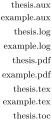
  \begin{forest}

    declare toks={basename}{},

    declare toks={extension}{},

    [,phantom,grow'=0,for children={anchor=east},s sep=0,

      delay={

        for children={split option={content}{.}{basename,extension}},

        ~sort by={>O+t{extension},>O+t-{basename}}~,

        ~sort~,

      }

      [example.tex][example.pdf][example.log][example.aux]

      [thesis.tex][thesis.pdf][thesis.log][thesis.aux][thesis.toc]

    ]

  \end{forest}
min=⟨nodewalk⟩,(step)¶
max=⟨nodewalk⟩
walk and min=⟨nodewalk⟩,(step)¶
walk and max=⟨nodewalk⟩
mins=⟨nodewalk⟩,(step)¶
maxs=⟨nodewalk⟩
walk and mins=⟨nodewalk⟩,(step)¶
walk and maxs=⟨nodewalk⟩
Visit the node(s) in the given ⟨nodewalk⟩ with a minimum/maximum value with respect to the sort order previously specified by sort by.
Variants mins/maxs visit all the nodes that with the minimum/maximum value of the sorting key; variants min/max visit only the first such node (first in the order specified by the given nodewalk).
min in nodewalk,(step)¶
max in nodewalk
mins in nodewalk,(step)¶
maxs in nodewalk
min in nodewalk’,(step)¶
max in nodewalk’
These keys search for the minimum/maximum among the nodes that were already visited in the current nodewalk.
Keys mins in nodewalk and maxs in nodewalk visits all nodes that reach the minimum/maximum, while keys min in nodewalk and max in nodewalk variants visit only the first such node.
Keys min in nodewalk’ and max in nodewalk’ visit the first minimal/maximal node by moving back in the history, see back.
3.8.5 History¶
Forest keeps track of nodes visited in a nodewalk and makes it possible to revisit them, in a fashion similar to clicking the back and forward button in a web browser.
These keys cannot be prefixed by for.
back=⟨count: n⟩(step)¶
jump back=⟨count: n⟩(step)¶
walk back=⟨count: n⟩(step)¶
Move \(n\) steps back in the history. In the back variant, all steps are fake; in the jump back variant, the final step is real; and in the walk back variant, all steps are real.
Note that as the origin is not a part of the history, these keys will not step there (unless current was the first step of your nodewalk). (Use origin to move to the origin of the nodewalk.)
forward=⟨count: n⟩(step)¶
jump forward=⟨count: n⟩(step)¶
walk forward=⟨count: n⟩(step)¶
Move \(n\) steps forward in the history. In the forward variant, all steps are fake; in the jump forward variant, the final step is real; and in the walk forward variant, all steps are real.
3.8.6 Miscellaneous¶
The following nodewalk keys are not steps. Rather, they influence the behaviour of nodewalk steps in various ways. The keys in this section having ⟨nodewalk⟩ arguments do not start a new nodewalk in the sense of §3.8.1; the given nodewalk steps rather become a part of the current nodewalk.
every step=⟨keylist⟩(register)¶
Contains the every-step keylist of the current nodewalk.
fake=⟨nodewalk⟩(nodewalk key)¶
real=⟨nodewalk⟩(nodewalk key)¶
The ⟨nodewalk⟩ embedded under fake consists of “fake” steps: while the current node is changed, every-step keylist is not executed and the history is not updated.
Note that these keys do not introduce an embedded nodewalk. The given ⟨nodewalk⟩ will not have its own history and every-step keylist.
real undoes the effect of fake, but cannot make real the implicitely fake steps, such as the return to the origin in spatial propagators like for nodewalk. fake and real can be nested without limit.
last valid(step)¶
last valid’(step)¶
If the current node is valid, these keys do nothing. If the current node of the nodewalk is invalid (i.e. its id is \(0\)), they step to the last valid visited node. If there was no such node, they step to the origin of the nodewalk.
The variant without ' makes a fake step. More precisely, it behaves as if both fake and on invalid=fake are in effect.
on invalid={error|fake|step}⟨nodewalk⟩(nodewalk key)¶
This key determines what should happen if a nodewalk step landed on the invalid node, i.e. the node with id=0.
There is a moment within the step when the current node is changed but the step itself is not yet really done, is “still fake”, i.e. the history is not yet updated and the every-step keylist is not yet executed. If the new current node is invalid, this key determines what should happen next.
on invalid={error}⟨nodewalk⟩ produces an error; on invalid={fake}⟨nodewalk⟩ does nothing: history is not updated and the every-step keylist is not executed, thus making the step essentialy fake; on invalid={error if real}⟨nodewalk⟩ produces an error unless fake is in effect. on invalid={last valid}⟨nodewalk⟩ returns to the last valid node, by making a fake step, like last valid.
Loops with the implicit id=0 condition (§3.10) automatically switch to on_invalid=fake mode.
See also Nodewalk option on invalid.
options=⟨keylist: node keys⟩(nodewalk key)¶
Execute the given node options in the context of the current node.
There is not much need to use this key, as any keys that are not (long) steps or sequences of short steps are automatically used as Forest node options any way, but there are still usage cases, for example whenever the names of node options and (long) steps are the same, or in a style that wants to ensure there is no overlap.
strip fake steps=⟨nodewalk⟩(nodewalk key)¶
If ⟨nodewalk⟩ ends with fake steps, return to the last node current before those steps were made. For details, see define long step.
3.8.7 Short-form steps¶
All short forms of steps are one token long. When using them, there is no need to separate them by commas. Here’s the list of predefined short steps and their corresponding long-form steps.
P(short step)¶
the previous leaf — previous leaf
F(short step)¶
the first leaf — first leaf
>(short step)¶
the next node on the current tier — next on tier
<(short step)¶
the previous node on the current tier — previous on tier
v(short step)¶
last valid node in the current nodewalk, fake version — last valid
3.8.8 Defining steps¶
You can define your own steps, both long and short, or even redefine predefined steps. Note, though, that it is not advisable to redefine long steps, as their definitions are interdependent; redefining short steps is always ok, however, as they are never used in the code of the package.
define long step=⟨name⟩⟨options⟩⟨nodewalk⟩¶
See also nodewalk key strip fake steps.
Define a long-form step named ⟨name⟩ as equivalent to ⟨nodewalk⟩. ⟨options⟩ control the exact behaviour or the defined step.
n args=⟨number⟩ 0 make for=⟨boolean⟩ true
Should we make a for prefix for the step? strip fake steps=⟨boolean⟩ true
Imagine that ⟨nodewalk⟩ ends with fake steps. Now, fake steps are usually just a computational tool, so we normally wouldn’t want the current node after the walk to be one of them. As far as the outer world is concerned, we want the node to end at the last real step. However, simply appending last valid to our style will not work. Imagine that the nodewalk results in no steps. In this case, we’d want to remain at the origin of our empty nodewalk. However, imagine further that the (outer) step just before the empty nodewalk was fake. Then last valid will not step to the correct node: instead of staying at the origin, it will go to the node that the last real step prior to our nodewalk stepped to. In case there was no such real step, we’d even step to the invalid node (normally getting an error).
Defining the step using strip fake steps ensures the correct behaviour described above. Set strip fake steps=false only when the fake steps at the end of the nodewalk are important to you.

  \forestset{

    ~define long step~={children from to}{n args=2}{

      if={#1>#2}{}{n=#1,while={n()<#2}{next}}

    }

  }

  \begin{forest}

    for children from to={2}{5}{draw}

    [root[1][2][3][4][5][6]]

  \end{forest}
define short step=⟨token: short step⟩⟨n args⟩⟨nodewalk⟩¶
Define short step taking \(n\) arguments as the given ⟨nodewalk⟩. Refer to the arguments in the usual way, via #1, ….
To (re)define braces, {}, write define short step={group}{1}{...}.
.nodewalk style=⟨nodewalk⟩(handler)¶
⟨nodewalk key⟩/.nodewalk style=⟨nodewalk⟩ is a shorthand for
for_nodewalk={⟨nodewalk key⟩/.style=⟨nodewalk⟩}{}.
The precise algorithm for keyname resulotion in nodewalks is as follows.
First, Forest searches for the given ⟨keyname⟩ in the /forest/nodewalk path. If found (a long-form step or a nodewalk style), it is executed.
Next, it is checked whether ⟨keyname⟩ is a sequence of short-form steps; is so, they are executed.
Otherwise, ⟨key⟩ is executed in the /forest path. This includes both Forest’s and TikZ’s keys. The latter are usually forwarded to TikZ via node options.
There are some clashes between node key and nodewalk step names. For example, l is both a ⟨dimen⟩ option and a short form of the step to the last child. According to the rules above, the nodewalk step will take precedence in case of a clash. Use nodewalk key options to execute a clashing node key.
2 Note that nesting operation (§3.8.4) and history (§3.8.5) steps, or embedding nodewalks under these steps doesn’t work, for most combinations, as many of them internally manipulate nodewalk history.
When executing the every step keylist, Forest switches into the /forest path, which makes it impossible to directly include a nodewalk into the every-step keylist. The reason is performance. Every time a /forest/nodewalk key is not found, the short-form nodewalk recognition algorithm is executed, and this algorithm is slow. As every step is used a lot (it is for example used every invocation of every spatial propagator) and the keys in every step are usually node options from /forest path, Forest would spend way too much time checking if a given node option is actually a short-form nodewalk.
If you need to execute nodewalk keys within the every-step keylist, use node key Nodewalk.
4 Even the outermost explicitly invoked nodewalks actually have the outer nodewalk. It is “static” in the sense that no real step is ever made in it, but it has all the nodewalk properties — the current node, every step keylist register, history and on invalid mode (error) — which can interact with the embedded nodewalk.
5 While it might at first sight seem stupid to have an empty step, this is not the case. For example, using propagator for current derived from this step, one can process a ⟨keylist⟩ constructed using or .wrap value.
6 Note that n without an argument is a short form of next.
7 Don’t worry, lazy evaluation is used.