Forest
Reference
3.1 Package loading and options¶
Load the package by writing \usepackage{forest} in the document preamble.
Field-specific definitions and defaults are stored in separate libraries. Use \usepackage[⟨library name⟩]{forest} to load library ⟨library name⟩ and its defaults alongside the main package. Loading several libraries in this way is allowed: however, if you need more control over loading the defaults, use the following macros.
\ useforestlibrary[*][[⟨options⟩]]{⟨library⟩,...}(macro)¶
Loads the given libraries.
The starred version applies their defaults as well, while the starless does not. Multiple library names can be given, separated by commas. Libraries can receive ⟨options⟩. This macro can only be used in the preamble.
\ forestapplylibrarydefaults{⟨library name⟩,...}(macro)¶
Loads the default settings of ⟨library⟩.
Multiple library names can be given, separated by commas. This macro can be used either in the preamble or in the document body. Its effect is local to the current TeX scope.
For example, the linguistics library defines c-command related nodewalks, changes the default parent–child edges to south–north (the main package default is border–border) and sets the baseline to the root1 node. Thus, if you write \usepackage[linguistics]{forest} in your preamble, or use macro \forestapplylibrarydefaults like below, you get the following:
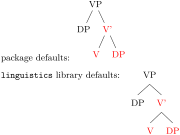
  package defaults:

  \begin{forest}

    [VP % cannot use "for c-commanded" below!

      [DP, for sibling={for tree=red}]

      [V'[V][DP]]

    ]

  \end{forest}\\[1ex]

  |linguistics| library defaults:

  ~\forestapplylibrarydefaults{linguistics}~

  \begin{forest}

    [VP

      [DP, ~for c-commanded~={red}]

      [V'[V][DP]]

    ]

  \end{forest}
compat=⟨keylist⟩(package option, default most)¶
Enter compatibility mode with previous versions of the package.
If at all possible, each backwards incompatible change is given a key in the compat path, e.g. compat=1.0-forstep reverts to the old behaviour of spatial propagators for ⟨step⟩, where a propagator could not fail.
While each compatibility feature can be enabled individually, they are grouped for ease of use. To load compatibility features since the last version of form x[.y[.z]], write compat=x[.y[.z]]-all or compat=x[.y[.z]]-most. The former enables all compatibility features since that release, the latter only those that are guaranteed to not disrupt any new functionality of the package.
To load all compatibility features since the last major release (x in x.y.z), write compat=all; to load most of them, write compat=most or simply compat.
To enable multiple compatibility features, either use this option multiple times, or provide it with a comma-separated list of compatibility features. (Surround the list by braces.)
Specifying this option also defines macro \ forestcompat (taking the same arguments as the package option) which can be used to enable compatibility features locally, within the document body. To enable compatibility mode but not enable any specific compatibility feature for the entire document, write compat=none as a package option.
For a list of compatibility features, see §6.1.
By default, the package warns when a compatibility feature is used. Disable this behaviour by compat=silent.
tikzinstallkeys=true|false(package option, default true)¶
Install certain keys into the /tikz path. Currently: /tikz/fit to.
debug=⟨debug category⟩[, ⟨debug category⟩]*(package option)¶
nodewalks(debug value)¶
dynamics(debug value)¶
process(debug value)¶
Prints out some debugging info to the log file. When given no argument, prints out all the available information, otherwise only the information on the listed (comma-separated) debug categories. The available categories are listed below.