chemfig
Reaction schemes
2 Arrow types
When the \arrow command is followed by an optional argument in braces (which is not mandatory), the argument defines the type of arrow:
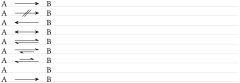
Arrow types
\schemestart A\arrow{->}B\schemestop\par % by default

\schemestart A\arrow{-/>}B \schemestop\par

\schemestart A\arrow{<-}B \schemestop\par

\schemestart A\arrow{<->}B \schemestop\par

\schemestart A\arrow{<=>}B \schemestop\par

\schemestart A\arrow{<->>}B \schemestop\par

\schemestart A\arrow{<<->}B \schemestop\par

\schemestart A\arrow{0}B \schemestop\par

\schemestart A\arrow{-U>}B \schemestop
The arrow “-U>” is not fully drawn, an arc can be added tangent to the arrow center using optional arguments on the command, see section 9. Here is a “-U>” arrow with the arc on top of it: 
For the sake of clarity, capital letters will be used throughout the documentation instead of chemical formulas made with the \chemfig command except for specific examples. Reaction schemes obviously work identically with letters and drawn molecules. Several examples are shown in the Gallery with proper reaction schemes.