chemfig
Reaction schemes
7 Branching
So far, only linear reaction schemes have been treated. Branched schemes are also possible and this is where compound names play a key role. When a name is preceded by “@” in the argument between brackets of the \arrow command, it means that the compound already exists. Several scenarios are possible:
(@n1--n2): the arrow will leave from the existing compound “n1” and the scheme will continue following the arrow, thus creating a branch;
(@n1--@n2): the arrow is drawn between two existing compounds, no matter whether they are already defined or whether they will later in the reaction scheme: therefore this syntax can be placed anywhere in the code of the reaction scheme;
(n1--@n2): this syntax is not permitted;
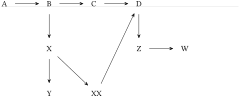
In the following example, 3 branches are made, a first one from “B”, a second one from “D” and a last one from “X”. Finally one more arrow connects two existing compounds: “XX” and “D”:

\schemestart

  A\arrow(aa--bb)B\arrow(--cc)C\arrow D

  \arrow(@bb--xx1)[-90]X\arrow[-90]Y% 1st branch

  \arrow(@c4--)[-90]Z\arrow W% 2nd branch

  \arrow(@xx1--xx2)[-45]XX% 3rd branch

  \arrow(@xx2--@c4)% XX-to-D arrow

\schemestop
One may wish to have “Y” and “XX” on the same horizontal line. To achieve this, a horizontal invisible bond is drawn between “Y” and “XX”; the scheme is completed with a final arrow between the two existing compounds “XX” and “D”:
\schemestart

  A\arrow(aa--bb)B\arrow(--cc)C\arrow D

  \arrow(@bb--xx1)[-90]X\arrow[-90]Y\arrow(--xx2){0}XX

  \arrow(@c4--)[-90]Z\arrow W

  \arrow(@xx1--@xx2)% X-to-XX arrow

  \arrow(@xx2--@c4)% XX-to-D arrow

\schemestop