chemfig
Reaction schemes
8 Subscheme
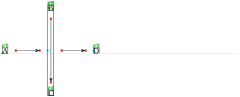
A fraction of the reaction scheme can be defined within a single bounding box, so that chemfig treats it as a compound. The reaction scheme fraction is defined inside the compulsory argument between braces of the \subscheme command so it is subsequently regarded as a single entity. When \subscheme is located after an arrow, the command labels this subscheme as a compound named “c<n+1>”:
\setchemfig{scheme debug=true}

\schemestart

  A\arrow

  \subscheme{B\arrow[-90,2]C}

  \arrow

  D

\schemestop
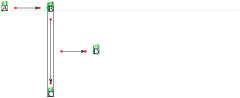
Although this is not clearly seen because of labels overlap, the box around the subscheme is called “c2”, and name numbering continues inside the subscheme with B called “c3” and C called “c4”. Since the first compound in the subscheme is “B”, the subscheme’s baseline is that of “B”. This can be pointed out by specifying the anchors:
\setchemfig{scheme debug=true}

\schemestart

  A\arrow(--.mid west)

  \subscheme{B\arrow[-90,2]C}

  \arrow

  D

\schemestop
Note that since “\subscheme{⟨scheme⟩}” is only a convenient shortcut for
\schemestart⟨scheme⟩\schemestop
Consequently, it can be used with the same optional arguments as \schemestart.
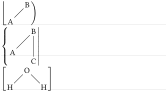
chemfig provides the \chemleft and \chemright command pair. These allow to set expandable delimiters on either side of a material. The commands must be followed by delimiters, just like in the case of TeX primitive commands \left and \right:
\chemleft⟨car1⟩⟨material⟩\chemright⟨car2⟩
where ⟨car1⟩ and ⟨car2⟩ can be “(” et “)” or “[” and “]”, or any other expandable delimiter consistent with the \left et \right commands.
\chemleft\lfloor\chemfig{A-[1]B}\chemright)


\chemleft\{\chemfig{A-[1,1.25]B-[6,1.25]C}\chemright|


\chemleft[\chemfig{H-[1]O-[7]H}\chemright]
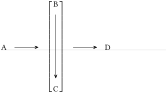
The code of the reaction scheme discussed above including \chemleft and \chemright is written:
\schemestart

  A\arrow

  \chemleft[\subscheme{B\arrow[-90,2]C}\chemright]

  \arrow

  D

\schemestop
By analogy, the macros \chemup and \chemdown can be used to draw expandable delimiters above and below the material, respectively:
\chemup⟨car1⟩⟨material⟩\chemdown⟨car2⟩
For example:

\schemestart[[arrow angle=-90]

X\arrow

\chemup\{\chemfig{A-[1]B-[7]C}\chemdown\}

\arrow Y

\schemestop

\qquad

\schemestart[[arrow angle=-90]

X\arrow

\chemup[\chemfig{A-[1]B-[7]C}\chemdown]

\arrow Y

\schemestop
Delimiters can can also be drawn through compounds’ style and apply them to a random compound (and hereby to a subscheme). These expandable delimiters (parentheses, brackets, braces) can be used upon loading the “matrix” TikZ library in the document preamble:
\usetikzlibrary{matrix}
Since the \chemleft, \chemright, \chemup and \chemdown commands are available, the chemfig package will not automatically load the library. As long as the user want to access this special set of delimiters, the library must be explicitly loaded.
The same brackets-delimited subscheme as above is presented again:
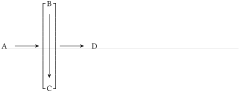
\schemestart

  A\arrow(--[left delimiter={[}, right delimiter={]}])

  \subscheme{B\arrow[-90,2]C}

  \arrow

  D

\schemestop
Since the delimiters are drawn outside the bounding box, it is advisable to slightly shorten the incoming and outgoing arrows:
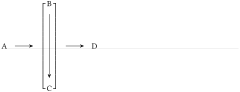
\schemestart

  A\arrow(--[left delimiter={[},

  right delimiter={]}])[,,shorten >=6pt]

  \subscheme{B\arrow[-90,2]C}

  \arrow[,,shorten <=6pt]

  D

\schemestop
Subschemes should be used with care, undesired results are sometimes observed. In this example, a subscheme is used to horizontally align 3 different compounds:
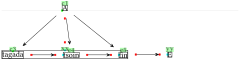
\setchemfig{scheme debug=true}

\schemestart

  A

  \arrow{0}[-90]

  \subscheme{%

    tagada\arrow{}

    tsoin\arrow{}

    fin}

  \arrow(xx--yy){}E

  \arrow(@c1--@c3){}

  \arrow(@c1--@c5){}

  \arrow(@c1--@c4){}

\schemestop
The center of the subscheme is exactly located on the same vertical line as the center of compound "A". This is because the two entities are connected by an invisible arrow with a \(-90 \) angle. However, the arrow between the two pre-existing compounds “A” and “tsoin” is not vertical because “tsoin” is not on the center of the subscheme since "tagada" is wider than "end". If this arrow is to be vertical within the use of the \subscheme command, one must find a correct angle for the arrival anchor of the invisible arrow by try-and-error.
A much simpler method is to use a branch instead of a subscheme: draw a visible arrow between “A” and “tsoin”, and then draw horizontal arrows on both sides of “tsoin”, with a branch for the right-hand side arrows.
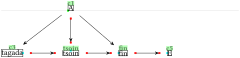
\setchemfig{scheme debug=true}

\schemestart

  A

  \arrow(--tsoin){->}[-90]

  tsoin

  \arrow{<-}[180]

  tagada

  \arrow(@tsoin--fin){}

  fin

  \arrow{}

  E

  \arrow(@c1--@c3){}

  \arrow(@c1--@fin){}

\schemestop