chemfig
Reaction schemes
12 The + sign
The use of a “\+” macro that displays a \({}+{}\) sign is available between the commands \schemestart and \schemestop. This macro accepts an optional argument in braces with 3 dimensions in the form {⟨dim1⟩,⟨dim2⟩,⟨dim3⟩}, where:
⟨dim1⟩ and ⟨dim2⟩ are the dimensions to be inserted before and after the \({}+{}\) sign;
⟨dim3⟩ is the vertical offset of the sign.
These dimensions can also be set, for all the following \({}+{}\) signs with the ⟨keys⟩ + sep left = ⟨dim⟩, + sep right = ⟨dim⟩ et + vshift = ⟨dim⟩. The default values are 0.5em for the two first and 0pt for the third.

\schemestart

A\+B\+{2em,,5pt}C\+{0pt,0pt,-5pt}D\arrow E\+F

\schemestop


\setchemfig{+ sep left=1em,+ sep right=1em,+ vshift=0pt}

\schemestart

A\+B\+{2em,,5pt}C\+{0pt,0pt,-5pt}D\arrow E\+F

\schemestop
As shown in the example below, it should be kept in mind that the \({}+{}\) sign inserted by the \+ command is part of the compound:

\setchemfig{scheme debug=true}

\schemestart A\+ B\+{,,5pt}C\arrow D\+ E\schemestop
This makes it difficult to draw a vertical arrow exactly below the letter “A” since this letter is not a single compound for chemfig. This issue can be solved with the use of the \subscheme command to uniquely define the letter “A” as a single compound (the same procedure can be applied to the \({}+{}\) sign itself) so that it can be referred to later on with its own name:
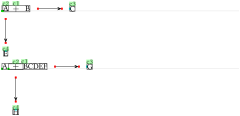
\setchemfig{scheme debug=true}

\schemestart

\subscheme{A}\+ B\arrow C

\arrow(@c2--)[-90]E

\schemestop

\medskip


\schemestart

A\subscheme{\+}BCDEF \arrow G

\arrow(@c2--)[-90]H

\schemestop
A common problem can be the misalignment of the “+” sign with the molecules before or after it. For example:
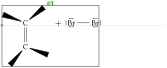
\setchemfig{scheme debug=true}

\schemestart

  \chemfig{C(<[:40])(<[:160])=[6]C(<[:-130])<[:-20]}

  \+

  \chemfig{\charge{90=\|,180=\|,270=\|}{Br}-\charge{0=\|,90=\|,-90=\|}{Br}}

\schemestop
Here, the “+” sign sits on the same baseline as the compound before it, and this baseline is that of the top carbon atom. One may shift the “+” sign, but this would not change the vertical position of “ ”. In fact, the “+” sign does not prevent chemfig from reading a compound, as shown in the example above where everything is included in the compound “ c1”. Therefore, one must stop the compound right after the first molecule with a \arrow{0}[,0] that will draw an invisible, zero-length arrow. In order to vertically center the whole scheme, one must also set the the anchor of the first compound as “west” (or “180”, which is a synonym) with the second optional argument of the \schemestart command:
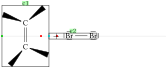
\setchemfig{scheme debug=true}

\schemestart[init anchor=west]

  \chemfig{C(<[:40])(<[:160])=[6]C(<[:-130])<[:-20]}

  \arrow{0}[,0]\+

  \chemfig{\charge{90=\|,180=\|,270=\|}{Br}-\charge{0=\|,90=\|,-90=\|}{Br}}

\schemestop
Thus, the first compound “ c1” consists of the first molecule and the second compound consists of everything else, i.e. the “+” sign and the second molecule. Alternatively, one can play with anchors or styles via the \arrow command to move the second compound to another location. Here, for example, the second compound is shifted downwards by 10pt in the first case. In the second case, the “south east” anchor of the first compound matches the “south west” anchor of the second one:
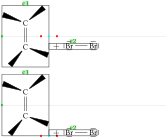
\setchemfig{scheme debug=true}

\schemestart[init anchor=west]

  \chemfig{C(<[:40])(<[:160])=[6]C(<[:-130])<[:-20]}

  \arrow(--[yshift=-10pt]){0}[,0]\+

  \chemfig{\charge{90=\|,180=\|,270=\|}{Br}-\charge{0=\|,90=\|,-90=\|}{Br}}

\schemestop

\medskip


\schemestart[init anchor=west]

  \chemfig{C(<[:40])(<[:160])=[6]C(<[:-130])<[:-20]}

  \arrow(.south east--.south west){0}[,0]\+

  \chemfig{\charge{90=\|,180=\|,270=\|}{Br}-\charge{0=\|,90=\|,-90=\|}{Br}}

\schemestop