chemfig
Reaction schemes
3 Arrows features
Each arrow is characterized by:
an angle expressed in degrees;
a coefficient that specifies the arrow length through the multiplication of the compounds spacing value defined by compound sep;
a style with TikZ instructions to customize the color, the thickness or other graphical attribute of the arrow.
These features are defined with the ⟨keys⟩
arrow angle = ⟨angle⟩, which default value is 0;
arrow coeff = ⟨decimal⟩, which default value is 1;
arrow style = ⟨code tikz⟩, empty by default.
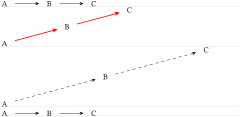
\schemestart A\arrow B\arrow C\schemestop


\setchemfig{arrow angle=15,arrow coeff=1.5,

arrow style={red, thick}}

\schemestart A\arrow B\arrow C\schemestop


\setchemfig{arrow coeff=2.5,arrow style=dashed}

\schemestart A\arrow B\arrow C\schemestop


\setchemfig{arrow angle={},arrow coeff={},arrow style={}}

\schemestart A\arrow B\arrow C\schemestop
In order to locally modify one or all of these default values, the \schemestart command accepts an optional argument in the form [angle,coeff,style] which changes the default arrow features within the sole reaction scheme:
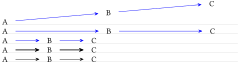
\setchemfig{arrow angle=5,arrow coeff=2.5,arrow style=blue}

\schemestart A\arrow B\arrow C\schemestop


\schemestart[arrow angle=0] A\arrow B\arrow C\schemestop


\schemestart[arrow angle=0,arrow coeff=1] A\arrow B\arrow C\schemestop


\schemestart[arrow angle=0,arrow coeff=1,arrow style=thick] A\arrow B\arrow C\schemestop


\schemestart[arrow angle=0,arrow coeff=1,arrow style=black] A\arrow B\arrow C\schemestop
Regarding style, the rule is: the style specified in the argument in brackets applies after the default style, without overwriting it! This is why only the “black” color attribute is able to overwrite the “ blue” default style.
Finally, the \arrow command accepts an optional argument in brackets in the form [angle,coeff,style] to change the feature of that given arrow. As above, style applies after the default style and after the style possibly-specified in the optional argument of the \schemestart command, again without overwrting them.
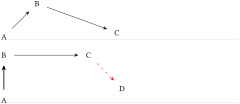
\schemestart

  A\arrow[45]B\arrow[-20,2]C

\schemestop

\bigskip


\schemestart

  A\arrow[90,,thick]B\arrow[,2]C

  \arrow[-45,,dashed,red]D

\schemestop