chemfig
Reaction schemes
11 The \merge command
The \merge command allows to draw arrows coming from several existing compounds that merge into one single arrow that arrive to one single compounds.
Just after the \merge command, the direction that follows up must be specified. For this, 4 different direction characters can be used: “>” (the default direction if no character is entered), “<”, “^” and “v”.
The syntax follows with:
\merge{dir}(n1.a1)(n2.a2)(...)(ni.ai)--(n.a[s])
where the “ni” names before the double dash are those already-defined compounds from which out coming arrows will merge into a single one. One can also specify the “ai” anchor, when the default one is not convenient. Like for the \arrow command, the command “n.a[s]” includes the name, the anchor and the style of the target compound.
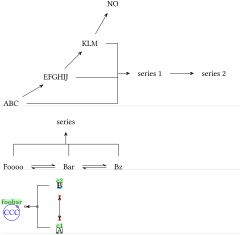
\schemestart

ABC\arrow[30]EFGHIJ\arrow[45]KLM\arrow[60]NO

\merge>(c1)(c2)(c3)--()series 1

\arrow series 2

\schemestop

\bigskip


\schemestart

Foooo\arrow(foo--bar){<=>}Bar\arrow(--baz){<=>}Bz

\merge^(foo)(bar)(baz)--()series

\schemestop

\bigskip


\setchemfig{scheme debug=true}

\schemestart

A\arrow{<->}[90]B

\merge<(c1.120)(c2)--(foobar.45[circle,blue])CCC

\schemestop
Regarding the geometry of the \merge arrow, it consists of \(n\) segments leaving from \(n\) compounds up to the perpendicular line that connects them: the default length of the shortest of these segments is worth half of the compound-spacing distance defined by \setcompoundsep. The arrow drawn from the connecting line to the target compound has the same default length, its origin is on the middle of the connecting line. These three geometric features can be customized with the optional argument immediately after the target compound:
\merge{dir}(n1.a1)(n2.a2)(...)(ni.ai)--(n.a[s])[c1,c2,c,style]
where:
the shortest segment distance between reactants and the connecting line is controlled through the multiplication of the \setcompoundsep distance by a coefficient c1, whose default value is 0.5;
the length of the arrow between the connecting line and the product compound is controlled through the multiplication of the \setcompoundsep distance by a coefficient c2, whose default value is 0.5;
the origin of the arrow between the connecting line and the product compound is determined by the coefficient c, a value of 0 involves a departure from the the left of the connect line (or from its top if the direction is v or ^);
the style of the \merge arrow is defined with the last argument: style.
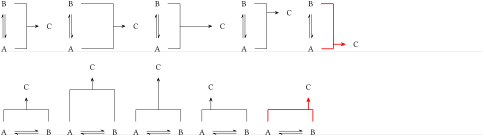
\schemestart A\arrow{<=>}[90]B\merge(c1)(c2)--()C\schemestop\qquad

\schemestart A\arrow{<=>}[90]B\merge(c1)(c2)--()[1]C\schemestop\qquad

\schemestart A\arrow{<=>}[90]B\merge(c1)(c2)--()[,1]C\schemestop\qquad

\schemestart A\arrow{<=>}[90]B\merge(c1)(c2)--()[,,0.2]C\schemestop\qquad

\schemestart A\arrow{<=>}[90]B\merge(c1)(c2)--()[,,0.9,red,thick]C\schemestop

\bigskip


\schemestart A\arrow{<=>}B\merge^(c1)(c2)--()C\schemestop\qquad

\schemestart A\arrow{<=>}B\merge^(c1)(c2)--()[1]C\schemestop\qquad

\schemestart A\arrow{<=>}B\merge^(c1)(c2)--()[,1]C\schemestop\qquad

\schemestart A\arrow{<=>}B\merge^(c1)(c2)--()[,,0.2]C\schemestop\qquad

\schemestart A\arrow{<=>}B\merge^(c1)(c2)--()[,,0.9,red,thick]C\schemestop
Finally, it is possible to write labels above or below the merged arrow. For this, the direction character accepts two optional arguments in brackets, a first one for the label above the arrow and a second one for the label below it. Therefore, the full syntax of the merge command is:
\merge{dir}[labelup][labeldow](n1.a1)(n2.a2)(...)(ni.ai)--(n.a[s])[c1,c2,c,style]
All the features introduced before for arrow labeling can be implemented here as well, i.e. rotation angle and anchoring with the syntax *{angle.anchor} entered just before the content of the label.
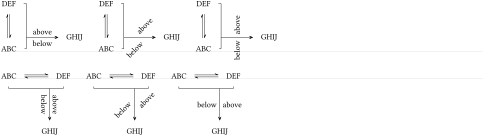
\schemestart

ABC\arrow{<=>}[90]DEF\merge>[above][below](c1)(c2)--()[0.25,1,0.75]GHIJ

\schemestop\qquad

\schemestart

ABC\arrow{<=>}[90]DEF\merge>[*{45.south west}above][*{45.north east}below](c1)(c2)--()[0.25,1,0.75]GHIJ

\schemestop\qquad

\schemestart

ABC\arrow{<=>}[90]DEF\merge>[*{90}above][*{90}below](c1)(c2)--()[0.25,1,0.75]GHIJ

\schemestop

\bigskip


\schemestart

ABC\arrow{<=>}DEF\merge v[above][below](c1)(c2)--()[0.25,1,0.75]GHIJ

\schemestop\qquad

\schemestart

ABC\arrow{<=>}DEF\merge v[*{45.north west}above][*{45.south east}below](c1)(c2)--()[0.25,1,0.75]GHIJ

\schemestop\qquad

\schemestart

ABC\arrow{<=>}DEF\merge v[*{0}above][*{0}below](c1)(c2)--()[0.25,1,0.75]GHIJ

\schemestop